Cost management in the SAP Plant Maintenance module is one of the most poorly exploited topics on industrial projects. Most consultants treat it as a passive reporting subject, when it is in fact the only lever that turns a maintenance department into a budget steering center. In 2026 on S/4HANA, the Finance Controlling Plant Maintenance integration has expanded with new Fiori screens, but the foundations remain the same three cost types, the Value Categories, the Cost Elements, and the settlement mechanism toward a cost center. This article puts those foundations back into practical perspective.
- Three cost types coexist on a maintenance order: Estimated (entered manually by the planner), Planned (calculated by the system from the resource plan), Actual (updated as confirmations come in).
- Display is done by Value Category (coarse grouping, more readable for the business) or by Cost Element (fine granularity, more readable for CO).
- Five standard Value Categories: internal service, external service, internal material, external material, other.
- Order settlement via
KO88transfers the actual costs to the receiver (cost center, WBS, other order). - For tactical reporting:
IW39with a cost layout. For multi-axis analysis:MCI4,MCI2, or the Fiori “Asset Management Cost Center Performance”.
Why PM cost management deserves more than a hidden tab
On the projects I audit, the “cost” tab of maintenance orders often stays untapped. The planner barely knows what they are looking at, the management controller pulls their own reports in parallel, and nobody reconciles the two. That is a waste, because SAP PM natively contains everything needed to steer the maintenance budget day to day, provided you correctly use the three cost types, the right level of granularity, and the right settlement strategy.
The Plant Maintenance module is tightly integrated with the FI and CO modules. Each PM order is technically a cost collector. Time confirmations via IW41, parts consumption via MIGO, and external services via purchase commitments automatically feed the actual costs. At the end of the order, settlement redistributes those costs to the receiver centers defined in the settlement rule. The SAP Community documentation details this mechanism for hierarchical reporting.
The three cost types on a maintenance order
Understanding these three types is the foundation. Many time-consuming project discussions stem from confusion between Estimated, Planned, and Actual. Here is the distinction without ambiguity.
| Type | Source | Business use | When to consult it |
|---|---|---|---|
| Estimated Costs | Entered manually by the planner. Based on experience, not on planned resources. | Pre-project budget, authorization request, internal quote. | Before the order release phase, to validate the envelope. |
| Planned Costs | Automatic SAP calculation from the resource plan (operations, components, services). | Forecast budget commitment, released order view. | Once the order is released, before execution. Compare it to the Estimated to measure the planner’s accuracy. |
| Actual Costs | Automatic calculation as confirmations come in (time via IW41, parts via MIGO, services via vendor receipt). | Real cost of the intervention, basis for internal billing and settlement. | During and after execution. Variance vs Planned = drift signal. |
Operational steering uses all three together. The Estimated vs Planned comparison measures the quality of the plan. The Planned vs Actual comparison measures the quality of execution. The sum of Actual over a period gives the real cost of the maintenance department, which becomes the basis for billing the business or for the following year’s budget.
Value Category vs Cost Element: choosing the right level of granularity
The “cost” tab of a PM order exposes its figures in two modes. The choice between the two depends on the audience looking at the report and on the question being asked.
Value Categories group several Cost Elements according to a business logic. The five standard Value Categories I see in production are: internal service, external service, internal material, external material, and other (scrap, travel). Configuration via transaction OIN0 on the PM Customizing side. This mode speaks to the maintenance manager who wants to know where the budget goes without digging into accounting detail.
Cost Elements classify costs according to their accounting nature. Two types: primary (direct external charges, such as a part purchase) and secondary (internally allocated charges, such as an internal technician hour calculated via an hourly rate). Configuration on the FI/CO side via KA01 for creation. This mode speaks to the management controller who wants to reconcile PM costs with the general ledger.
Practical recommendation: expose Value Category by default in maintenance user screens. Keep Cost Element for CO reports and fine-grained analyses. The Cost Element categories are documented in detail by SAP.
Granularity: operation or order header?
SAP PM lets you view costs at two levels: operation by operation, or aggregated at the order header.
- 1View by operation
Each operation (for example: disassembly, bearing replacement, test, reassembly) displays its own Estimated / Planned / Actual. Useful to identify the operation that went off track, particularly on long or complex orders. Indispensable in corrective maintenance where an unexpected event can blow up the budget of a single operation.
- 2View by header
The system aggregates all operations into a single total for the order. Useful for tactical reporting and high-level steering. Sufficient for the majority of standard preventive maintenance orders where breaking it down by operation adds nothing.
The default granularity setting is configured in the order type configuration via OIOA. Enabling the operation view on all order types clutters the screen; reserving it for complex types (overhaul, major maintenance, corrective maintenance with unexpected events) keeps the interface readable.
Order settlement: redistributing costs to the right receiver
A maintenance order does not stay a cost collector indefinitely. At the end of the intervention, its actual costs must be transferred to a receiver center via the settlement mechanism. Three steps structure this flow.
- 1Define the settlement rule
On each order, configure a rule that indicates where to redistribute the costs. Possible receivers: cost center of the equipment (the most frequent in maintenance), WBS of a project (for a major overhaul), or another internal order (for internal subcontracting). The rule can be single (full allocation to one receiver) or multiple, with weighting across several receivers.
- 2Run the settlement
Transaction
KO88for the individual settlement of an order, orCO88for a collective settlement (for example, month-end processing of all closed orders). The system then writes the CO postings that transfer the order’s Actual Costs to the receiver defined in the rule. - 3Verify and close the order
After settlement, the order moves to status TECO (technically completed) then CLSD (closed). At this point, no further posting is possible. Check via
IW32or theIW39list that the balance on the order is indeed zero after settlement, otherwise the residual cost will remain as an undistributed cost-on-order.
The classic pitfall: forgetting to define the settlement rule on the order. Without a rule, KO88 fails. On a recurring order type, configure a default settlement strategy via OKO7 on the CO Customizing side, so the rule is proposed automatically at creation.
The analysis tools: IW39, MCI2/MCI4 and Fiori
SAP PM exposes three families of transactions for analyzing costs. Each one meets a different need.
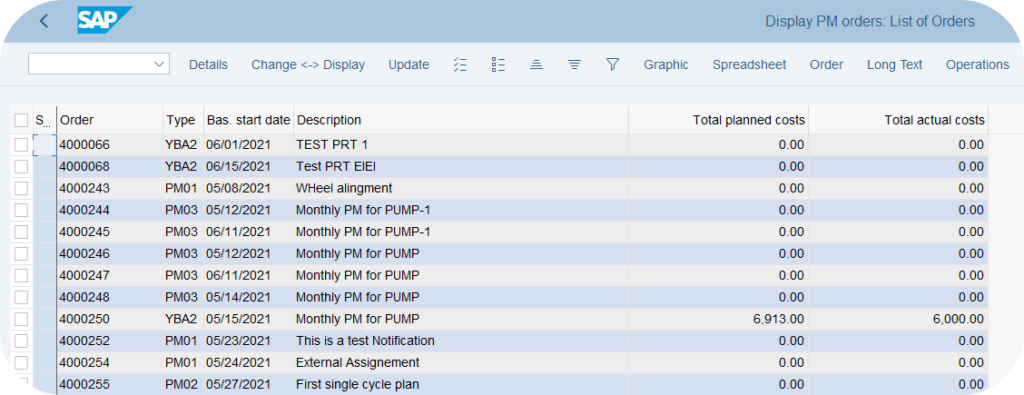
IW39 with a cost layout is the everyday tactical tool. A list of orders with Estimated, Planned, Actual columns that can be added to the layout. Powerful filters by cost center, equipment, period. Ideal for a planner or maintenance manager who wants a quick overview.

MCI4 Planner Group Analysis and MCI2 Manufacturer Analysis are LIS transactions (Logistics Information System). They offer a multi-axis analysis (planner group, manufacturer, equipment type) with drill-down and Excel exports. More powerful than IW39 for cross-cutting analyses, heavier to configure.
Modern Fiori Apps (Asset Management Cost Center Performance, Maintenance Cost Overview) are available from S/4HANA 1909 onward. They offer a modern visual rendering, KPI cards, and period-on-period comparisons with no LIS configuration. For a maintenance team equipped with Fiori, this is the recommended path.
The IW39, MCI2, MCI4 transactions and the Fiori apps show what has been spent. They do not block a budget overrun in real time. For real budget control on PM orders, set up the budget profile via KO22 and activate the availability checks on the CO side. Otherwise, your reporting remains a post-hoc observation.
Budget optimization: the concrete levers
Once the mechanism is mastered, budget optimization becomes possible. Three levers come up regularly on industrial projects.
- Bring Estimated and Planned closer together. If the gap is systematic between what the planner estimates and what SAP calculates, it is the sign of a poorly configured resource plan (obsolete hourly rates, inaccurate standard durations). Revise the rates in
KP26on the CO side and the standard times inIA05on the PM side. - Monitor the Planned vs Actual variance. A systematic overrun on certain order types or certain equipment? A signal of an execution problem (underestimated times, unavailable parts forcing urgent purchases, unplanned subcontracting). Proper use of preventive maintenance (see our article on SAP PM preventive maintenance) reduces these drifts.
- Refine the settlement strategy. Instead of a uniform settlement to the cost center of the equipment, distribute the costs to several receivers depending on the type of intervention (preventive to the preventive maintenance budget, corrective to the production budget that suffered the breakdown). This holds the teams accountable and provides real traceability.
On my industrial assignments, the quality of maintenance budget steering predicts the site director’s satisfaction better than the breakdown frequency does. A maintenance department that can explain every euro spent earns its internal credibility, regardless of the incident occurrence rate.
Pierre Balbinot, SAP PP / EAM consultant
Frequently asked questions about SAP PM cost management
What is the difference between Estimated and Planned Costs on a PM order?
Estimated is entered manually by the planner from their experience. Planned is calculated automatically by SAP from the resource plan (operations, components, services). Estimated serves the pre-project budget and the envelope validation before release. Planned serves the budget commitment after release. Comparing the two measures the planner’s accuracy.
Which transaction is used for the settlement of a PM order?
KO88 for the individual settlement of an order. CO88 for a collective settlement (for example at month-end on all closed orders). The settlement rule must be defined on the order before execution, otherwise KO88 fails with an error message.
How do you configure the Value Categories in Customizing?
Customizing via transaction OIN0 on the PM side. Each Value Category groups several Cost Elements. The five standard Value Categories in production: internal service, external service, internal material, external material, other. Also configure the Cost Element to Value Category mapping in the same IMG.
Are Cost Elements created on the PM side or the CO side?
On the CO side, via KA01 (creation) and KA02 (change). PM consumes the Cost Elements defined by CO. There are two types: primary (direct external charges) and secondary (internally allocated charges). PM mainly uses secondary Cost Elements for internal labor hours via the KP26 hourly rates.
Should you use IW39 or the Fiori apps in 2026?
Both depending on the context. IW39 remains the fast everyday tool for a planner on SAP GUI, with customizable layouts and quick filters. The Fiori apps (Asset Management Cost Center Performance, Maintenance Cost Overview) offer a modern visual rendering and are better suited to a manager who consults the KPIs without configuring a layout. On a greenfield S/4HANA project, favor the Fiori apps as the default experience.
In summary: turning PM cost management into a steering lever
Cost management in SAP PM is not a topic of advanced technical configuration. It is above all a matter of operational discipline: correctly using the three cost types, choosing the right display granularity, setting up a settlement strategy consistent with the budget organization, and regularly monitoring the Estimated, Planned, Actual variances. On the projects I audit, it is exactly the adoption of this discipline that distinguishes a maintenance department that is endured from a maintenance department that is steered. The senior reflex is to put this steering in place from Go-Live, because instilling this discipline later costs much more in business change management.
Keep reading
SAP Serial Number: OIS2 setup and material vs equipment
A SAP serial number is the unique identifier attached to one specific physical unit of a given material. It is the tool for unit-level traceability, the foundation for individualized after-sales...
 Pierre B.
SAP PRT: Production Resources and Tools
On an industrial site, the tools shared between production lines are often invisible in SAP. Jigs, probes and technical drawings move from one order to the next, but nobody knows...
Pierre B.
SAP PM Preventive Maintenance: the complete guide
One hour of unplanned downtime costs a manufacturer 25,000 USD on average, and up to 2.3 million USD/hour in the automotive sector according to the Siemens report True Cost of...
Pierre B.
SAP Classification System: characteristics and classes
You are looking for every high-criticality 24V piece of equipment in SAP. Every batch with a viscosity between 200 and 250. Every premium customer in a specific geographic area. If...
Pierre B.