Your routing times are accurate, validated by the methods team. Yet costing produces wrong costs, and capacity planning shows fantasy loads. Between the two hides a link almost nobody checks: the SAP work center formulas.
They are what turns the standard values of your routings into scheduling durations, activity costs and capacity requirements. This guide walks the full chain: the parameter, the formula, the indicators that decide where it applies, the assignment in the work center, and the live test.
- Work center formulas serve 3 applications: costing, scheduling and capacity requirements planning.
- A formula combines parameters (
SAP_02machine time,SAP_08base quantity,SAP_09operation quantity) linked to SAP fields. - SAP ships a standard library: SAP001 to SAP008, the SAPC* duration formulas, SAPF01 for PRTs;
SAP006= SAP_02 * SAP_09 / SAP_08. - 5 indicators decide where the formula is allowed to apply: Generate, Allowed for Calculation, Work Center for Capacity Reqmts., PRT Allowed For Reqmts., Allowed for Scheduling.
- The Standard Value Key groups up to 6 parameters in the work center, and the Test Formula button simulates the calculation without creating an order.
What a SAP work center formula actually does
A work center formula is a calculation expression the system evaluates every time it needs to convert routing data into an operational result. Three applications feed on it: costing, which values the activities of the operation; scheduling, which calculates operation dates and durations; and capacity requirements planning, which determines the load placed on work centers.
The skeleton of almost every one of these formulas fits on a single line: requirement = standard value multiplied by the order quantity, divided by the base quantity. Everything else is a variation on that pattern, and that is exactly why a formula error goes unnoticed: numbers come out, they are simply wrong.
These formulas are assigned in the work center views (Costing, Scheduling, Capacity) and to PRTs, the production tooling. The capacity calculated here then feeds the entire planning chain, all the way up to pMRP capacity simulation upstream.
SAP formula parameters: the vocabulary before the sentence
Before writing a formula, SAP asks you to define its vocabulary: the parameters. A parameter is an identifier that points to a real piece of system data: a standard value from the routing, an operation field, a value entered by the user.
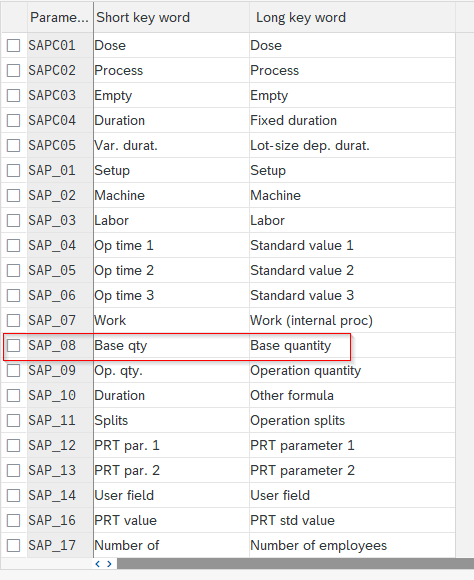
The standard parameters cover most production needs:
| Parameter | Data | Typical origin |
|---|---|---|
SAP_02 | Machine time | Standard value from the routing |
SAP_08 | Base quantity | Base quantity of the routing |
SAP_09 | Operation quantity | Quantity of the operation (order) |
SAP_11 | Number of operation splits | Splitting of the operation |
The detail view of a parameter shows its definition, its unit and, above all, its linked SAP field: that link is what lets a formula evaluate automatically with the right data.
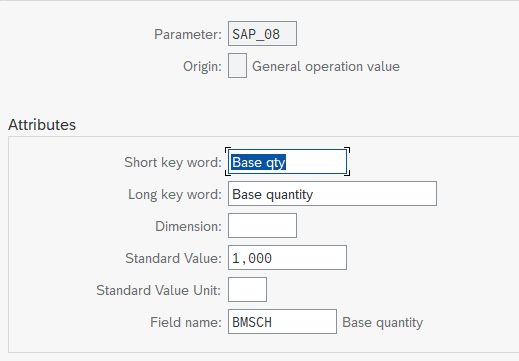
And if your business needs a piece of data the standard does not cover, a custom parameter can be created: energy consumption or a material weight, for example, for advanced costing requirements.
Building and reading a formula: SAP006 dissected
The formulas themselves live in customizing, reachable through transaction OP54:
SPRO path:
Production → Basic Data → Work Center → Costing → Work Center Formulas → Define Formula for Work Centers
SAP delivers a library of ready-to-use standard formulas: SAP001 for setup time, SAP002 for machine time, SAP006 for machine requirements, the SAPC* series for durations, and SAPF01 for PRT quantities.
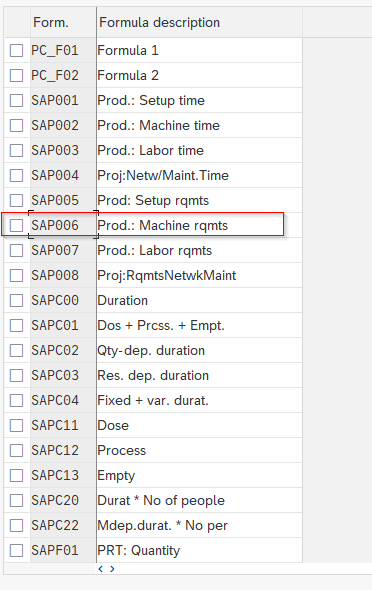
Let’s read the most telling one: SAP006, the machine requirement. Its definition fits in one expression: SAP_02 * SAP_09 / SAP_08. Word for word: the machine time from the routing, multiplied by the quantity to produce in the operation, divided by the base quantity the time was measured against. If the routing says 10 minutes of machine time for 100 pieces and the order asks for 500, the machine requirement is 50 minutes.
Practitioner’s advice: never create a formula from scratch. Copy the closest standard formula and adjust it: you inherit consistent indicators and a proven expression.
The 5 indicators that decide where the formula applies
The most neglected part of a formula definition sits right below the expression: the indicators. They are what allows or forbids each application to use the formula.
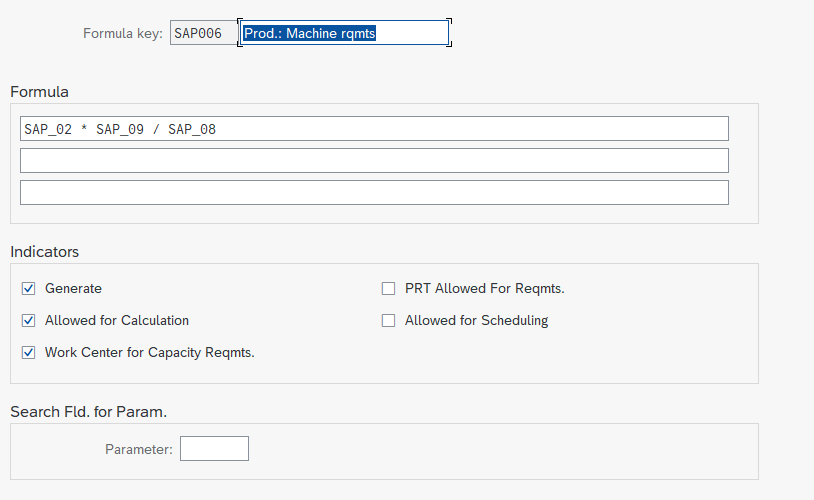
| Indicator | What it allows | When to check it |
|---|---|---|
| Generate | Generates code for the formula (performance) | Recommended, especially for heavily used formulas |
| Allowed for Calculation | Use by costing | Formula meant to value activities |
| Work Center for Capacity Reqmts. | Use by capacity requirements planning | Work center load formula |
| PRT Allowed For Reqmts. | Use for tooling requirements (PRT) | PRT quantity or usage formulas |
| Allowed for Scheduling | Use by scheduling | Operation duration formula |
The classic trap: a perfectly written formula, but the indicator for the target application left unchecked. The system raises no error; the expected value is simply missing. If a capacity calculation or a cost fails to show up, check the indicators before suspecting the expression.
Assigning and testing: CR03, the SAP Standard Value Key and Test Formula
A defined formula still calculates nothing: it has to be assigned to the work center. The meeting point is called the Standard Value Key. This key, assigned in the Basic Data view of the work center, groups up to 6 parameters; each one maps to a formula. This is where the production and costing teams genuinely collaborate: one side defines what gets measured, the other what gets valued, and the quality of your routing data depends on the production type you selected.
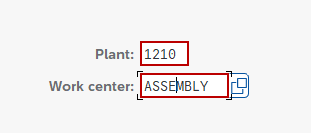
To see the result, let’s open a work center in CR03:
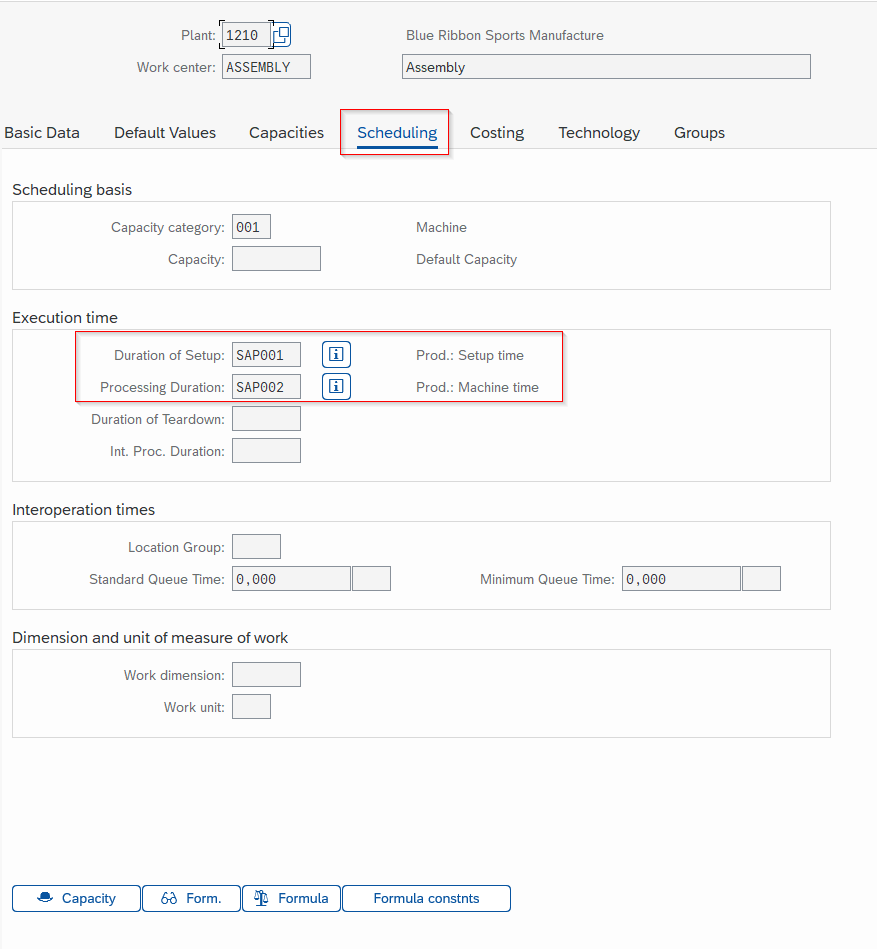
In the Scheduling tab, every calculated field displays its formula: setup duration, processing time, interoperation times. The Costing and Capacity views follow the same logic with their own formulas.
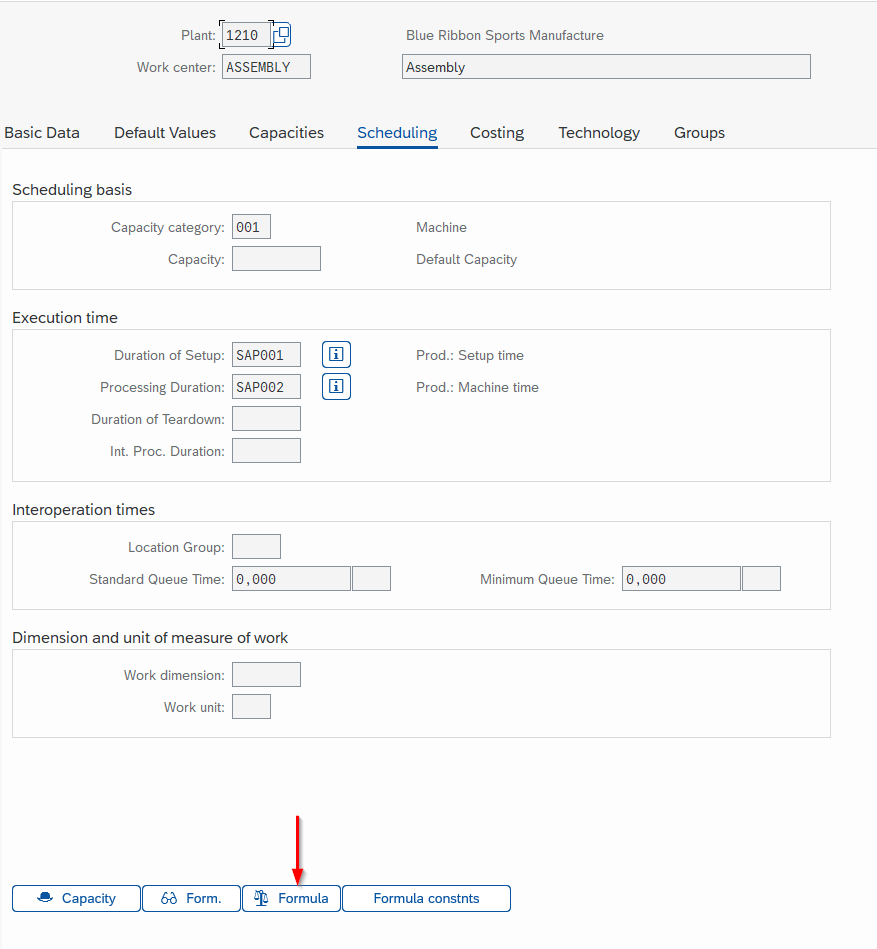
That leaves the best feature of the lot, and the least used: Test Formula. Position the cursor on one of the work center’s formulas and launch the test; the system asks for trial values and calculates the result immediately, without creating a single production order.
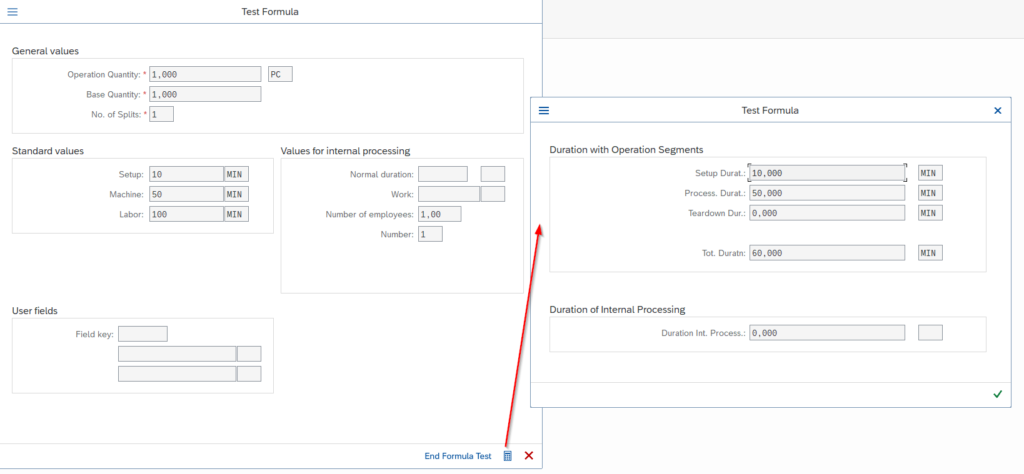
With setup at 10, machine time at 50 and labor at 100 in the trial values, the test returns its durations segment by segment. The habit to build before any go-live: test every assigned formula with realistic values and compare against a manual calculation. The full chain fits in five moves:
-
1Define or identify the parameter
Check that the data you need exists as a parameter, linked to the right SAP field; create a custom parameter otherwise.
-
2Write the formula
In OP54, copy the closest standard formula and adjust the expression.
-
3Check the indicators
Explicitly authorize each target application: costing, capacity, PRT, scheduling.
-
4Assign it in the work center
Through the Standard Value Key in Basic Data, then the Scheduling, Costing and Capacity views.
-
5Test it with Test Formula
Realistic trial values, comparison against a manual calculation, before any productive use.
PRT formulas: the same mechanism for production tooling
The mechanism does not stop at work centers. PRTs, the production resources and tools, use the same formulas to calculate their quantities and usage durations: SAPF01 (PRT Quantity) in the standard library, and the PRT Allowed For Reqmts. indicator as the entry gate.
Their customizing path is separate:
SPRO path:
Logistics - General → Product Lifecycle Management (PLM) → Production Resources/Tools → Assignment of Production Resources/Tools → Formulas
The full lifecycle of production tooling, from the PRT master record to its assignment in routings, is covered in our PRT guide; on the formula side, everything you have just read applies identically.
Formulas are the perfect example of invisible customizing: nobody talks about them as long as the numbers come out, and everybody hunts for them the day costing goes off the rails. The official reference on the capacity side remains the work center capacity management documentation, complemented by the official guide to the formula parameter. And the next time a cost looks wrong despite a correct routing, you will know exactly where to look.
FAQ: your questions about SAP work center formulas
What are work center formulas used for in SAP PP?
They turn the standard values of your routings into operational results for three applications: costing (activity valuation), scheduling (operation durations and dates) and capacity requirements planning. They are assigned in the work center views and to PRTs.
Which transaction is used to create a SAP work center formula?
OP54, or the IMG path Production, Basic Data, Work Center, Costing, Work Center Formulas, Define Formula for Work Centers. The right reflex: copy the closest standard formula rather than creating one from scratch.
How do you read formula SAP006?
SAP006 calculates the machine requirement: SAP_02 * SAP_09 / SAP_08, meaning the machine time multiplied by the operation quantity, divided by the base quantity. It is the generic skeleton in action: standard value x order quantity / base quantity.
What is a Standard Value Key in SAP?
The key that groups up to 6 formula parameters and is assigned in the Basic Data view of the work center, with one formula per parameter. It is the collaboration point between production (what gets measured) and costing (what gets valued).
What does the Generate indicator do in a SAP formula?
It generates code for the formula, for performance reasons. Not to be confused with the four authorization indicators, which open the use of the formula to costing, capacity calculation, PRTs and scheduling.
How can you test a SAP formula without creating a production order?
With the Test Formula button of the work center: you enter trial values (quantities, standard values) and the system immediately calculates the resulting durations, segment by segment. No order is created.
Keep reading
SAP PRT: Production Resources and Tools
On an industrial site, the tools shared between production lines are often invisible in SAP. Jigs, probes and technical drawings move from one order to the next, but nobody knows...
 Pierre B.
Beginner's guide to batch management in SAP MM
I have seen consultants tick the "Batch management" box on thousands of materials in a MASS run, without realizing the batch level was still set at client level. A few...
Pierre B.
SAP batch determination and management
You are configuring SAP batch determination and the engine does not kick in. You are picking batches in the wrong order even though the sort rule is correctly set up....
Pierre B.
SAP Production Version: setup with C223 and MRP4
https://youtu.be/Bae4g30aZC4 The production version is the SAP object that says "to manufacture this material, you combine this bill of materials with this routing, over this period". On an S/4HANA project,...
Pierre B.