A SAP serial number is the unique identifier attached to one specific physical unit of a given material. It is the tool for unit-level traceability, the foundation for individualized after-sales service, the preventive maintenance of a piece of equipment, and the targeted product recall. But it is also a setting that turns a mundane goods movement into the mandatory entry of a precise number. The useful question at the start of a project is not how to configure OIS2. It is whether you should really activate serialization on this material, and with which settings on the profile side.
This guide targets SAP MM and PM consultants, industrial key users (manufacturing, aerospace, hospitals, energy), and project managers who have to make this call at the start of the Explore phase. I write from the EAM and PP projects I see in the field, where I have come across serialized materials that serve no purpose and others that should have been serialized since go-live. I am not going to give you an OIS2 screencast: I am going to show you the decision grid, the six profile parameters that drive the runtime, and how to position material serialization against PM equipment management.
- SAP serialization is useful in 4 cases: high unit value, equipment to maintain, regulatory obligation, theft/counterfeiting risk. Not a standard to switch on by default.
- The
OIS2profile rests on 6 key parameters (level 1 vs 2, existence requirement, equipment category, StkCk, auto GR, equipment view). Set them right and you avoid 80% of go-live incidents. - 6 serializing procedures (
MMSLPPSFSDCCSDCRMMSIPOSL) -> one level 01/02/03 per business flow. Mandatory everywhere = blocked warehouse. - MM material serialization and PM equipment are complementary, not competing. Profile level 1 = automatic coupling.
- Start with StkCk in Warning for three months, never in Block at go-live. Migrating existing stock is mandatory before activation.
When to activate SAP serialization: 4 use cases that justify it
Activating serialization carries a significant operational cost. Every goods movement becomes an additional entry for the warehouse operator. Every stock vs serial inconsistency potentially blocks the movement. Every migration of existing stock requires retroactively creating the numbers. Before going into OIS2, ask the business question: what will this unique number be used for, who will consult it, and which business process would be degraded without it?
- High unit value asset and individualized after-sales service. An industrial engine, a server, a vehicle, a production automation unit. The customer buys a specific object, and you have to trace it from the day of manufacture to the day of decommissioning. Individual warranty, standard exchange, after-sales intervention: everything relies on unit-level identification.
- Equipment to maintain with a history. A compressor, a production line, an MRI scanner in a hospital, a generator. You need to cross-reference the serial number and the PM equipment master record in order to carry maintenance orders, measurements, component replacements, and the failure history.
- Regulatory obligation or product recall. Aerospace, medical devices, premium automotive, certain food sectors. Authorities require the ability to trace a defective product all the way to the end customer or the original batch. No room for discussion: serialization is imposed by compliance.
- Theft, loss, or counterfeiting risk. Critical components (chips, GPUs, rare metals), military equipment, luxury goods. The serial number becomes a proof of ownership and a stock-control tool against shrinkage.
If I cannot answer in one sentence the question “who is going to read this serial number and what for”, I do not activate serialization. Serialization switched on for convenience or anticipation creates an operational debt that is paid every day in data entry and blockages, without ever delivering the expected value.
OIS2 serial number profile: the 6 parameters that drive everything
The serialization profile is a 4-character key that you attach to the material master. The whole configuration lives in OIS2 (maintenance) or OIS1 (display). The profile holds two levels of information: the global parameters (which drive cross-cutting behavior) and the internal table of serializing procedures (which dictates per business operation).
Six parameters concentrate most of the runtime. Set right, they avoid 80 percent of the go-live incidents I see on EAM projects. Set wrong, they block your warehouse operators at 5:45 p.m. and end up in product escalation.
| OIS2 parameter | Effect on the runtime | Project recommendation |
|---|---|---|
| Serialization Level | 1 = serial number synchronized with equipment number (1:1). 2 = independent numbers. | Level 1 by default if you want automatic equipment. Level 2 if the equipment is created separately or if several serial numbers point to the same equipment. |
| Existence Requirement (Existence Check) | Defines whether the number must exist before the movement, or whether it is created during the movement. | Mandatory for manufacturer-serialized purchases (you receive a number already assigned). Automatic creation for internal production and production order output. |
| Equipment Category | Category assigned by default when an equipment is created automatically by MIGO at level 1. | Category M (Machine) or S (Serialized) depending on your reference data, to be locked from the design stage. Irreversible decision without a heavy correction. |
| Stock Check (StkCk) | Consistency check between MM material stock and serial number stock. Modes Warning, Block, or deactivated. | Start in Warning for three months, never in Block at go-live. The serial database will take time to stabilize, and Block prevents inventory corrections. |
| Goods Receipt Auto Creation | Allows automatic generation of the number during a receipt or a production order confirmation. | Activate on high-volume flows (internal production). Deactivate on targeted after-sales flows where the number must reflect the manufacturer identifier. |
| Equipment View Mandatory | Forces activation of the Serial Data view when creating a number with equipment coupling. | Activate if level 1. Otherwise you create orphan numbers with no PM equipment, and after-sales cannot attach preventive orders. |
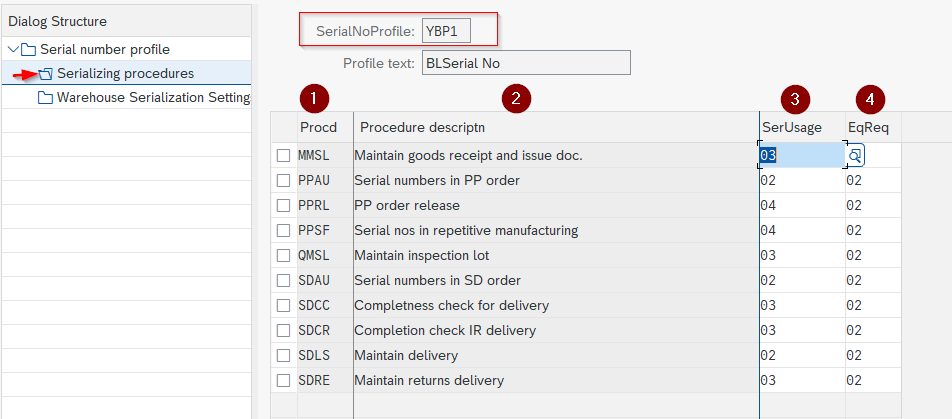
The 6 serializing procedures, explained by business flow
The procedures table is the heart of the profile. For each business operation that touches stock or delivery, you indicate whether entering the serial number is mandatory (level 01), optional (02), or automatically created (03). Six procedures cover most of the flows. Understanding what to assign to each flow is the project decision that separates a smooth serialization from a daily operational blockage.
| Code | Business flow covered | Level recommendation |
|---|---|---|
MMSL | Standard goods movements (MIGO, MB1A, MB1B, transfers). The core of your warehouse operations. | Optional (02) on internal transfers, mandatory (01) on external issues such as type 601 and on corrections. |
PPSF | Production order confirmation, number creation at production order output. Internal production in push flow. | Auto creation (03) if SAP internal numbering. Mandatory (01) if you capture a product identifier from the line (laser, serial labeling). |
SDCC | Post Goods Issue (PGI) on outbound delivery VL02N. This is the point that captures customer traceability. | Mandatory (01) on the outbound delivery. This is the procedure that often justifies serialization on its own for after-sales and warranty. |
SDCR | Post Goods Receipt on sales return. The customer sends back a unit that you have to identify. | Mandatory (01) if you handle after-sales, otherwise you cannot find which original order the returned unit belongs to. |
MMSI | Physical inventory, unit-level counting. The procedure that verifies your serial database reflects the warehouse reality. | Mandatory (01) at least once per fiscal year to avoid drift. Optional (02) on cycle counts if the volume is low. |
POSL | Receipt against purchase order (inbound PGR via VL31N or MIGO). You capture the manufacturer number on arrival. | Mandatory (01) on industrial equipment purchases (you trace the manufacturer number). Auto creation (03) acceptable for lightly serialized consumables. |
The classic temptation is to tick mandatory (level 01) on all six procedures, just to be safe. The result: every internal transfer, every inventory correction, every inter-site return becomes blocked until a number is entered. If your serial data is not perfectly up to date (which never happens at startup), your warehouse operators spend their days calling support. Optional on internal movements, mandatory on external movements: that is the right default reflex.
Configuring an OIS2 profile and attaching it to a material: 5 steps
Once the business need is validated and the target profile defined, the implementation comes down to five steps. The sequence I apply systematically on a serialization go-live, to avoid round trips between configuration and stock migration.
- 1Create the profile in OIS2
Run transaction
OIS2, click New Entries. Enter a 4-character code (typical convention: 2 business letters + 2 digits, e.g. Z001 for a general strategy). Fill in the 6 global parameters of the profile (level, existence requirement, equipment category, StkCk, auto GR, equipment view). Save. - 2Define the serializing procedures of the profile
Still in OIS2, select the profile and double-click Serializing procedures in the left-hand menu. Add the applicable procedures (MMSL, PPSF, SDCC, SDCR, MMSI, POSL) with their level (01/02/03) according to the grid defined in the design. Any missing procedure amounts to deactivating serialization on the corresponding operation.
- 3Attach the profile to the material master
Open
MM02on the target material. Go to the General Plant Data Storage 2 view or Sales: General/plant data (depending on the main procedure). Enter the 4-character profile in the Serial No. Profile field. Save. From that moment on, all movements of the material obey the profile. - 4Test in IQ01 then in MIGO
Run
IQ01to manually create a first standalone serial number on the material (sanity check). Then chain a goods receipt movement inMIGO501 or 101 to validate automatic creation according to the profile. Check inIQ09that all numbers are correctly created with the right stock status. - 5Migrate the existing stock and switch to production
If the material already has stock in the warehouse, create the numbers for the existing stock via mass import (LSMW or Migration Cockpit S/4HANA) before go-live. Otherwise, the first goods movement = blockage. Once the serial database is stabilized and one inventory cycle has passed without incident, you can consider switching StkCk from Warning to Block.

MM material serialization or PM equipment: complementary, not competing
A recurring question in fit-gap design: for an asset to trace, should you activate material serialization (OIS2 profile in MM) or manage it only as PM equipment (without a profile)? Many projects frame this as a dilemma. In reality these are two complementary tools that answer two different moments in the life cycle.
MM material serialization (OIS2 profile)
- Direct link to MM stock, unit-level inventory traceability in
MMBEandMB52 - Automatic creation during a goods movement (MIGO, production order, delivery)
- End-to-end visibility of the logistics flow: purchasing, production, warehouse, shipping, customer delivery
- Capture of the manufacturer number in external numbering, SAP generation in internal numbering
- Compatible with PM equipment management if the profile is level 1 (automatic coupling)
- Essential for regulatory obligations (pharma, medical, aerospace)
PM equipment (IE01 record without a profile)
- No link to MM stock, the asset does not appear in MMBE or MB52
- Manual creation exclusively (IE01), no automation by movement
- Suited to heavy non-mobile equipment (production lines, buildings, fixed installations)
- Simpler to set up, less profile configuration, less risk of operational blockage
- Fits when the asset never leaves the site and has no purchase-resale cycle
- Carries maintenance history, preventive orders, measurements via the equipment record
Practical arbitration rule: if the object moves around (purchase, transfer between sites, customer delivery, return, disassembly-reassembly), activate material serialization. If it is fixed once and for all on a site and no longer moves, PM equipment alone is enough. And for hybrid cases (a compressor purchased then permanently installed), the level 1 profile gives you both worlds synchronized: the unit is traced as a material when it moves, as equipment when it is installed. Transaction IE4N serves precisely to combine installation, dismantling, and goods movement in a single operation.

Project pitfalls to avoid on a serialization go-live
Setting the profile’s stock check to Block mode from day one is a guarantee of blocked movements within 48 hours. The serial database is never perfect at startup. Start in Warning for three months, handle discrepancies through the stock consistency report provided by SAP, then switch to Block once the database is clean. Not the other way around.
If the material already has stock in the warehouse before the profile is activated, the first movement will ask you for a number that does not exist. Either you create the numbers by hand via IQ01 on the existing stock (long but clean), or you switch the procedure concerned to auto creation for the duration of the migration and let SAP generate them. But you cannot activate the profile and carry on as before: it is a mandatory migration plan.
Level 1 synchronizes serial and equipment (one number = one equipment). Level 2 makes them independent. On a project where you want automatic equipment in PM, choosing level 2 by mistake means each receipt creates the number but not the equipment, and you discover the gap three months later when the preventive plan cannot attach. Irreversible decision without a heavy correction on the existing numbers.
Take a pilot material, activate the profile on it in MM02, and play all the movement cases (purchase, production, transfer, delivery, return, inventory) over two weeks. In two weeks you will identify the badly set parameters without impacting the run. Once the profile is stabilized, roll it out via mass update LSMW or Migration Cockpit S/4HANA across the rest of the scope. The deployment functional specification must explicitly document the target profile and the migration strategy.
On EAM projects, the quality of the OIS2 configuration predicts warehouse-user satisfaction better than the initial training. Six parameters set right save six months of escalations.
Pierre Balbinot, SAP functional consultant
To go further on the SAP traceability landscape, batch management covers collective grouping (FIFO, shelf life, quality), the natural complement to unit-level serialization. Batch determination automates the business selection of batches. And on the PM side, preventive maintenance systematically relies on the equipment created via the level 1 profile. The entry authorizations on IQ01 and OIS2 must be restricted to the appropriate business roles to avoid uncontrolled changes.
Frequently asked questions about the SAP serial number
Which transaction is used to create a SAP serial number?
For the manual creation of a standalone number: IQ01. For the change: IQ02. For the display: IQ03. To list all the numbers of a material: IQ09. For automatic creation during a goods receipt movement: MIGO with the Create Serial Nos Automatically box ticked according to the profile. In S/4HANA Cloud, the Fiori Manage Serial Numbers app replaces these GUI transactions.
Is the SAP serial number mandatory for all materials?
No. Serialization is activated material by material through the serial number profile in the material master (MM02, General Plant Data/Storage 2 view or Sales: General/plant data). With no profile entered, no number is requested on movements. It is a design decision that has to be justified by the business: individualized after-sales, equipment to maintain, regulatory obligation, or high unit value.
What is the difference between a SAP serial number and a batch number?
The serial number identifies one specific physical unit (a single device, a single vehicle). The batch number groups several units produced together (a batch of 500 boxes of tablets from the same production order). In pharma and food sectors, the two are often combined: batch for shelf-life traceability and collective compliance, serial for after-sales and individual recall. See SAP batch management for the collective counterpart.
Can serialization be activated retroactively on an existing material?
Yes, but with caution and a migration plan. You add a profile to the material master via MM02 at any time. The existing stock will have no serial number attached, and future movements will require an entry. Two strategies: manually create the numbers on the existing stock via IQ01 (clean but long), or switch the procedure concerned to auto creation for the duration of the migration and let SAP generate them. Always test on a pilot material before a mass rollout.
What do the 6 serializing procedures of the OIS2 profile contain?
MMSL for standard goods movements (MIGO, transfers), PPSF for production order confirmations, SDCC for the outbound PGI on delivery VL02N, SDCR for the customer return, MMSI for physical inventory, POSL for the receipt against purchase order. Each procedure is given a level (01 mandatory, 02 optional, 03 automatic creation) that dictates the runtime behavior on the operation.
Which profile level should be chosen to synchronize serial and PM equipment?
Level 1. Level 1 automatically creates the PM equipment when the material is received, with an identifier synchronized to the serial number. Level 2 keeps the two independent (serial numbers created without automatic equipment). For an asset to maintain, level 1 almost systematically. For serialized consumables with no PM need, level 2 is enough.
How can you view the movement history of a serial number?
Via IQ03 on the serial number, Documents tab. There you see all the related goods movements (deliveries, transfers, issues for production order, returns). In the database, the data lives in table OBJK (field SERNR) joined to tables SER01 to SER06 depending on the document type (SER01 deliveries, SER03 MIGO movements, SER05 production orders, SER06 handling units).
Does serialization work in S/4HANA Cloud?
Yes, in both Private Edition and Public Edition. In Private Edition you keep the classic IMG and transaction OIS2 for the profile customizing. In Public Edition you go through the Fiori apps dedicated to master data management, and the Manage Serial Numbers app replaces the GUI transactions IQ01/02/03/09. The profile, serializing procedures, and synchronization level concepts remain identical.
Keep reading
SAP Classification System: characteristics and classes
You are looking for every high-criticality 24V piece of equipment in SAP. Every batch with a viscosity between 200 and 250. Every premium customer in a specific geographic area. If...
 Pierre B.
SAP PRT: Production Resources and Tools
On an industrial site, the tools shared between production lines are often invisible in SAP. Jigs, probes and technical drawings move from one order to the next, but nobody knows...
Pierre B.
SAP PM Preventive Maintenance: the complete guide
One hour of unplanned downtime costs a manufacturer 25,000 USD on average, and up to 2.3 million USD/hour in the automotive sector according to the Siemens report True Cost of...
Pierre B.
Beginner's guide to batch management in SAP MM
I have seen consultants tick the "Batch management" box on thousands of materials in a MASS run, without realizing the batch level was still set at client level. A few...
Pierre B.