One hour of unplanned downtime costs a manufacturer 25,000 USD on average, and up to 2.3 million USD/hour in the automotive sector according to the Siemens report True Cost of Downtime 2024. On the rail and industrial sites where I work, the question is never “are we going to break down?” but “when, and how much did we lose before we saw it coming?”.
The preventive maintenance in SAP PM is exactly the lever that turns this “when” into a controlled schedule. This article lays out the concepts of SAP preventive maintenance for a consultant who knows what equipment is but has never configured a strategy or scheduled a plan. We cover the four pivotal objects, the key transactions (IP11, IP01, IP10, IK01) and the classic pitfalls that leave a created plan inert.
- Preventive maintenance in SAP PM relies on four objects: maintenance strategy, task list, maintenance item, maintenance plan. Each has its own role, none replaces another.
- The strategy (
IP11) defines the rhythm (every 3 months, every 1000 km, etc.). The task list (IA01,IA05,IA11) defines the content (what to do). - The maintenance plan (
IP01,IP41,IP42,IP43) combines the strategy and the task list for a given piece of equipment. - Pitfall number one: a created plan generates no maintenance order unless it is scheduled via
IP10. This step is silent and forgotten by most projects.
Preventive vs corrective: the difference in 2 minutes
Two modes coexist in SAP PM, and confusing them wastes time in steering committee meetings. Preventive maintenance is proactive: it is planned before the failure, based on a time cycle or an operating counter. Corrective maintenance is reactive: it occurs after a defect appears, usually triggered by a user notification (IW21).
Preventive (proactive)
- Trigger: time cycle or counter
- Order type:
PM03 - Use case: critical equipment, wear parts
- Downtime cost: low
Corrective (reactive)
- Trigger: failure or detected defect
- Order type:
PM01 - Use case: non-critical equipment, troubleshooting
- Downtime cost: high
On a well-configured piece of equipment, both modes coexist. Preventive maintenance handles the schedulable operations (quarterly lubrication, filter change, regulatory inspection), corrective maintenance absorbs the unexpected (mechanical breakage, sensor failure). The goal of a well-run PM project is to gradually shift the corrective share toward the preventive share, because every hour of failure avoided is worth 25,000 USD according to Siemens. The SAP France page on preventive maintenance details the business context and the types of strategies beyond the pure SAP scope.
The 4 pivotal objects of SAP preventive maintenance
SAP preventive maintenance relies on four distinct objects that fit together in a precise order. None works alone. Understanding the cascade prevents configuring an object that will point to nothing:
Creating a maintenance strategy with IP11
The strategy is the abstract rhythm. It describes when to intervene, not what to do. SAP offers two types of strategies:
- Time-based: intervention based on the calendar. Example: every 3 months, every 6 months, every year.
- Performance-based: intervention based on a counter. Example: every 1,000 km driven, every 5,000 operating hours, every 100,000 units produced.
Within a strategy, you define maintenance packages (PMP). One package = one elementary cycle with a frequency. A typical strategy for a compressor can combine three packages: a quarterly one (PMP1 = 3 months), an annual one (PMP2 = 12 months), a five-year one (PMP3 = 60 months). The system then calculates the automatic sequencing.

To go further on strategy types and hierarchy options, the SAP Learning course “Exploring Preventive Maintenance in SAP S/4HANA Asset Management” covers the advanced options and the ECC to S/4HANA migration.
Task list: IA01, IA05, IA11
The task list is the content: what to do at each intervention. SAP offers three creation transactions depending on the scope:
| Transaction | List type | When to use it |
|---|---|---|
IA01 | Equipment task list | List attached to a specific piece of equipment. Typical case: a single compressor with a specific set of operations. |
IA05 | General task list | Generic list reusable across several pieces of equipment. Typical case: “centrifugal pump visual inspection” applicable to the entire pump fleet. |
IA11 | Functional location task list | List attached to a functional location (physical location). Typical case: general maintenance of a workshop or a production area. |
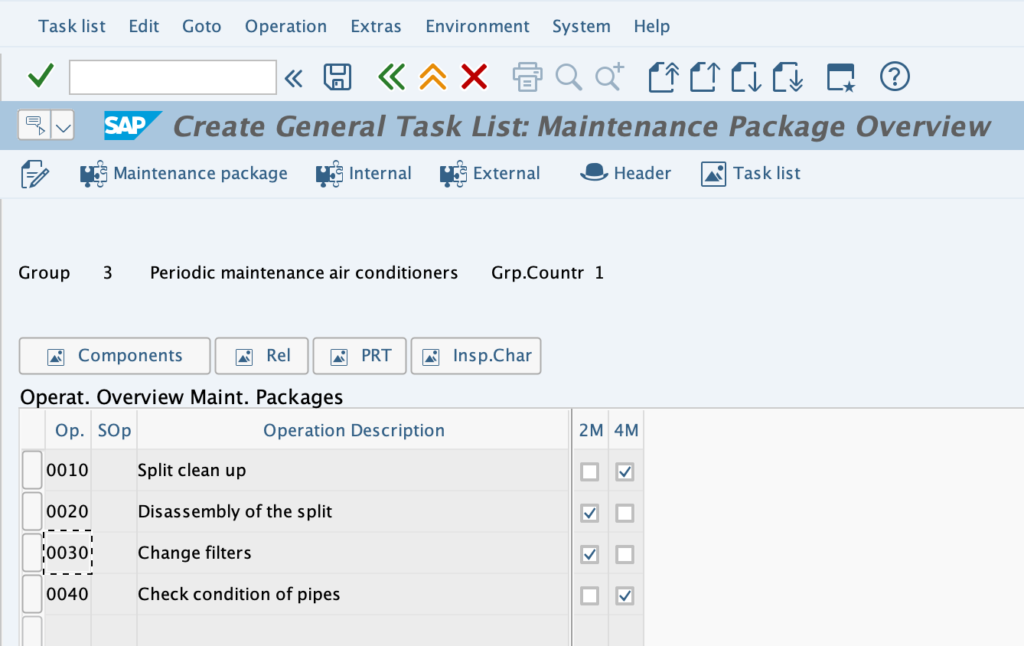
A task list is structured in three levels: a header (description, total duration, order type), a sequence of operations (step 10 = oil change, step 20 = visual inspection, step 30 = filter replacement), and components (associated spare parts and consumables). On mature projects, the lists are enriched with equipment characteristics through the SAP classification system to dynamically filter the operations according to the equipment type.
Creating the maintenance plan: IP01, IP41, IP42, IP43
Four transactions are used to create a maintenance plan, depending on the type of cycle wanted. The choice of transaction determines what will or will not be possible afterwards:
| Transaction | Plan type | Use case |
|---|---|---|
IP01 | General plan (legacy) | Historical transaction, still has residual use. Prefer IP41/IP42/IP43 on new projects. |
IP41 | Single cycle plan | Simple single cycle (every 6 months, without strategy). The most common in practice. |
IP42 | Strategy plan | Plan backed by an IP11 strategy. Allows combining several PMPs (quarterly + annual + five-year). |
IP43 | Multiple counter plan | Plan with several combined counters (operating hours AND mileage). Advanced case. |
Step by step to create an IP41 plan (single cycle, the most common case):
-
1Launch IP41 and choose the plan type
Enter the maintenance plan type (for example standard
PMor a custom Z type). -
2Header tab
Plan description, target order type (
PM03for preventive), priority, planning plant. -
3Define the maintenance item
Enter the equipment or functional location, the task list to execute (created beforehand in
IA05), and the operating unit. -
4Cycle parameters tab
Cycle (for example 6 months), early and late tolerance, adjustment factor. These parameters determine the window in which SAP will generate the order.
-
5Save
The plan is created, but not yet active. No order will be generated as long as the plan has not been scheduled. This is the forgotten step covered in the next section.

Scheduling the plan: IP10, the forgotten step
The created plan is inert until it has been scheduled via IP10. This step is silent, gives no error message if it is omitted, and explains the most frequent question: “I created the plan three months ago but I never received an order”.
Scheduling a plan amounts to starting it. SAP then calculates the first due date from the reference date entered, and generates the first maintenance order (IW31) automatically. At each following due date, the system generates a new order, provided that the batch job RISTRA20 runs daily (Basis configuration).
On the sites where I have worked, about eight projects out of ten have at least one maintenance plan that was created but never scheduled via IP10. Most of the time it is a consultant who left the assignment between creating the plan and starting it, and no one picked up the topic. Result: a critical piece of equipment for which the client believes they have quarterly maintenance, when no order has been generated for 18 months. To check as a priority on any PM audit.
For configuration details and advanced options (manual vs automatic scheduling, reference date management, restart scenarios), the official SAP S/4HANA Maintenance Plan documentation covers the full mechanics.
Condition-based: the measuring point (IK01)
Beyond time cycles and simple counters, SAP PM offers a third logic: condition-based maintenance. The intervention triggers when a sensor exceeds a business threshold (engine temperature, hydraulic pressure, vibration). The mechanism relies on the measuring points created in IK01, which record the measurement readings either manually by an operator or automatically through an IoT or MES integration. When the measuring point exceeds the target value, a maintenance order can be generated, or an IP43 plan (multiple counter) can kick in.
The topic is more advanced than standard preventive maintenance and deserves its own article. The main prerequisite: the classification of the counter through a characteristic configured in CT04, then attached to the equipment.
SAP PM preventive maintenance is not just one feature among others. It is the condition for turning a maintenance service that is endured into a maintenance service that is mastered, and every hour of failure avoided is worth between 25,000 USD and 2.3 million USD depending on the sector. The basic concepts (strategy, task list, item, plan) are enough day to day. The transactions IP11, IP01, IP10, IK01 cover the usual cases. And the IP10 step is the first one I check on any PM audit, because it is the most forgotten and the most impactful.
Frequently asked questions
What is preventive maintenance in SAP?
Preventive maintenance in SAP PM is the set of operations scheduled on a piece of equipment before a failure appears, to reduce unplanned downtime and smooth the workload of maintenance teams. It contrasts with corrective maintenance (reactive, after failure). It relies on four objects: strategy, task list, maintenance item and maintenance plan.
What is the difference between preventive and corrective maintenance in SAP?
Preventive maintenance is proactive and planned (time cycle or counter), with a standard order type PM03. Corrective maintenance is reactive and unplanned, triggered by a user notification, with a standard order type PM01. On a well-configured piece of equipment, both modes coexist: preventive handles the schedulable operations, corrective absorbs the unexpected.
What is transaction IP10 used for in SAP?
IP10 is used to schedule a maintenance plan, that is, to start it. Without this step, the plan stays inert and no maintenance order is generated, even if the plan is correctly created in IP01 or IP41. It is the most often forgotten step on PM projects, and the number one cause of pending plans with no order generated.
How do you create a maintenance plan in SAP?
For a single cycle plan (the most common), launch IP41, choose the plan type, fill in the header (description, target order type PM03, priority), define the maintenance item (equipment and task list), enter the cycle parameters (frequency, tolerances), then save. To activate the plan, schedule it next via IP10. For plans with a multi-PMP strategy, use IP42. For plans with multiple counters, use IP43. A close pattern on the logistics side: automatic batch determination.
What is a measuring point in SAP PM?
A measuring point is the SAP object that records the readings of a sensor or a counter on a piece of equipment (operating hours, mileage, temperature, pressure). It is created in transaction IK01 and relies on an SAP classification characteristic. When the measuring point exceeds a threshold value, it can trigger the automatic generation of a maintenance order through an IP43 plan or a condition-based mechanism.
What is the difference between IP41, IP42 and IP43 in SAP?
IP41 creates a single cycle plan (a simple time or counter cycle, without strategy). IP42 creates a plan backed by an IP11 strategy, which allows combining several PMPs (quarterly + annual + five-year). IP43 creates a multiple counter plan (for example an hours counter and a mileage counter). The choice depends on the complexity of the cycle wanted.
What are the main SAP PM transactions for preventive maintenance?
The key transactions are IP11 (create a maintenance strategy), IA01/IA05/IA11 (create a task list according to scope), IP01/IP41/IP42/IP43 (create a maintenance plan), IP10 (schedule the plan), IK01 (create a measuring point for condition-based), IW31 (maintenance order generated automatically) and IW21 (maintenance notification).
Keep reading
SAP Serial Number: OIS2 setup and material vs equipment
A SAP serial number is the unique identifier attached to one specific physical unit of a given material. It is the tool for unit-level traceability, the foundation for individualized after-sales...
 Pierre B.
SAP PRT: Production Resources and Tools
On an industrial site, the tools shared between production lines are often invisible in SAP. Jigs, probes and technical drawings move from one order to the next, but nobody knows...
Pierre B.
SAP Classification System: characteristics and classes
You are looking for every high-criticality 24V piece of equipment in SAP. Every batch with a viscosity between 200 and 250. Every premium customer in a specific geographic area. If...
Pierre B.
SAP EWM Master Data Integration: ERP Sync with CIF, ALE, DRF
Since the move to S/4HANA, the question "how do you synchronize data between SAP ERP and EWM" no longer has the same answer, and many projects still get it wrong...
 Michael A.