Sooner or later, on a project, a user shows you a sales order and asks why the displayed price is not the one they expected. You open the line, you look at the amount, and there you have two options: either you know where SAP went to fetch that figure, or you start guessing. SAP SD pricing determination relies on a generic mechanism, the condition technique, which links a few objects together to calculate each value of a sales order line. Understanding this chain means moving from a spectator to someone able to explain, and fix, a price.
The good news: this mechanism is logical. Once the right building blocks are in the right order, there is no black magic left, just a sequence that SAP always runs the same way.
- SAP does not invent a price: it applies it through a pricing procedure and retrieves it from condition records.
- The condition technique relies on five building blocks: pricing procedure, condition types, access sequence, condition tables and condition records.
- The access sequence goes from the most specific to the most general and stops at the first record found: this is the source of most “strange” prices.
- A sales price only exists if there is a valid condition record on the document date, set at the right level.
- Faced with a surprising price, the first reflex is the pricing analysis on the line, before making any change.
SAP SD pricing determination, in one sentence
SAP SD pricing determination is the mechanism by which the system automatically calculates each price element of a sales document (base price, discounts, surcharges, taxes) by applying a pricing procedure that fetches the right values from condition records. This is a definition you can reuse as is: SAP does not invent a price, it retrieves it and adds it up according to rules that the configuration has set.
All of this relies on what SAP calls the condition technique (or pricing), a mechanism described in the official SAP documentation on the condition technique. It is a cross-functional mechanism: the same logic serves pricing, but also output determination or account determination. In SD, you first encounter it on pricing, and that is the best ground to understand it.
Why a junior consultant must master this mechanism
Because pricing is where users are waiting for you. A discount that does not apply, an extra tax, a customer price that does not come up: these are daily tickets on a project. If you understand the condition technique, you no longer suffer these incidents. You know where to start, which block to question, and you give an answer instead of a shrug. This is exactly the kind of reflex expected from a junior SAP consultant who is operational.
It is also a reusable foundation. Once you have grasped the mechanics in SD, you find it elsewhere in SAP, almost identical. The investment pays off across the whole career, and it fits into the path to learn SAP that you build module after module.
The 5 building blocks of the condition technique
Pricing determination relies on five objects. Taken on their own, each one is simple. It is their interplay that produces the final price.
The pricing procedure
The pricing procedure is the ordered list of condition types applied to a sales document. It is the recipe: it states which price elements come into play, in which order, and how they chain together (a subtotal here, a discount calculated on a given amount there). When you open the pricing of an order, what you see on screen is the execution of this procedure, line by line.
The condition types
A condition type is a single price element: the base price, a customer discount, a surcharge, a tax. Each condition type has its own behavior (fixed amount, percentage, per quantity) and its own attributes. The pricing procedure simply stacks them in the right order. Think of them as the lines of a receipt: each line is a condition type.
The access sequence
The access sequence is the order in which SAP searches for a valid condition record for a given condition type. It is what answers the question “where should I look first?”. SAP works down the sequence from the most specific case to the most general, and stops as soon as it finds a value. This is the detail that explains most “strange” prices: SAP stopped earlier than you thought.
The condition tables
A condition table defines the combination of criteria that serves as the key to store a price. For example: a price per customer and per material, or a price per customer group, or a price per material alone. Each level of the access sequence points to a condition table. This is the granularity of your pricing: the more precise the table, the more specific the price.
The condition records
The condition record is the master data that carries the actual value: 100 EUR for this customer and this material, a discount rate for this group. It is the only block that contains a figure. The other four define the structure; the record fills in the amount. When a price is wrong, the answer is very often here: a missing record, an expired one, or one entered at the wrong level.
| Criterion | Condition type | Condition record |
|---|---|---|
| Role | Defines the nature of a price element and its behavior | Carries the actual value for a specific case |
| Contains a figure? | No: it is a structure | Yes: it is the data that carries the amount |
| Example | Base price, customer discount, surcharge, tax | 100 EUR for this customer and this material; a discount rate for this group |
| Level | Stacked in the pricing procedure | Set at a specific level (customer, material) with a validity |
| When a price is wrong | Check that it is actually in the applied procedure | Check that it exists, is valid on the date and at the right level |
How SAP chains these blocks to find the price
Now that the five blocks are in place, let’s see how SAP makes them work together. It is a flow, always the same.
The flow: from the pricing procedure to the final line price
When you enter an order line, SAP first determines which pricing procedure applies (based notably on the sales organization and the customer). It then runs through each condition type of this procedure, in order. For each condition type, it triggers the access sequence, which queries the condition tables one after another. As soon as a table contains a matching condition record, SAP takes the value, writes it on the line, and moves to the next condition type. At the end of the run, it adds everything up according to the rules of the procedure: the net price of the line is the result of this accumulation.
Keep the image in mind: the procedure is the shopping list, the access sequence is the route through the store, and the condition record is the product you put in the basket.
How the access sequence finds the right record
This is the most misunderstood point, so let’s insist. The access sequence is ordered from the most specific to the most general. SAP tests the first access: if it finds a record, it stops there, even if there is another record lower down that would have seemed fairer to you. This is intentional: the price specifically negotiated for a customer should win over the general rate. Practical consequence: when a price that is too generic applies, it is often because the expected specific record at the level above is missing.
Manual vs automatic conditions, header conditions
Not all prices come from a record. SAP allows manual changes on certain condition types: a sales rep can directly enter an exceptional discount on the line, within the limits set by the configuration. There are also header conditions, which apply to the whole document rather than to a single line, for example a global discount distributed across all items. Knowing how to tell apart a value coming from a record, a value entered by hand and a header condition already avoids a good part of the false leads in diagnosis.
Creating and analyzing a pricing condition
Understanding the theory is good. But on a project, you will be asked two very concrete things: create a price, and understand why a given price applies. Here are the two moves.
Creating a condition record
Creating a sales price means creating a condition record for a given condition type, at a specific level (for example this material, for this customer, valid over a given period). In SAP S/4HANA, the Fiori app “Manage Prices – Sales” centralizes this maintenance: you create, change, copy or delete several condition records in one place, and you set the validities there. On the classic transaction side, the standard transaction to create a condition record is VK11 (change and display following the same logic). Depending on your project and your release, you will work either with the Fiori app or in transaction: both drive the same condition records.
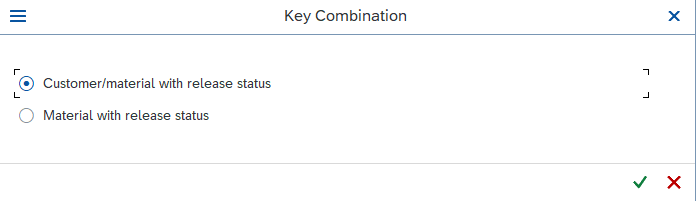
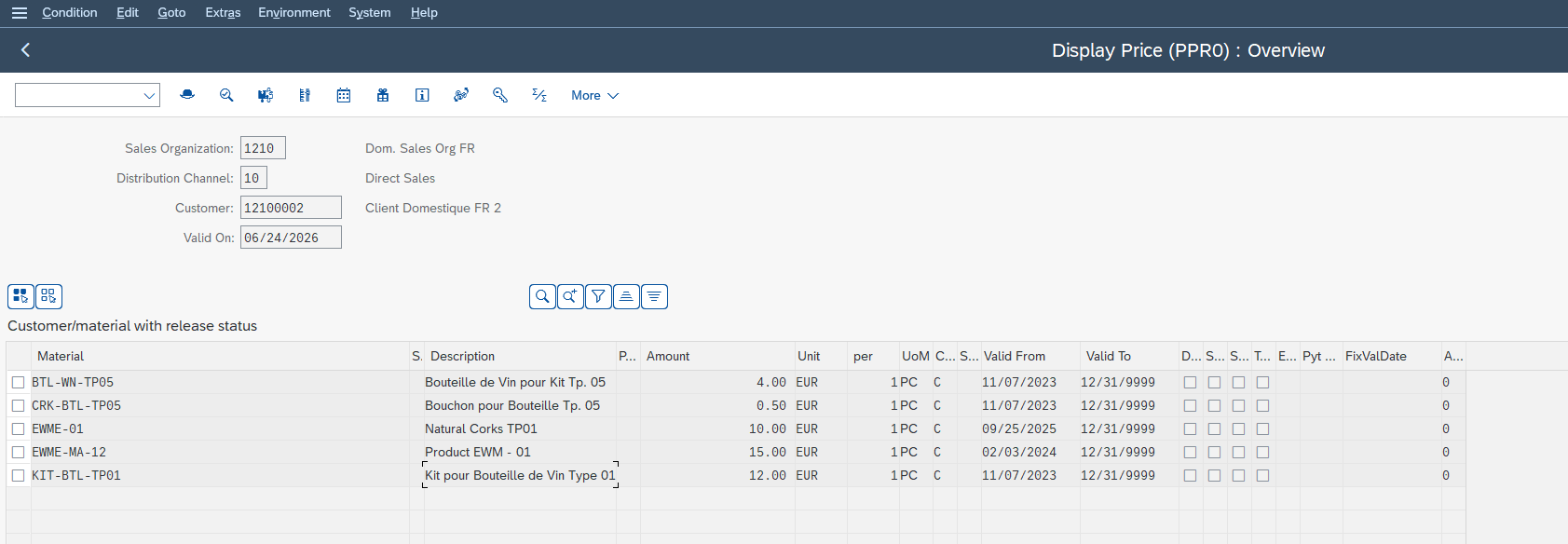
The reflex to keep: a price only exists if there is a condition record behind it, set at the right level and valid on the document date. No valid record, no value.
Analyzing the pricing of an order line
This is the tool every junior consultant should know first. From an order line, SAP offers a pricing analysis function: it walks through, condition type by condition type, what the system did. For each one, it indicates which access was attempted, which one succeeded, and which condition record supplied the value (or why none was found). Instead of guessing, you read the system’s decision.
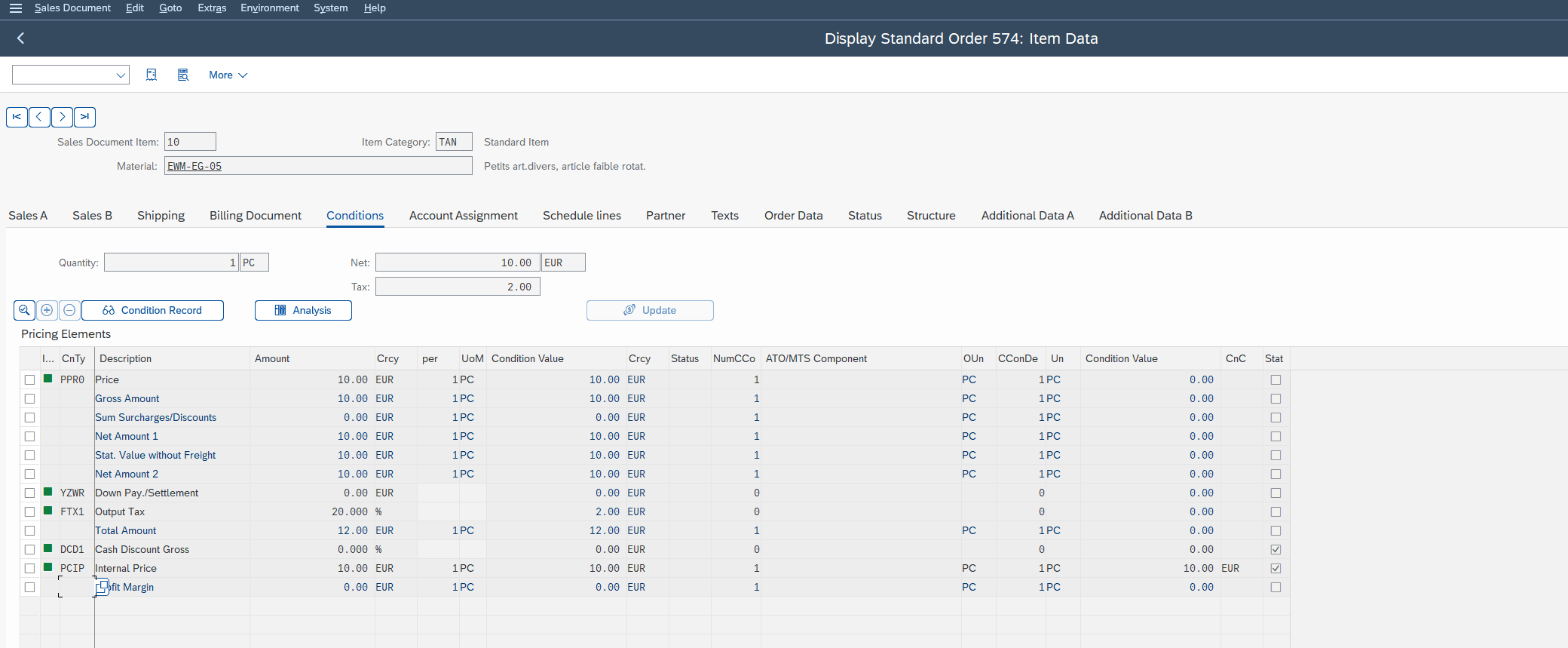
When a price surprises you, open the pricing analysis before anything else. In the vast majority of cases, it tells you plainly that a given access found nothing, or that a given record was selected instead of the one you expected. Diagnosis starts from there, not from a random change.
Real cases a junior consultant runs into
Theory makes full sense on real situations. Here are three you will meet quickly.
Discounts and surcharges
Discounts and surcharges are condition types like any others: they have their access sequence, their tables and their records. A percentage customer discount, a surcharge for a small quantity, a scale-based discount: all of this is configured and maintained via condition records. When an expected discount does not apply, the reasoning is identical to the base price: is the condition type in the pricing procedure, and does a valid record exist at the targeted level?
Tax determination
Tax is also a condition type, but it depends on specific criteria: departure country, destination country, tax classification of the customer and of the material. Tax determination combines these criteria to find the right rate. This is often where discrepancies hide in international contexts: a tax classification wrongly filled on the customer or material master, and the rate that comes up is not the right one. The mechanism, however, remains that of the condition technique.
When the expected price does not appear: where to start the diagnosis
The method comes in three steps, always in the same order. Follow it before touching any configuration: nine pricing incidents out of ten are solved within this sequence.
-
1Open the pricing analysis on the line
Run the pricing analysis on the line in question and read what SAP actually did, condition type by condition type. This is the system’s decision, not a guess.
-
2Check the condition type involved
Is the condition type actually present in the pricing procedure applied to this document? If it is not there, no record can come up, whatever its content.
-
3Check the condition record
Does it exist? Is it valid on the document date? Is it set at the right level (the right customer, the right material)? Most incidents are solved here, without touching the configuration.
This discipline, taking the checks in the right order rather than at random, saves a considerable amount of time in the field.
In summary
Pricing determination in SAP SD is not a black box: it is a chain of five building blocks (pricing procedure, condition types, access sequence, condition tables and condition records) that the system always runs the same way. Mastering this flow, and knowing how to read the pricing analysis, makes you immediately more useful on a sales order. Concrete next step: in your test environment, open an order, run the pricing analysis on a line, and follow the path of one condition type down to its record. It is by reading the system’s decision for the first time that the whole mechanism falls into place in your head.
Frequently asked questions
What is pricing determination in SAP SD?
It is the mechanism by which SAP automatically calculates each price element of a sales document. It applies a pricing procedure that lists the condition types to use, then fetches the actual values from condition records. The net line price is the result of this ordered accumulation.
What is the difference between a condition type and a condition record?
The condition type defines the nature of a price element (base price, discount, surcharge, tax) and its behavior. The condition record, in turn, carries the actual value for a specific case (for example 100 EUR for this customer and this material). The condition type is the structure; the record is the figure.
What is the access sequence used for in SAP pricing?
The access sequence defines the order in which SAP searches for a valid condition record, from the most specific criterion to the most general. SAP stops as soon as it finds a value. This is what lets a price negotiated for a given customer win over a general rate.
What is the pricing procedure in SAP SD?
It is the ordered list of condition types applied to a sales document. It determines which price elements come into play, in which order, and how they combine (subtotals, calculation bases for discounts). It is the recipe SAP runs to produce the price.
How can I find out why a given price applies to an order line?
Use the pricing analysis function available on the order line. It walks through, condition type by condition type, which access was attempted, which one succeeded, and which condition record supplied the value. It is the first diagnostic reflex, before making any change.
How do I create a sales price in SAP SD?
You create a condition record for the desired condition type, at the right level (customer, material) and with a validity period. In SAP S/4HANA, the Fiori app “Manage Prices – Sales” centralizes this maintenance; in classic transaction, the standard transaction to create a condition record is VK11. Without a valid record on the document date, no price comes up.
Keep reading
SAP ECC vs S/4HANA: the key differences for your SAP career
If you look into SAP for your career, two acronyms keep coming up: ECC and S/4HANA. One is the older generation of SAP's ERP, the other is the current version....
 Michael A.
SAP Consultant Salary: How Much Do You Earn (Junior to Senior)?
Before moving into SAP, almost everyone asks the same question, rarely out loud: does it really pay? The short answer is yes, and rather well. In the United States, an...
Michael A.
SAP Key User: Role, Responsibilities and Career Path
SAP Key User: The Pivotal Role That Makes a Project Run (and Opens a Career) On an SAP project, there is always one person everyone turns to. When a colleague...
Michael A.
SAP EWM Master Data Integration: ERP Sync with CIF, ALE, DRF
Since the move to S/4HANA, the question "how do you synchronize data between SAP ERP and EWM" no longer has the same answer, and many projects still get it wrong...
Michael A.