SAP Credit Block: Release a Blocked Sales Order (VKM1, VKM3) and Understand OVA8
You create a sales order the way you do a hundred times a week, and instead of going through, a message stops you: the order is blocked because it exceeds the credit limit. The customer is waiting, the sales rep is getting impatient, and you are hunting for where to click to release it. That is the scenario behind most SAP credit block cases in the SD module (Sales & Distribution). The short answer comes down to two moves: you list the blocked documents with transaction VKM1, and you release a specific order with VKM3. The block itself comes from the automatic credit check, configured on the project side in transaction OVA8.
Before we get into the “where do I click,” a word about the “why.” The credit check is not there to annoy you: it is a safeguard that prevents shipping to a customer who already owes too much money. Once you understand this mechanism, releasing an order becomes a reflex, not a riddle. This article follows the order of your daily work: first release, then understand.
- See what is blocked:
VKM1(list of documents held for credit). - Release an order whose number you know:
VKM3. - Understand why it blocks: the automatic credit check configured in
OVA8. - Find the limit:
FD33on ECC,UKM_BPon S/4HANA.
Why is a SAP sales order blocked for credit?
A SAP sales order is blocked for credit when the automatic credit check in the SD module detects that the order would push the customer past their authorized credit limit. SAP does not cancel the order: it sets it aside, with a “credit blocked” status, until an authorized person decides whether or not to release it. The order does exist in the system; it is simply frozen at the delivery stage.
This check relies on the concept of the credit control area: it is the scope within which SAP sums up what a customer already owes you. Each customer is assigned a credit limit within that area. When a new order, added to the existing exposure, exceeds this limit, the check is triggered.
The automatic credit check, without the jargon
Picture a gauge per customer: on one side what they already owe you (open invoices, deliveries not yet billed, orders in progress), on the other the ceiling your company grants them. The automatic credit check constantly compares the gauge to the ceiling. As long as you stay under the ceiling, the order goes through without a word. The moment you cross it, SAP raises the flag and blocks.
Exactly what enters the gauge (orders alone, deliveries, open invoices) depends on the configuration. This is precisely what the consultant sets in OVA8, and we will come back to it further down. For now, hold on to the idea: the block is not a bug, it is an automatic decision based on a ceiling.
Where the order gets stuck in the flow
The important point for a key user is knowing when the block hits. The check usually happens when the sales order is saved, but the visible effect shows up later: an order blocked for credit cannot be delivered. It is the delivery stage that stays locked until the release has taken place.
In other words, the credit block does not necessarily stop you from creating the order, but it stops you from moving it forward. You can end up with an order that is saved, visible, and yet impossible to deliver. That is often where the confusion starts: “the order is right there, so why is nothing shipping?” Because it is waiting for a credit release.
Careful: a credit block is not an invoice block or an authorization block
The word “blocked” covers several very different realities in SAP, and mixing them up wastes a huge amount of time. To sort them out at a glance:
- Credit block (the one this article is about): the order exceeds the customer credit limit. You handle it with
VKM1/VKM3in the SD module. - Vendor invoice block: an incoming invoice with a variance against the purchase order, on the MM side. You handle it with transaction
MRBR. Nothing to do with customer credit. - Authorization block: you are not allowed to run a transaction or access an object. That is a user profile matter, managed by your SAP administrator, not credit.
If your error message talks about the credit limit being exceeded, you are on the right article. Otherwise, change track before looking toward VKM3.
Release the order: VKM1, VKM3, VKM4, VKM5 (the decoder)
To release an order, you use the VKM family of transactions. The most direct one for a key user day to day: VKM1 to see the list of blocked documents, VKM3 to release an order whose number you know. SAP reloads the order, you confirm the release, and delivery becomes possible again.
The VKM family groups several closely related transactions, and it is that closeness that breeds confusion. Here is what settles it.
Which VKM transaction for which need
| Transaction | What it does | When to use it |
|---|---|---|
| VKM1 | List of SD documents blocked for credit | You want to see everything blocked and release in batch |
| VKM2 | List of released documents | You want to review what has already been released |
| VKM3 | Processing of a specific sales order | You have the number of the order to release |
| VKM4 | Broad list (orders and deliveries) | You are working on a scope mixing orders and deliveries |
| VKM5 | Processing of a blocked delivery | The block is on a delivery, not on the order |
In practice, most key-user situations are handled with VKM1 (to see) and VKM3 (to release a known order). Keep the others in mind for special cases, without drowning in them.
VKM1: list and release blocked documents
VKM1 displays the list of SD documents held for credit overrun, according to the criteria you enter on the selection screen (credit control area, customer, dates). You get a list of blocked orders, and you can select a line to release it directly from the list.
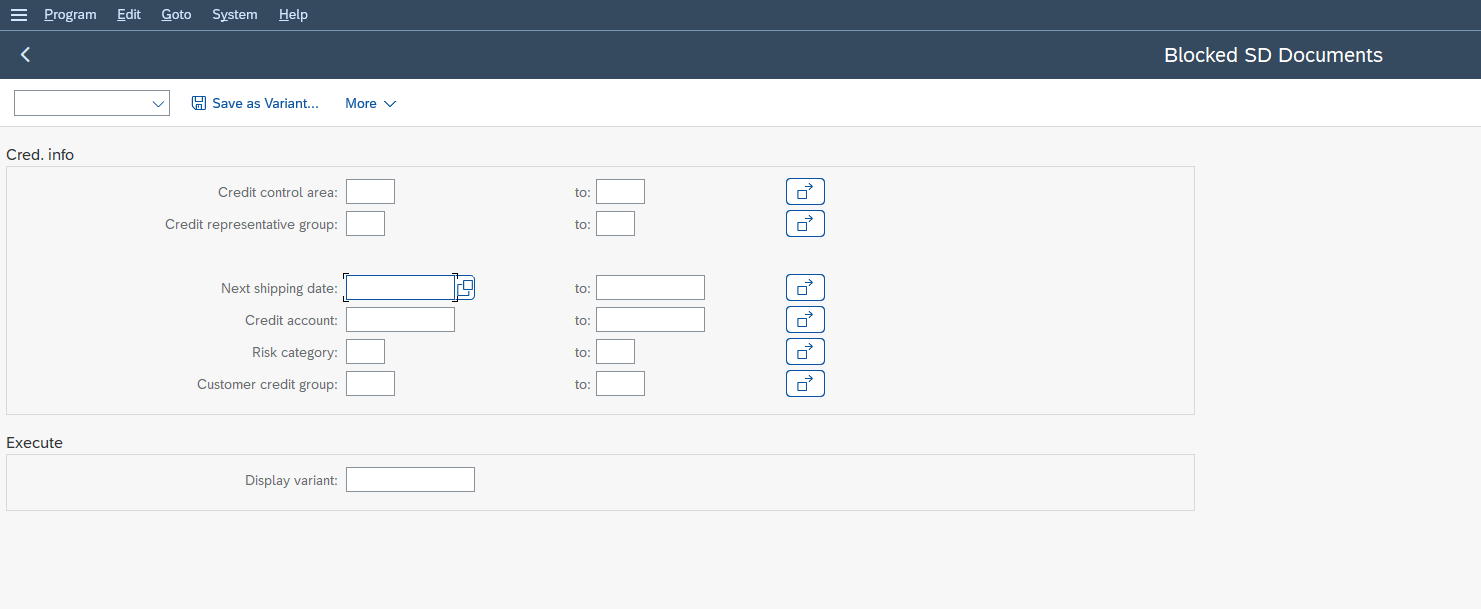
This is the “overview” transaction: before releasing anything, VKM1 shows you the scale of the issue. How many orders are held, for which customers, and since when. For a controller or a credit analyst, this is the natural working screen at the start of the day.
VKM3: release a specific order, step by step
When you already know the number of the order to release, VKM3 gets straight to the point. The procedure is short:
-
1Launch transaction VKM3
Open transaction
VKM3from the SAP command field. It is the dedicated entry point for processing a specific sales order. -
2Enter the order number
Fill in the number of the blocked sales order on the selection screen, then confirm. You do not need to know the credit control area: the order number is enough.
-
3Display the order and its credit status
SAP displays the held order with its credit status. You see what triggered the block (limit overrun) before deciding to release.
-
4Select the order in the list
Tick the line of the order concerned. That is the one the release will target.
-
5Release the order
Use the release function: the credit status changes to “released.” The order is no longer held by the credit check.
-
6Save
Save to make the release effective. The delivery for the order can now be created normally.
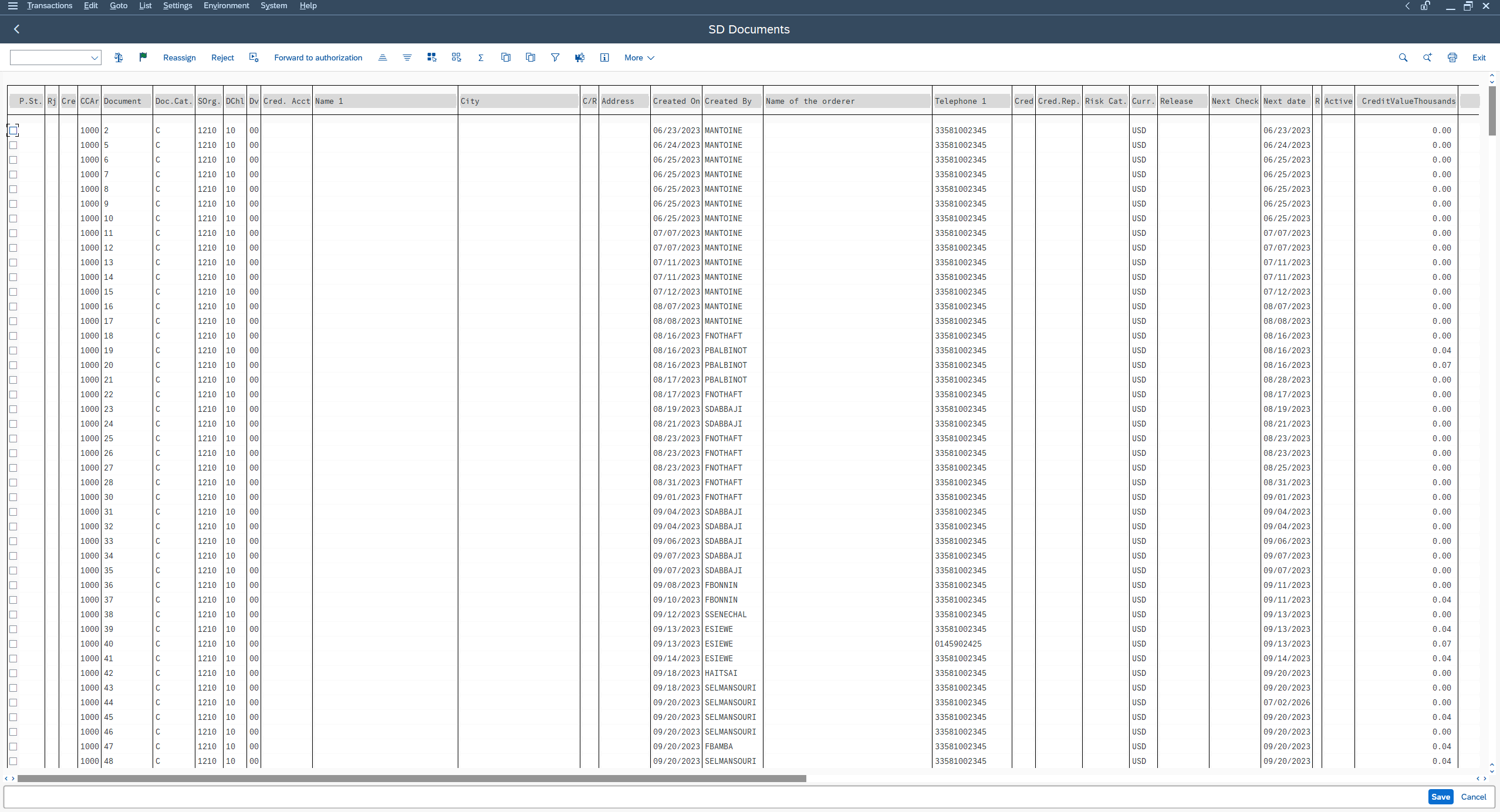
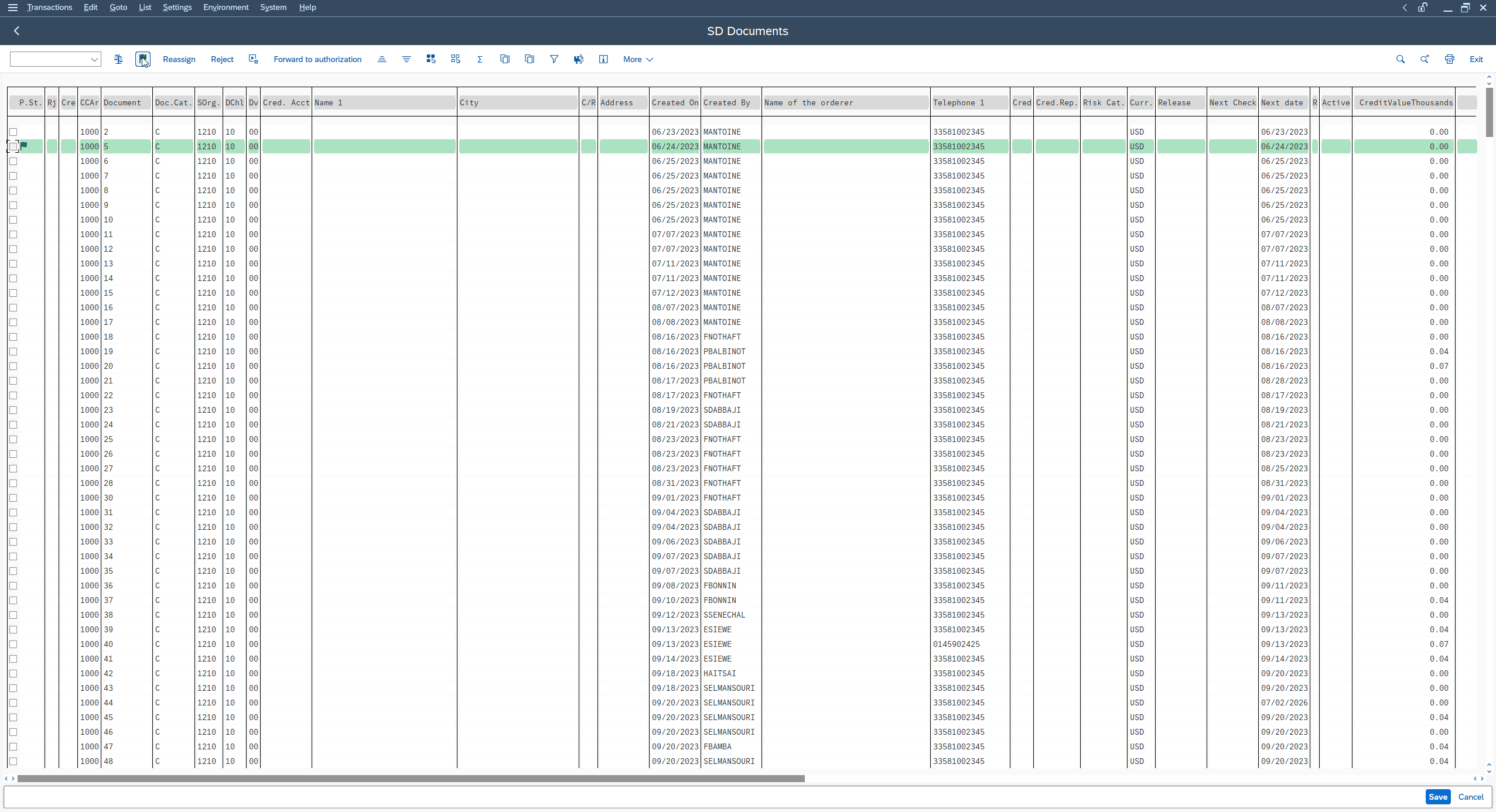
Once saved, the order is no longer held: its delivery can be created normally. If the order does not release as expected, it is generally not the transaction that is at fault: it is often a credit recheck being re-triggered, a case we detail below.
Who is allowed to release?
Not everyone can release an order blocked for credit, and that is by design. Releasing is a financial decision: you agree to expose the company beyond the set ceiling. This right is generally reserved for a dedicated profile, often a credit analyst or a member of the controlling team, through the authorizations attached to the credit group concerned.
If SAP refuses the release even though you can clearly see the order, it is not a transaction problem: it is that your authorization profile does not cover credit release. The right move is to reach out to the authorized person rather than to look for a technical workaround.
The block spreads: order, delivery, invoice
The credit block does not stay confined to the order: it spreads along the order, delivery, invoice chain (the Order-to-Cash flow). Understanding where it hits saves you from looking for the problem in the wrong place, for example on the delivery side when the cause is upstream.
Where the block hits in the O2C chain
The standard sales flow runs through three main stages: the sales order, the delivery, then the invoice. The credit check most often slots in at the order level, sometimes also at the delivery level, depending on the configuration. The consequence reads as a cascade: no credit release, no delivery; no delivery, no invoice. A block upstream freezes everything downstream.
This is exactly what makes the topic confusing when you do not know the mechanism. The user sees “nothing is shipping” and looks toward logistics, when the real cause is an order held for credit two stages earlier. The reflex to build: facing an order that will not move forward, check its credit status first.
Can a blocked order be delivered or invoiced?
No, not as long as it is held. An order blocked for credit cannot be delivered: creating the delivery is prevented until the credit status is released. And with no delivery, there is logically no invoice to issue. The block acts like a circuit breaker: it interrupts the chain at the point of the check.
That is precisely the point of the mechanism. The goal is not to hinder data entry, but to prevent goods from shipping to a customer who is already too deep in debt. Releasing, via VKM1 or VKM3, reopens the downstream circuit. In fact, an order can easily clear the pricing determination step in an SD order without a hitch, and get stopped right after by the credit check: correct pricing does not mean a deliverable order.
The re-block trap after a change
Here is a case that often surprises people. You release an order, all is well, then someone changes its quantity or amount. Result: the order can re-block for credit. That is normal. A change that alters the exposed value re-runs the check, and the previous release no longer holds for the new amount.
After any value change on an already released order (quantity, amount), check its credit status again. The release holds for the state of the order at the moment you granted it, not for a new amount.
Understanding OVA8: the engine of the automatic credit check
OVA8 is the configuration transaction for the automatic credit check in SAP SD. It is the one that defines, for a given combination, how SAP reacts to an overrun: which type of check to apply, and which behavior to trigger (warn, block, or both). This is a consultant matter; a key user does not touch it day to day, but understanding what OVA8 decides helps you interpret why an order got blocked.
What OVA8 configures
The automatic credit check is set for a combination of three elements: the credit control area, the credit group (which groups the document types subject to the check, for example orders) and the customer risk category (the risk level assigned to them). For each of these combinations, OVA8 defines the system reaction.
Concretely, this is what explains why the same overrun can block for a customer classified “high risk” and only warn for another. The behavior depends on the risk category attached to the customer. It is also why two seemingly similar customers can behave differently toward credit: their risk category differs.
Static or dynamic check
OVA8 distinguishes several types of check. Without going into the configuration, two families are enough for a key user:
- The static check compares the customer overall exposure (orders, deliveries, open invoices) to their limit, without factoring in time.
- The dynamic check adds a horizon notion: values beyond a certain due date are not taken into account in the overrun calculation.
What you should take away: depending on the type of check configured, what “counts” in the gauge is not quite the same. This can explain a block that seems unjustified at first glance, when it is actually consistent with the rule in force.
Why OVA8 concerns the consultant, not the key user day to day
OVA8 is a customizing screen: you set behaviors there that will apply to everyone, and a poorly thought-out change can block (or let through) thousands of orders. It is consultant territory, to be handled in a configuration environment, not in production on a whim.
For the key user, the value of OVA8 is purely explanatory: knowing it exists, and that it is the one that “decides” the block, lets you ask the consultant the right questions. “My order is blocking even though the limit is not exceeded” becomes a precise question about the risk category or the type of check, not a vague complaint.
Where is the credit limit? FD32 (ECC) versus UKM_BP (S/4HANA)
The credit limit of a customer is not viewed in the same place depending on your SAP version. On the old Credit Management (ECC), you go through FD32. On S/4HANA with SAP Credit Management (FSCM), credit management has migrated to the business partner, and you go through UKM_BP. This is one of the most disorienting switches on the topic, because yesterday’s go-to transaction no longer exists the same way.
On ECC: FD32 and FD33
In the historical Credit Management (attached to FI-AR), the credit limit of a customer is managed by customer account and by credit control area:
FD32is used to create and change the credit data of a customer: limit, risk category, any blocks.FD33is the display version: you view without any risk of changing.
This is where you read the ceiling granted to the customer and the risk category assigned to them. If you are still on an ECC system, FD33 is your reference display transaction when an order blocks.
On S/4HANA FSCM: UKM_BP and the BP role UKM000
With S/4HANA, SAP switched to SAP Credit Management (derived from FSCM), and the logic changes. Credit data is no longer attached to an isolated customer account but to the business partner. You access it through transaction UKM_BP, working the partner role UKM000 (the role that carries the credit management data).
On S/4HANA, the FD32 reflex no longer works as before: the risk category, the limit and the credit segments are now carried on the business partner side, via UKM_BP and the BP role UKM000. Change transaction, not system.
Practical consequence: if you look for FD32 on an S/4HANA system, you may no longer find it the way you used to. The right reflex becomes UKM_BP. The risk category, the limit, the credit segments: everything is now carried on the business partner side. The official SAP Learning course Working with SAP Credit Management details this organization for anyone who wants to dig into the configuration.
ECC or S/4HANA? Here is your transaction
| You want to… | On ECC (classic Credit Management) | On S/4HANA (SAP Credit Management / FSCM) |
|---|---|---|
| View / change the credit limit | FD32 (change) · FD33 (display) | UKM_BP, BP role UKM000 |
| See blocked orders | VKM1 | VKM1 |
| Release a specific order | VKM3 | VKM3 |
| Configure the automatic check | OVA8 | OVA8 |
Good news for releasing: the VKM transactions (VKM1, VKM3) remain your entry point in both worlds. It is mainly viewing the limit that changes address between ECC and S/4HANA.
Common mistakes and points of attention
A few situations come up often enough to deserve a list to keep on hand. None is complicated, but each one wastes time when you discover it in production.
- The order stays blocked after release. Often, it is because a change of quantity or amount re-ran the check, or the configuration triggers a new verification. Check the credit status after every value change.
- The limit is not exceeded, and yet it blocks. Look toward the customer risk category and the type of check configured in
OVA8: what enters the gauge is not always what you think. Also consider stale credit data (exposure that is not properly updated). - You cannot find FD32 on your system. You are probably on S/4HANA: credit management has moved under
UKM_BP(BP role UKM000). Change transaction, not system. - SAP refuses the release. It is not the transaction, it is your authorization profile. Credit release is reserved for authorized people: reach out to the credit analyst.
- “Nothing is shipping.” Before looking toward logistics, check the credit status of the order. A block upstream freezes the whole O2C chain.
FAQ
How do I release a credit-blocked sales order in SAP?
You use the VKM family of transactions. To see all blocked orders, run VKM1. To release an order whose number you know, run VKM3, enter the number, select the order and use the release function, then save. Delivery then becomes possible again. Releasing is reserved for authorized profiles (credit analyst, controlling).
What is the difference between VKM1 and VKM3?
VKM1 displays the list of all SD documents blocked for credit according to your selection criteria: it is the overview transaction, ideal for batch processing. VKM3 processes a specific sales order whose number you already know: it is the single-case transaction. In short, VKM1 to see and sort, VKM3 to release a known order.
What is transaction OVA8 for?
OVA8 configures the automatic credit check in SAP SD. It defines, for a combination of credit control area, credit group and risk category, how the system reacts to an overrun: warn, block, or both. It is a configuration screen handled by the consultant, not by the key user day to day.
Why is my SAP order blocked for credit overrun?
Because the order, added to the customer existing exposure (open invoices, deliveries, orders in progress), pushes past the credit limit granted in the credit control area. The automatic credit check detects this overrun and holds the order. The exact behavior depends on the customer risk category and the OVA8 configuration.
Can a credit-blocked order be delivered or invoiced?
No, not as long as it is held. The credit block prevents delivery creation, and with no delivery there is no invoice. The block acts like a circuit breaker on the order, delivery, invoice flow. You have to release the order first (VKM1 or VKM3) for the downstream to become possible again.
Which transaction replaces FD32 in S/4HANA?
On S/4HANA, credit management has migrated to SAP Credit Management (FSCM) and credit data is attached to the business partner. The reference transaction becomes UKM_BP, working the partner role BP UKM000. FD32 belongs to the classic ECC Credit Management.
Who can release a credit order in SAP?
Credit release is a financial decision, generally reserved for a dedicated profile: credit analyst or controlling, depending on the authorizations attached to the credit group. If SAP refuses the release even though you can see the order, it is a matter of authorization profile, not transaction.
How do I see the list of credit-blocked orders?
Run transaction VKM1, fill in your criteria (credit control area, customer, dates) on the selection screen, and SAP displays the list of SD documents held for credit overrun. VKM4 offers a broader list mixing orders and deliveries.
In summary
Facing a SAP order blocked for credit, the reflex comes down to two transactions: VKM1 to see what is held, VKM3 to release a specific order. The block itself comes from the automatic credit check configured in OVA8, which compares the customer exposure to their limit, and it spreads to the whole order, delivery, invoice chain. Before hunting for a customer limit, ask yourself a simple question: ECC or S/4HANA? On ECC you go through FD33, on S/4HANA through UKM_BP. Next time an order refuses to move forward, open its credit status before anything else, then reach out to the credit analyst if the release is beyond your rights. To place this check within the whole module, the overview of the SAP SD module (Sales & Distribution) shows how credit ties in with the other stages of the sale.
Keep reading
SAP Movement Types: 101, 261, 311 and 551 Explained
SAP Movement Types: 101, 261, 311, 551 and What Each One Triggers Marta Vidal, a purchasing key user at Glass+ in Valencia, receives twenty tonnes of silica and opens MIGO....
 Michael A.
Storage Type Search Sequence in SAP EWM Explained
Storage Type Search Sequence in SAP EWM: How Putaway Chooses Where Stock Goes Nuria Sanz runs operations at the Glass+ central warehouse in Valencia. One morning, a putaway warehouse task...
Michael A.
How to Read MD04 in SAP: Stock/Requirements List Explained
How to Read MD04 in SAP: The Stock/Requirements List Explained Available quantity goes negative on October 19. The planner calls the supplier in a hurry, and the order she pulls...
Michael A.
SAP Account Determination: How OBYC Picks the G/L Account
SAP Account Determination (OBYC): From Goods Movement to G/L Posting You post a goods receipt in MIGO. You enter a material, a quantity, a purchase order. At no point does...
Michael A.