SAP EWM Wave Management: Mastering Picking Waves
A misconception runs through almost every team I meet: “my wave creates my picking tasks.” It does not. SAP EWM wave management builds nothing on its own: a wave is a grouping of existing picking tasks that you release together to pace the picking. The nuance sounds slim. Yet it explains half the calls a key user gets in the morning: “I released my wave, and no warehouse task comes out, why?” As long as you confuse the container (the wave) and the content (the tasks), you look for the problem in the wrong place.
Let us set the vocabulary straight up front, because that is what unlocks everything. The “picking wave” and “wave management” (the official system label) point to the same thing. This article places the wave inside the outbound process of the SAP EWM (Extended Warehouse Management) module, explains the bridge between wave, warehouse task and warehouse order, and dismantles the cases where “nothing gets created.” If you want to first put the wave back in its wider context, start with the SAP EWM (Extended Warehouse Management) module, of which this article is the picking building block.
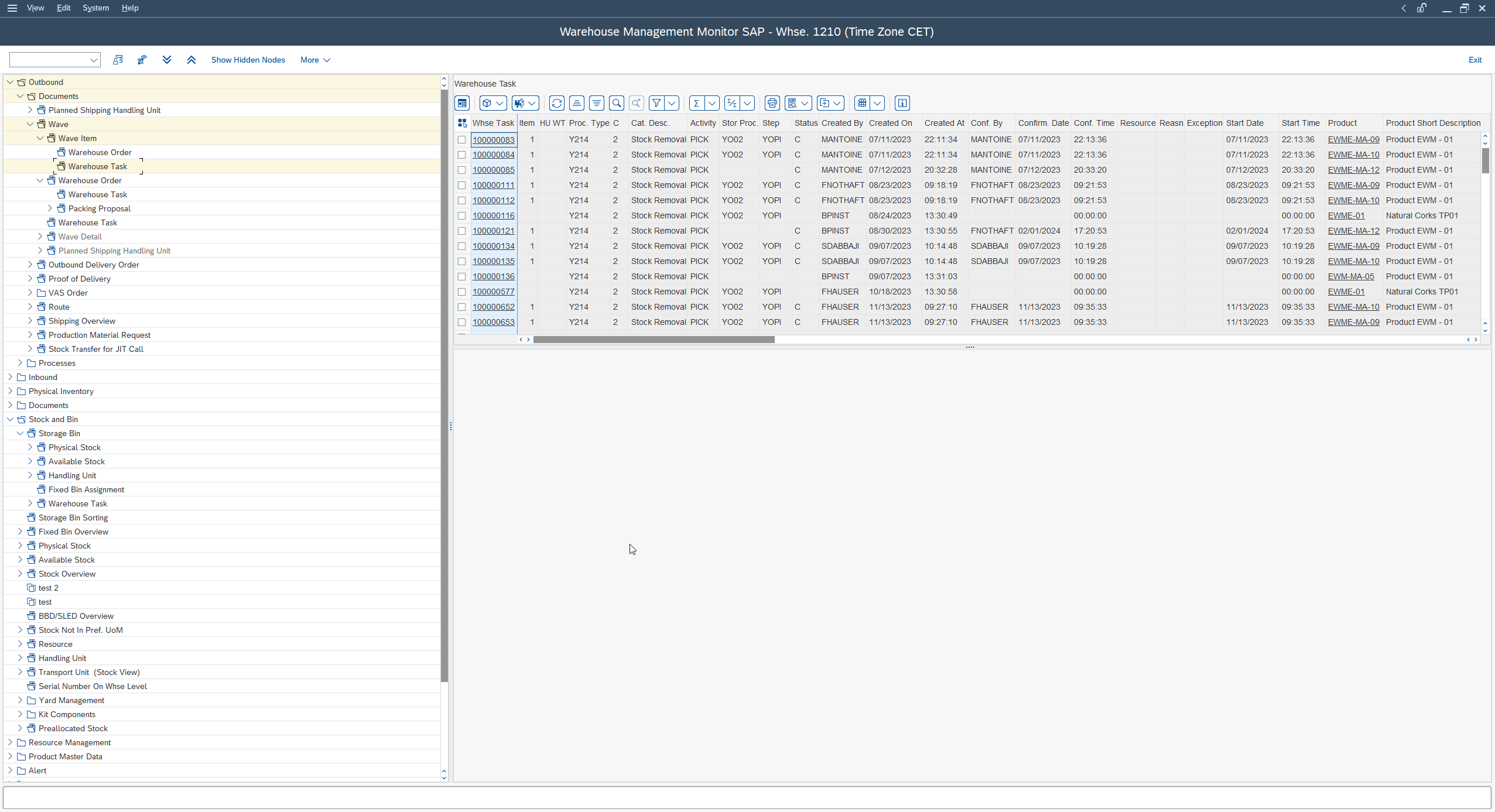
- A wave groups picking items and releases them together: it organizes the picking, it creates nothing by itself.
- It is the release of the wave that generates the warehouse tasks (WT), the single unit of movement instruction.
- The warehouse order creation rules (WOCR) assemble the WTs into warehouse orders (WO), the work packages handed to the picker.
- You feed a wave by automatic condition (through a wave template) or by manual assignment, then you release it in immediate, scheduled or manual mode.
- “I released my wave but no WT comes out”: nine times out of ten it is unavailable stock or an unassigned item, never the wave itself.
What is a wave in SAP EWM?
A wave in SAP EWM is a grouping of picking items that you process and release together, to optimize and pace the picking in the warehouse. It replaces no document: it organizes the work already requested by the outbound deliveries. You can see it as a work window: “these orders, we prepare them now, in one block.”
A wave groups, it does not create
This is the point I hammer in training. A wave gathers items waiting to be picked, then you release it. It is that release which triggers what follows. The wave itself is only an organizing basket: until it is released, nothing goes into execution. Keep this sentence in mind, it will serve you in the troubleshooting below: the wave groups and releases, it does not build the task directly.
The wave groups and releases, it does not build the task directly.
What it does for a key user
The benefit is very concrete for whoever runs picking day to day. Grouping by waves lets you smooth the pickers’ workload and align with carrier departures: you prepare together what ships together. Rather than releasing each order as it comes, you handle coherent packages: same route, same zone, same departure time. This is picking scheduling, not a configuration gadget.
Where the wave fits in the outbound process
In the outbound flow, the wave sits upstream of physical execution. The system receives the picking demand issued from the outbound deliveries, these items are assigned to a wave, then the release of the wave kicks off the creation of the picking tasks. In other words: the wave is the paced trigger of the picking, not its documentary starting point.
Wave, warehouse task and warehouse order: the bridge to grasp
The central confusion in EWM comes down to three objects that get mixed up: the wave, the warehouse task (WT) and the warehouse order (WO). Untangling them means understanding why “releasing a wave” and “seeing a task on the terminal” are two distinct steps.
The wave releases warehouse tasks (WT)
When you release a wave, the system generates the warehouse tasks (WT) corresponding to the items it contains. The warehouse task is the elementary movement instruction: take this quantity of that product, from that source bin, to drop it at that destination. It is the single work order the picker executes. The wave decides when these WTs are born; the WT describes what to move.
Warehouse orders (WO) group WTs for the floor
Warehouse tasks are not executed one by one in a vacuum: they are gathered into warehouse orders (WO), which are the work packages actually handed to a picker. The warehouse order is what your operator takes on their terminal. Splitting WTs into WOs follows warehouse order creation rules (commonly called WOCR, warehouse order creation rules) that decide how many tasks to group, on which criteria, within the same work package.
The model to remember
The right mental model fits in one line: the wave groups the items, its release generates the warehouse tasks, and the warehouse order creation rules assemble those tasks into executable warehouse orders. Three levels, three roles. When something “does not come out,” it is almost always that you are looking at the wrong level.
Creating a wave: template, automatic condition or manual
There are three ways to feed a wave in EWM: let it build automatically from a template, assign it by hand, or lean on a template that carries the wave options. Wave management sits, from the EWM index screen, under Extended Warehouse Management, Work Scheduling menu, Wave Management section.
Menu path:
Extended Warehouse Management → Work Scheduling → Wave Management
The wave template and its options
The wave template is the object that carries the characteristics of a typical wave: its window, its processing options, and the targeted picking completion date. Rather than redefining each wave, you configure a reusable template, which you maintain from the “Maintain Wave Templates” entry of the same Wave Management section. A template can carry several wave template options (time slots: cutoff, release time, start and end of picking), which lets a single template cover several waves within the day.
Automatic determination by condition, or manual assignment
Two modes coexist. In automatic determination, the system assigns the items to a wave using the condition technique: based on the picking demand data, it chooses the wave template that matches. This is the “industrial” mode, the one that runs without intervention. In manual assignment, you attach items to a wave yourself from the wave management transaction, which stays useful for one-off cases or catch-ups. Most warehouses combine the two: automatic for the normal flow, manual for the exception.
On which criteria to group
Grouping only makes sense if it fits your logistics. In practice, you combine waves on criteria such as the warehouse, the product, the route or the run, the activity area (the warehouse activity zone), the delivery date, the ship-to party or the carrier. The guiding idea is simple: what has to ship together, or be picked in the same zone, gains from being in the same wave. A bad grouping criterion, and you get waves that mix unrelated departures, so pickers who make pointless round trips.
Concretely, creating then releasing a wave comes down to a few steps, laid out here:
-
1Define a wave template (optional but recommended)
Create a wave template that carries the window, the processing options and the targeted picking completion date. The template avoids redefining each wave and serves as the basis for automatic determination.
-
2Feed the wave
Let automatic determination assign the items through the condition technique, or attach them by hand from the wave management transaction. Most warehouses use automatic for the routine flow and manual for the exception.
-
3Check the wave content
Verify that the expected items are indeed in the wave before releasing it. An item missing here signals an assignment problem (criterion or condition), not a release one.
-
4Release the wave
Trigger the release (immediate, scheduled or manual depending on the template). It is this release that generates the warehouse tasks, then the warehouse orders through the WOCR rules.
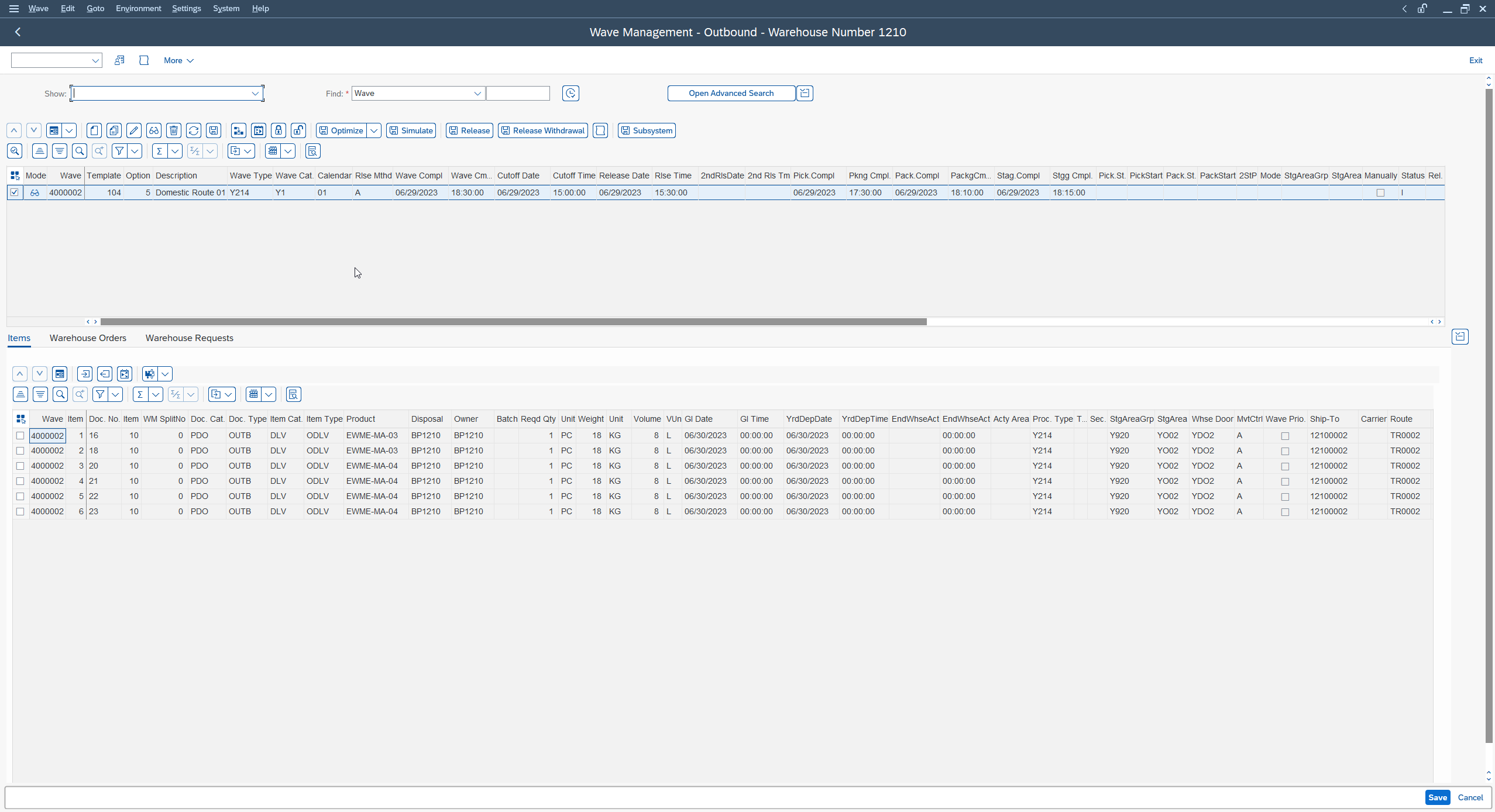
Releasing a wave: modes and picking completion date
Releasing a wave is the act that turns a grouping into real work: it is the release that generates the warehouse tasks. Three release modes exist, and the right one depends on your organization.
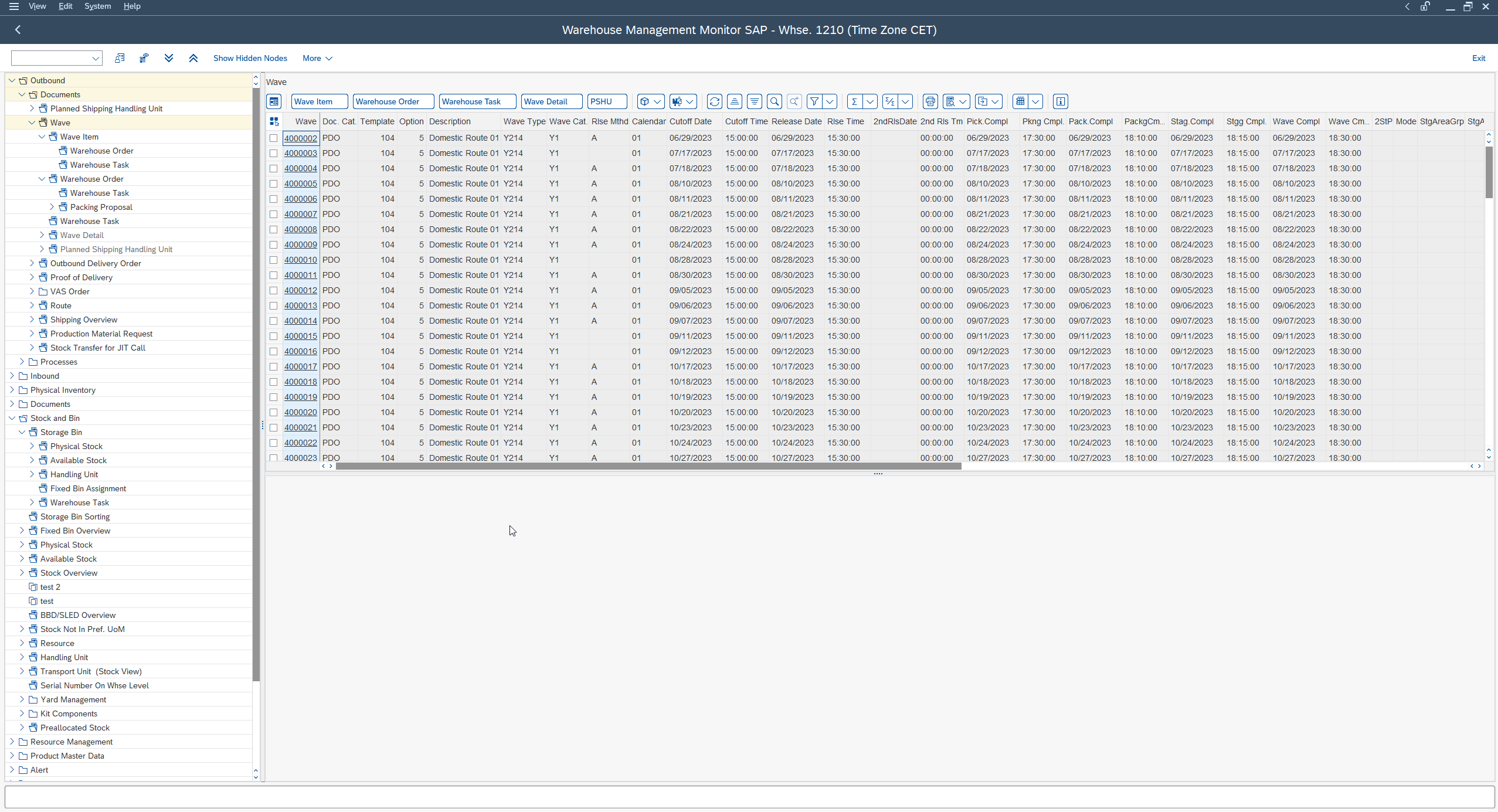
Immediate, automatic or manual release
The wave template offers three release methods: manual (a manager releases the wave when they decide to launch the picking), automatic (the wave releases at the release time defined on the template, through a job, without intervention), or immediate (the wave is released as soon as it is built). The choice is set on the template: you decide once and for all how a wave type should trigger. A warehouse that picks by fixed slots will lean on scheduled automatic release; a just-in-time flow will prefer the immediate one.
The picking completion date
The wave template carries a picking completion date (the targeted date by which picking must be done): the horizon at which the picking of the wave items must be finished. This is what lets you pace against departures and prioritize the most urgent waves.
A badly set picking completion date, and you release too late to make the truck, or too early and you clog the picking zones. The picking completion date drives the wave priority: never leave it at default on a flow constrained by carrier departures.
And after the release: execution
Once the wave is released and the warehouse orders are built, the work goes down to physical execution. The WOs are then handled on the floor, most often on the radio terminal: this is where the picker takes their tasks one by one. If you want the logical next step of the process, we detailed it on the picking execution on the RF terminal side: the warehouse orders an operator handles on the RF very often come from a wave that was released just before.
Wave management in EWM embedded or decentralized
One question comes back in every S/4HANA project: does the wave behave the same whether EWM is embedded (integrated in the S/4HANA core) or decentralized (deployed on a separate system)? On the functional principle, wave management stays the same building block: you group, you release, you generate warehouse tasks. What changes has mostly to do with deployment and data integration, not with the wave logic.
EWM embedded (S/4HANA)
- EWM integrated in the S/4HANA core, on the same system.
- The wave logic is identical: group, release, generate WTs.
- Less data synchronization to orchestrate between systems.
EWM decentralized
- EWM deployed on a system separate from the ERP core.
- The wave works the same way on the warehouse side.
- The stake shifts to data synchronization between the central system and EWM.
For the consultant, the stake sits upstream: depending on the deployment mode, it is the data synchronization between the central system and EWM that differs. The subject deserves its own treatment, which we covered on the EWM embedded vs decentralized side. Keep for today that the wave itself does not change nature: your wave to WT to WO mental model holds in both cases.
“I released my wave but no warehouse task is created”
This is the classic call, and nine times out of ten the wave has nothing to do with it. The release did its job; it is downstream that things jam. Here are the leads I check, in order.
Stock is not available
The number one cause: no source stock available to serve the item. Without an available quant in a zone the picking strategy can address, the system cannot create the picking warehouse task. The wave is indeed released, but it has nothing to pick. Good news: a wave can be released again. If the system could only generate part of the tasks for lack of stock, you replenish, then you re-release the wave to produce the missing tasks.
The item is not taken into the wave
Another case: the item does not appear in the wave at all. Here, the problem is upstream of the release, in the assignment. If automatic determination found no wave template matching the item data (wrong criterion, condition that does not match), the item stays out of the wave. You then check the grouping criteria and the assignment condition: it is often a delivery data point that does not fit what the template expects.
Your check points before re-running
Before reopening a ticket or calling your consultant, run through these checks:
- is the wave actually released, and not merely built?
- is there source stock available for the items concerned?
- are the items really assigned to the wave (if not, it is assignment, not release)?
- is the picking completion date consistent with the moment you release?
- in case of partial generation, did you re-release the wave after replenishment?
In the vast majority of cases, one of these five points gives the answer, without touching the configuration.
FAQ
What is a wave in SAP EWM, concretely?
A wave in SAP EWM is a grouping of picking items that you release together to pace and optimize the picking. It organizes work already requested by the outbound deliveries: it does not create a task by itself, it is its release that triggers the generation of the warehouse tasks.
What is the difference between a wave, a warehouse task and a warehouse order?
The wave groups and releases items; the warehouse task (WT) is the elementary movement instruction generated at release (what to pick, where, to where); the warehouse order (WO) is the package of WTs actually handed to a picker on their terminal. The wave decides when, the WT describes what, the WO organizes the floor work.
How do I create a wave automatically with a wave template rather than by hand?
In automatic determination, the system assigns the items to a wave through the condition technique, choosing the wave template that matches the demand data. In manual mode, you attach items to a wave yourself from the wave management transaction. Most warehouses use automatic for the routine flow and manual for the exception.
What are the release modes of an EWM wave?
Three modes: manual (a manager releases when they decide), scheduled or automatic (release at a defined time), and immediate (as soon as the wave is built). The mode is generally set on the wave template.
I released my wave but no warehouse task is created, why?
Most often because there is no source stock available to serve the items: the wave is released but has nothing to pick. Replenish, then re-release the wave (a wave can be released several times) to generate the missing tasks. Another possible cause: the item was not assigned to the wave, which is a matter of assignment, not release.
On which criteria should I group waves in EWM?
You commonly combine on the warehouse, the product, the route or the run, the activity area, the delivery date, the ship-to party or the carrier. The principle: what ships together, or is picked in the same zone, gains from being in the same wave.
Does wave management change in EWM embedded or decentralized?
Functionally, the wave logic stays the same in both cases: you group, you release, you generate warehouse tasks. What changes has to do with deployment and data synchronization between the central system and EWM, not with the nature of the wave.
In summary
To carry the gesture through, open the wave management transaction in your sandbox, release a test wave, and watch the warehouse tasks that are born: this is the best way to anchor the bridge between the wave and the floor. The official SAP Extended Warehouse Management documentation rounds out these markers on the product reference side.
Keep reading
SAP Movement Types: 101, 261, 311 and 551 Explained
SAP Movement Types: 101, 261, 311, 551 and What Each One Triggers Marta Vidal, a purchasing key user at Glass+ in Valencia, receives twenty tonnes of silica and opens MIGO....
 Michael A.
Storage Type Search Sequence in SAP EWM Explained
Storage Type Search Sequence in SAP EWM: How Putaway Chooses Where Stock Goes Nuria Sanz runs operations at the Glass+ central warehouse in Valencia. One morning, a putaway warehouse task...
Michael A.
How to Read MD04 in SAP: Stock/Requirements List Explained
How to Read MD04 in SAP: The Stock/Requirements List Explained Available quantity goes negative on October 19. The planner calls the supplier in a hurry, and the order she pulls...
Michael A.
SAP Account Determination: How OBYC Picks the G/L Account
SAP Account Determination (OBYC): From Goods Movement to G/L Posting You post a goods receipt in MIGO. You enter a material, a quantity, a purchase order. At no point does...
Michael A.