SAP Movement Types: 101, 261, 311, 551 and What Each One Triggers
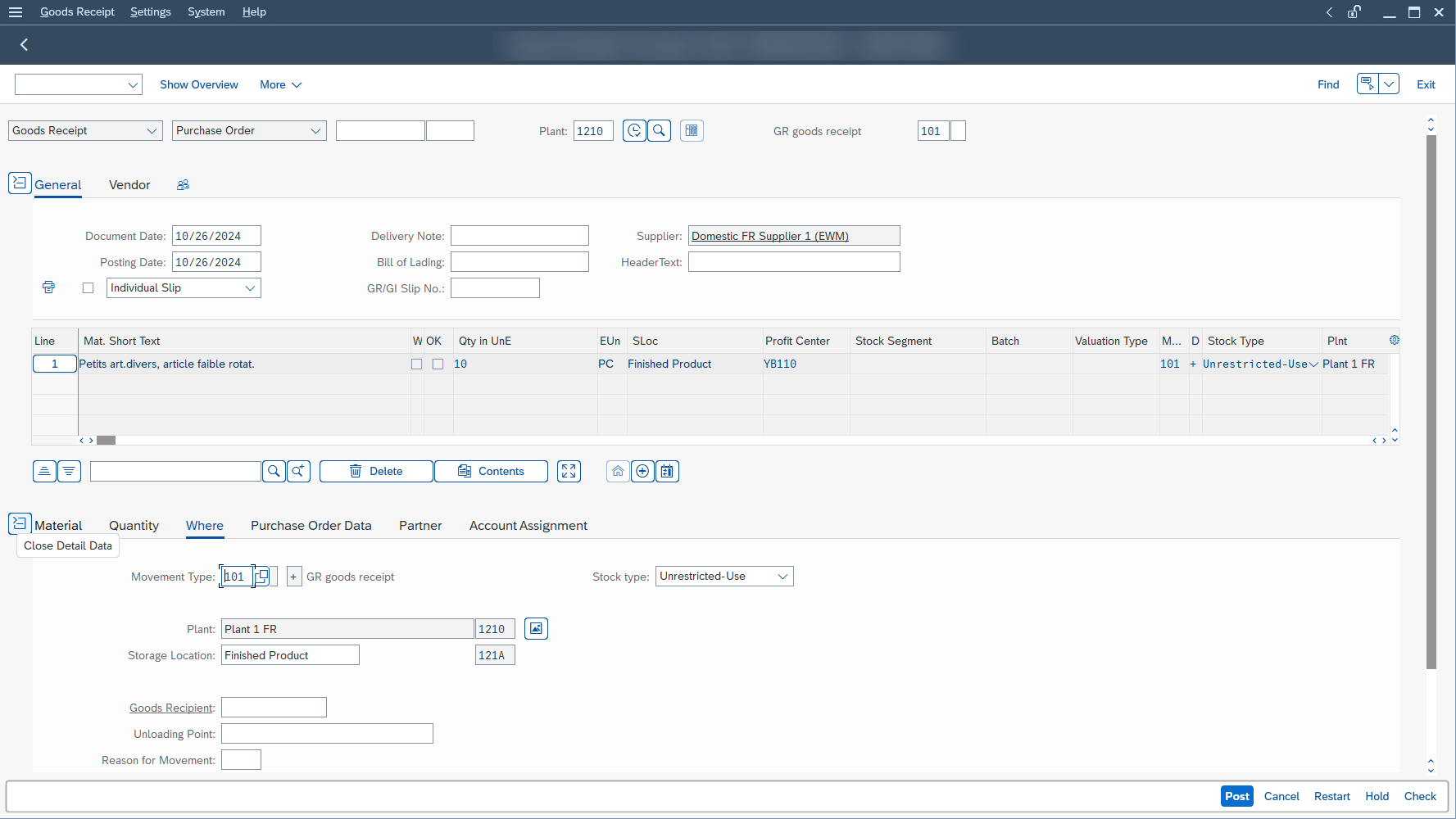
Marta Vidal, a purchasing key user at Glass+ in Valencia, receives twenty tonnes of silica and opens MIGO. Before the quantity, before the material, SAP asks her for a three-digit code: 101. If she enters a different one, the same truck produces a completely different result in stock and in the accounts. SAP movement types are those codes: each one tells the system what to do with the stock, its value and the accounting. Here are the four you will meet most often, how to reverse them, and why SAP sometimes rejects them.
- A movement type is a three-digit code carried by every item of a material document. It decides the direction of the movement, the update of stock and value, and the accounts hit.
- 101 receives against a purchase order, 261 consumes for a production order, 311 moves stock between two storage locations of the same plant, 551 scraps.
- To reverse, do not re-enter a code by hand: cancel with reference to the material document in
MIGO, and SAP determines the reversal code (102 for a 101). - When SAP rejects a movement, the cause is almost always a control rule (shelf life, stock in transfer, reservation) or a missing account, not the code itself.
What Is a Movement Type in SAP MM?
A three-digit code in the material document
Every posted goods movement creates a material document, and each item of that document carries a movement type. It is a three-character key that tells stock operations apart: receipt against a purchase order or a production order, issue to production or to a cost center, transfer from plant to plant. Without this code, SAP does not know which operation it is recording.
What it drives: stock, value, accounting
The code acts on three levels at once. First, the update of quantities: stock goes up, goes down or changes location. Second, the entry screens: depending on the code, MIGO asks you for a purchase order, a production order or a cost center. Third, accounting: the movement type is the entry point of account determination (OBYC), which finds the G/L accounts to post on its own. If the material is valuated, SAP creates an accounting document in addition to the material document, without you entering a single account.
Where to find it: MIGO, MB51, the material document
You enter the code in MIGO, the goods movement transaction, where SAP already proposes it based on the action you choose (goods receipt, goods issue, transfer posting). To review what happened, MB51 lists the material documents of one or more materials: you can filter it by plant, storage location or movement type. In MIGO, displaying a material document also gives access to the related accounting document. It is a habit close to the document flow on the sales side: you start from the document and trace back along the chain.

Which Code for Which Operation? The Decision Table
Put yourself at Glass+, the fictional glassmaker from our training courses, at the Valencia site (company code 1030, plant 1230).
| I want to | Code | Effect on stock | What SAP asks you for |
|---|---|---|---|
| Receive an ordered delivery of silica | 101 | Stock goes up | The purchase order |
| Issue silica from the warehouse to a production order | 261 | Stock goes down | The order number |
| Move silica from one storage location to another, within the same plant | 311 | The quantity changes location, the plant’s total stock does not move | Source and destination storage location |
| Scrap silica damaged by humidity | 551 | Stock goes down | A cost center |
A note on 311: it is the one-step transfer. There is also a two-step transfer between storage locations (codes 313 then 315), and the one-step transfer from one plant to another has its own code, 301. We come back to this in the next section.
The Four SAP Movement Types to Know: 101, 261, 311, 551
101: receive a purchase order
Movement type 101 posts a goods receipt against a purchase order (or a production order) into valuated stock. It is the second step of the procure-to-pay cycle, after the purchase order. You enter the receipt with reference to the order: SAP proposes the open items, and you tick the ones that arrive.
At Glass+, Marta receives 20 tonnes of silica at EUR 150 per tonne. SAP creates a material document, then an accounting document: the stock account is debited EUR 3,000 and the goods receipt / invoice receipt clearing account (GR/IR) is credited the same amount, pending the vendor’s invoice. The amounts are fictional and exclude tax.
101 has relatives worth knowing. 103 receives into goods receipt blocked stock, which is not valuated: you accept the goods conditionally, for example because a certificate is missing. The quantity appears in the purchase order history but is not yet part of normal stock, and no accounting document is created. 105 releases this blocked stock into usable stock, and valuation takes place at that moment.
261: consume a component for a production order
Movement type 261 is the goods issue to a production order from the warehouse. When a production order is opened, SAP automatically reserves the components. The planned issue is posted with reference to that reservation, and SAP then determines 261 by itself. The unplanned issue, for an extra component, is entered without a reservation reference: you choose 261 yourself and enter the order number as the account assignment.
There is a third route, backflush: the components are already at the production line, and their consumption is only declared when the order is confirmed. In that case, you do not post a goods issue by hand in inventory management for those components. At Glass+, if the Valencia furnace consumes 5 tonnes of silica for a batch of flat glass, the issue reduces stock by 5 tonnes and ties that consumption to the order.
311: transfer stock from one storage location to another
Movement type 311 is the storage location to storage location transfer, in one step, inside a single plant. You enter the source storage location and the destination storage location, and SAP moves the quantity in one go. This transfer can be planned with a reservation, which is handy for preparing a shop floor replenishment.
The two-step transfer goes through two documents. 313 removes the goods from the source storage location and places them in stock in transfer at the destination storage location. 315 then actually puts them away. You can only put away what is in transfer: if you try to put away more than the quantity in transit, SAP rejects it. The difference with 301 is simple: 301 is the one-step transfer from one plant to another, while 311 stays within the plant.
551: scrap a material
Movement type 551 is the withdrawal for scrapping from usable stock. It is used when a material can no longer be used: damaged, or past its shelf life. It is entered like a goods issue without a reference. Two variants exist for the other stock types: 553 from quality inspection stock, 555 from blocked stock. Scrapping lowers stock, and SAP moves the value from the stock account to a scrap account. SAP asks for an account assignment on the line: here we use a cost center.
A useful subtlety: the scrapped quantity is not counted as consumption in the material master. If you analyze the consumption of a material, scrap does not distort it.
What Each Code Triggers in Accounting
The movement type does not choose the account itself. It points to a chain of rules (a value string, then transaction keys) that the article on OBYC covers in detail. To avoid repeating that content, here is only the expected result, with the fictional Glass+ amounts.
| Code | Effect on stock | Typical entry (fictional amounts) |
|---|---|---|
| 101 | Receipt into valuated stock | Debit stock account: EUR 3,000 Credit GR/IR clearing account: EUR 3,000 |
| 261 | Issue to the production order | The stock account is credited; the offsetting account depends on your configuration |
| 311 | Change of storage location | No entry to remember here: open the accounting document in MIGO to see whether one exists |
| 551 | Issue for scrapping | The stock account is credited, a scrap account is debited |
One point explains the flexibility of the system: the same type of entry can end up on different accounts depending on the process. SAP separates, for example, an issue to a cost center, a scrap and an inventory difference through the account grouping code (also called general modification). In practice, this lets accounting see breakage separately from normal consumption.
Reversing a Movement: 102 and the Reversal Codes
A material document cannot be edited. If you got the quantity or the code wrong, you reverse it, then post the correct line. The reversal has its own code: the reversal of a 101 is 102. As a general rule, the reversal code is the original code plus one: 101 becomes 102, 103 becomes 104, and the initial stock entry 561 becomes 562. A return to the vendor is not a reversal: it is a separate movement, 122, which is itself reversed by 123. SAP does not ask you to guess the code if you reverse with reference to the document.
-
1Open MIGO
and choose the Cancellation action.
-
2Take as reference the material document
you want to reverse, then execute. SAP copies the items of the original document.
-
3Tick Item OK
on the items to reverse.
-
4Post.
SAP determines the reversal code on its own and creates a reversal document.
Reversing with reference has several advantages: the items are copied, the reversal code is determined by the system, and valuation follows the original document, except for receipts against a purchase order or production order, which are valuated based on the order. Reversing a valuated receipt also creates the opposite accounting entries: in our example, the stock is credited and GR/IR is debited EUR 3,000. To find the reversed documents, use the list of reversed material documents (MBSM).
For movements 261, 311 and 551, the habit is the same: reverse with reference and read the code SAP chose in the reversal document, for example via MB51.
Why SAP Rejects My Movement: Common Errors
When MIGO blocks, the code is not “forbidden” in itself. Most of the time, a control rule tied to that code kicks in. Each case the system documents has a cause, and someone who can fix it:
| What you see | Probable cause | Who fixes it |
|---|---|---|
| A 101 is rejected for insufficient shelf life | The expiration date entered is too close to the minimum remaining shelf life defined (check active for the plant and the movement type) | The warehouse clerk checks the date, the purchasing key user negotiates with the vendor |
| A 101 is rejected for a delivery that is too early or too late | A system message, set as an error rather than a simple warning, compares the receipt date with the planned delivery date (message 254) or with the goods receipt deadline entered in the purchase order (message 163) | The purchasing key user; the MM consultant adjusts the message type if needed |
| The put-away of a 315 is rejected | You are putting away more than the quantity in stock in transfer, or into a storage location other than the destination | The user corrects quantity and storage location |
| The issue against a reservation is rejected | The “movement allowed” indicator is not ticked on the reservation item | The planner or the key user who created the reservation |
| SAP finds no account at posting | A combination is missing in account determination | The MM consultant, see the article on OBYC |
When you hit the error, do not try to work around it: note the code, the material, the plant and the exact text of the message, then pass them on. An “MIGO is broken” becomes “the 101 for the silica purchase order is rejected by the shelf life check”.
Where Is the List of Movement Types Defined?
Movement types are configured in Materials Management Customizing. That is consultant territory, not key user territory.
SPRO path:
SPRO → SAP Reference IMG → Materials Management → Inventory Management and Physical Inventory → Movement Types → Copy, Change Movement Types
To create a code of your own, you copy a similar existing code, and the key of a new movement type must start with 9, X, Y or Z. That configuration is a topic in its own right, which this article does not detail. For the rest of the configuration, the official SAP S/4HANA product documentation is the reference.
What This Article Does Not Cover
We stay on four inventory management codes in MM. The other topics are elsewhere: sales movements such as the goods issue for delivery belong to SD, the 301 or 411 transfers and the 201 consumption each deserve their own comparison, and two features feed the choice of a code without replacing it: split valuation and batch determination. On the accounting side, the accounts themselves are an FI matter, and their link to the transaction key can be read in OBYC.
Frequently Asked Questions
What is a movement type in SAP MM?
It is a three-digit code, carried by each item of a material document, that tells SAP which stock operation it is recording. It controls the update of quantities and values, the entry screens and, through account determination, the accounting entries.
What is the movement type for a goods receipt against a purchase order?
It is 101. It receives into valuated stock, with reference to the purchase order. For goods receipt blocked stock that is not valuated, you use 103, and 105 then releases that stock.
What is the difference between movement types 311 and 301?
311 moves stock from one storage location to another within the same plant, in one step. 301 transfers stock from one plant to another, also in one step. The two-step transfer, 313 then 315, is described above.
How do I reverse a 101 or 261 movement?
In MIGO, choose Cancellation, take the material document as reference, tick the items and post. SAP determines the reversal code (102 for a 101). The original document is not changed: it stays, together with its reversal document.
Why does SAP reject my movement?
Rarely because of the code alone. Common causes are an active check (shelf life, delivery date), a put-away larger than the stock in transfer, a reservation whose movement is not allowed, or an account that cannot be found. Note the exact text of the message before writing to the consultant.
Where can I see the list of past movements for a material?
In MB51, the material document list. You filter it by material, plant, storage location or movement type. Each line gives the code, the quantity and the document, and you can open the related accounting document.
Summary
The movement type is the decision you make before everything else: receipt, consumption, transfer or scrapping, it sets what SAP does with stock and accounting. Entry mistakes are fixed by reversing with reference, never by editing the document. A concrete next step: in your test system, post a 101 against a purchase order, open the material document, find the accounting document, then reverse it with reference and compare with MB51. If you want to work through this cycle end to end, in order and on a complete case, the SAP MM training does it with a guided project.
Keep reading
Storage Type Search Sequence in SAP EWM Explained
Storage Type Search Sequence in SAP EWM: How Putaway Chooses Where Stock Goes Nuria Sanz runs operations at the Glass+ central warehouse in Valencia. One morning, a putaway warehouse task...
 Michael A.
How to Read MD04 in SAP: Stock/Requirements List Explained
How to Read MD04 in SAP: The Stock/Requirements List Explained Available quantity goes negative on October 19. The planner calls the supplier in a hurry, and the order she pulls...
Michael A.
SAP Account Determination: How OBYC Picks the G/L Account
SAP Account Determination (OBYC): From Goods Movement to G/L Posting You post a goods receipt in MIGO. You enter a material, a quantity, a purchase order. At no point does...
Michael A.
SAP Document Flow: Trace an Invoice Back to Its Order (VBFA)
SAP Document Flow: Trace an Invoice Back to Its Order (VBFA) It is 9:10 in the morning. A customer is disputing an invoice and wants your answer before noon. You...
Michael A.