Storage Type Search Sequence in SAP EWM: How Putaway Chooses Where Stock Goes
Nuria Sanz runs operations at the Glass+ central warehouse in Valencia. One morning, a putaway warehouse task proposes putting flat glass panels in the bulk zone, while everyone expects them in the rack. Nobody picked that storage type by hand: the storage type search sequence in SAP EWM decided it. It is the ordered list of storage types in which EWM looks for a free bin at putaway. EWM determines it from the delivery and the warehouse product, and you set it up in the customizing of SAP EWM. Here is the complete chain, a fictional case, and the usual reasons for a wrong result.
- The search sequence is the ordered list of storage types tested, one after the other, to find where to put a quantity away.
- Only the warehouse number is mandatory to determine it. In practice, the putaway control indicator of the warehouse product and the warehouse process type do almost all the work.
- EWM first reads a fully qualified entry. If there is none, it applies an access strategy that you define yourself.
- Once the type is chosen come the storage section, the bin type, the putaway rule and the capacity check. If nothing is found, EWM moves on to the next type in the list.
What the Storage Type Search Sequence Does in EWM
An ordered list of storage types in which to look for a bin
An EWM warehouse is divided into storage types: rack, bulk zone, goods receipt area, picking. When a quantity has to be put away, EWM does not scan the whole warehouse. It first determines a search sequence, for example “rack, then bulk”, and tests the types in that order. The first type that offers a valid bin wins.
Where it comes into play when the putaway warehouse task is created
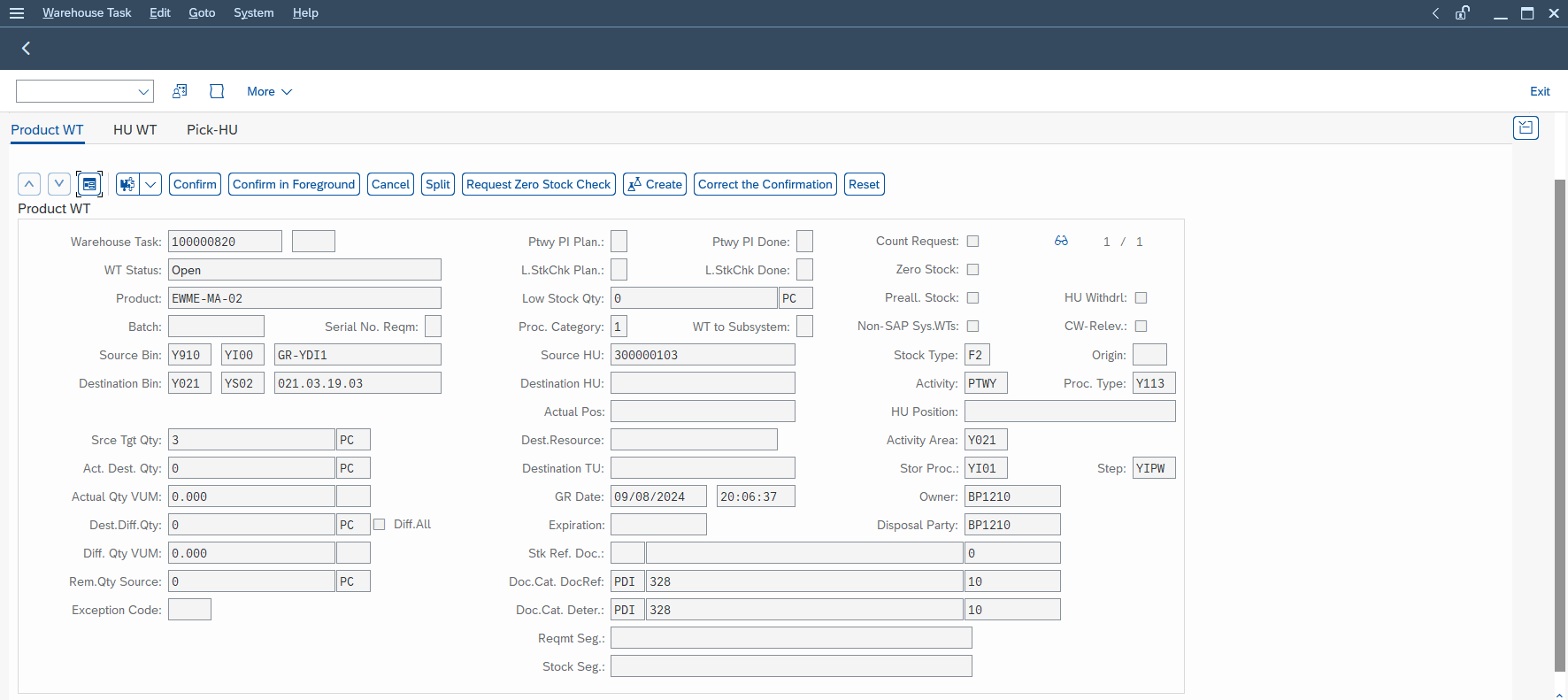
It comes into play when EWM creates the putaway warehouse task, after the goods receipt. The system then knows the product, the quantity and the document data. The sequence is the first destination decision: everything that follows (section, bin type, putaway rule) only runs inside a storage type that has already been chosen.
The difference with WM in two lines
If you come from the older module, the storage type search in WM relies on other parameters and other tables. Do not carry its objects over to EWM. The principle (a list of types tested in order) is similar, but EWM has its own determination mechanism, described below. For the context of the SAP EWM module as a whole, the module page remains the right entry point.
The Complete Chain: From Storage Type to Bin
Here is what happens, in order, for a quantity to put away. Think of a funnel: you start wide (which types?) and end precise (which bin?).
-
1EWM identifies the quantity to put away
by handling unit or from the packaging specification of the product.
-
2It determines the search sequence
of storage types from the parameters described in the next section.
-
3It takes the first type of the sequence
and, if the storage section check is active, first looks for a suitable section.
-
4It applies the bin type
This optional filter rules out bins that are too small or unsuitable.
-
5It runs the putaway rule of the type
(fixed bin, empty bin, addition to existing stock, for example), then the capacity check if it is active.
-
6If no bin is found
EWM moves to the next type of the sequence and starts again at step 3.
The section and the bin type are optional. The first steps (sequence, type) always exist. One useful detail for understanding the trade-offs: by default, the storage type carries the most weight, the section has a medium priority and the bin type the lowest. Evaluation points let you reverse that order when the standard does not suit your warehouse.
Which Parameters Determine the Sequence?
You do not enter the sequence on the document: EWM derives it from a set of parameters. Here is the list, with where each one comes from and an example from Glass+.
| Parameter | Where it comes from | Fictional example |
|---|---|---|
| Warehouse number | The document (the only mandatory parameter) | The Valencia central warehouse |
| Putaway control indicator | The warehouse product | A “panels” indicator for GP-PANEL |
| Warehouse process type, and its group | The delivery or receipt document | Receipt against a purchase order |
| Quantity classification | The quantity to put away | Full pallet or partial quantity |
| Stock type, stock type group, stock usage, party entitled to dispose | The stock concerned | Available stock, or consignment stock |
| Hazard classes | The hazardous substance data of the product | Rarely relevant for flat glass |
Warehouse number: the only mandatory one
Without a warehouse number, no determination is possible. All the other parameters are optional: you only use them if your warehouse needs to tell them apart.
Putaway control indicator of the warehouse product
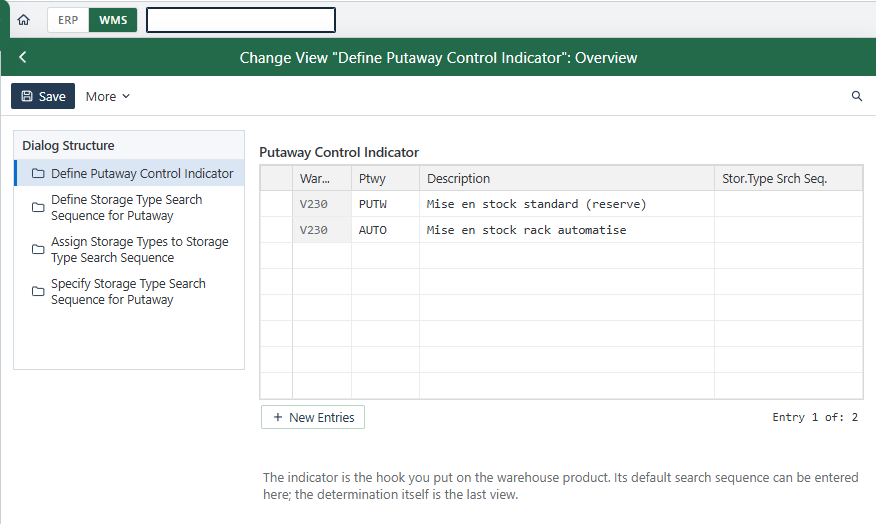
This is the most telling parameter for a junior consultant. It is held by the warehouse product, that is, the warehouse view of the material master coming from MM. Two products with the same indicator follow the same sequence; two products with different indicators can go to different zones. A product without an indicator is not an error in itself, but the determination must then include an entry that accepts an empty indicator.
Warehouse process type and its group
The process type describes the nature of the movement: receipt, return, transfer. You can group several process types so that they share the same determination line. It is one of the levers for keeping the table short.
Quantity classification, stock type, stock usage, party entitled to dispose
These parameters refine the result. The quantity classification is used to tell, for example, a full pallet from a remainder. The stock type covers normal stock, but also sales order stock and project stock; the stock usage covers consignment and subcontracting. Stock types can be grouped too. The party entitled to dispose separates stocks by owner.
Hazard classes
Two hazard classes can enter the determination. They are used by warehouses that store hazardous products in dedicated zones.
Fully Qualified Entry, Then Access Strategy
This is the part that surprises most beginners. EWM first reads the determination table with all parameters filled: this is the fully qualified entry. If it does not exist, EWM does not stop: it applies the access strategy that you defined. It states which fields to use, and in which order, to read the determination again with a less precise key.
Take Glass+ in Valencia. Nuria’s access strategy says: “first putaway control indicator and process type; failing that, putaway control indicator alone”. A panel received against a purchase order finds the most precise line. A panel received in a rare case (a customer return, for example) has no dedicated line; it falls back to the “indicator alone” line and follows the default sequence for panels.
The benefit is twofold. You avoid creating an entry for every possible combination, and you keep a readable fallback. Groups (process type, stock type) cut the number of lines further. Fewer lines means fewer chances that a combination is missing in production.
After the Sequence: Section, Bin Type and Putaway Rule
Once the storage type is chosen, EWM goes down one level. The storage section is a grouping of bins inside a type, for example “fast aisle” and “slow aisle”. It is optional and has to be activated. How the storage section search works in WM gives the general idea, even though the objects change.
The bin type filters by the size or nature of the bin; the bin type principle in WM is similar. Finally, the putaway rule of the chosen storage type picks the bin itself: fixed bin, empty bin, addition to existing stock. Each strategy deserves its own article; here, just remember that it runs last, within the scope that the sequence, the section and the bin type have already narrowed down.
Where to Configure It in EWM
Configuration is the job of the EWM consultant, not the key user. In customizing, the path is as follows. Steps 1 and 2 below are two activities of this path, to be run one after the other; steps 3 and 4 complete the setup and the test. Keep your SAP screen in English, as in the documentation. The official SAP EWM documentation on the SAP Help Portal remains the reference for each activity.
SPRO path:
SCM Extended Warehouse Management → Extended Warehouse Management → Goods Receipt Process → Strategies → Storage Type Search
-
1Define Storage Type Search Sequence for Putaway.
You create the sequence: its code and its description. At Glass+, a “panels” sequence and a “small parts” sequence.
-
2Assign Storage Types to Storage Type Search Sequence.
You list the storage types of each sequence there, with their order of passage. For “panels”: rack first, bulk second.
-
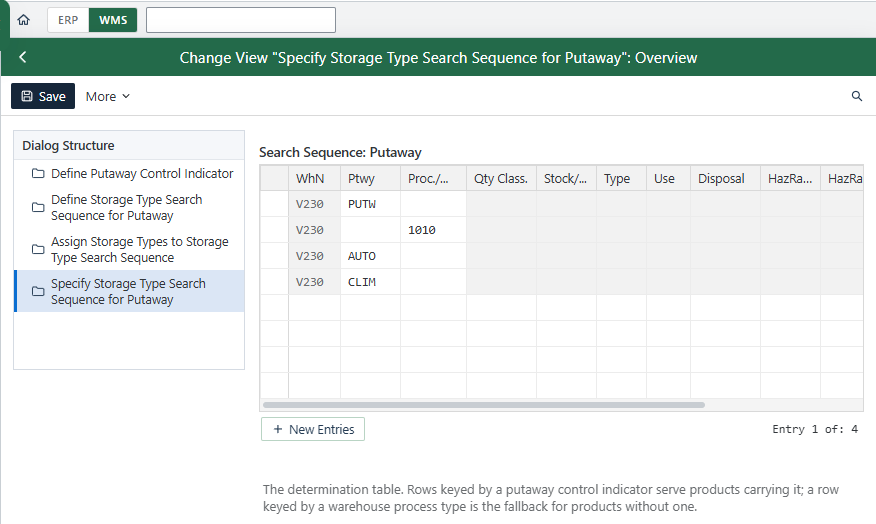
3Fill in the determination itself
For each combination of parameters (putaway control indicator, process type, and so on), you name the sequence to use. This is also where you define the access strategy.
-
4Test with a real receipt
in your test system: create a putaway warehouse task and check the storage type it proposes.
For a configuration in EWM Embedded in S/4HANA, as for a decentralized installation, I do not detail any difference here: this point is not covered by this article. On the MM side, just remember that the putaway control indicator is product data that must be filled in before the first receipt.
Why EWM Proposes the Wrong Storage Type: Troubleshooting
When a putaway task lands in the wrong place, the cause is almost always in the determination, not in the stock. Here are the most frequent cases.
| What you see | Probable cause | Where to check |
|---|---|---|
| Panels go to bulk instead of the rack | The warehouse product has the wrong putaway control indicator, or none | The warehouse view of the product |
| EWM finds no sequence | No entry matches this combination of parameters, and the access strategy has no fallback | The determination and the access strategy |
| One process type behaves differently from the others | It belongs to no group, so the common line does not cover it | The process type groups |
| The type is right, but the bin is unexpected | The section is not active, or the bin type filters out the bin you wanted | The storage type configuration |
| No task is created although the type exists | No free bin in the types of the sequence, capacity is reached | The capacity check and the stock per type |
The approach for a key user: note the product, the process type and the proposed storage type, then pass these three pieces of information to the consultant. To read the detail of what the system decided, the consultant opens the determination log in the system. Always start from the product: with the right indicator, many anomalies disappear.
What About Picking? A Short Clarification
The search sequence also exists on the goods issue side, with its own customizing path:
SPRO path:
SCM Extended Warehouse Management → Extended Warehouse Management → Goods Issue Process → Strategies → Specify Storage Type Search Sequence
The difference that matters: a storage type group changes the logic there, because EWM adds up the stocks of the group before applying the picking rule. This topic touches wave management and deserves its own article. Do not mix the two sequences: the putaway one says nothing about picking.
What This Article Does Not Cover
Storage control and step-by-step routing (storage control, POSC) are a different topic: they decide the path between two zones, not the destination type. Putaway strategies one by one, and waves, also have their own pages. The technical WM tables do not apply to EWM, and I cite none of them here.
Frequently Asked Questions
What is the storage type search sequence in SAP EWM?
It is the ordered list of storage types in which EWM looks for a bin at putaway. It is determined from the delivery and the warehouse product, and configured in EWM customizing. The first type that offers a valid bin is selected.
Where do you configure the storage type search sequence for putaway in SAP EWM?
In customizing, under Goods Receipt Process, Strategies, Storage Type Search. Two activities run one after the other: Define Storage Type Search Sequence for Putaway, then Assign Storage Types to Storage Type Search Sequence.
Which parameters determine the storage type search sequence in EWM?
Only the warehouse number is mandatory. Depending on your needs, you add the putaway control indicator of the warehouse product, the process type and its group, the quantity classification, the stock type and stock usage, the party entitled to dispose and the hazard classes.
What is the putaway control indicator for?
It classifies products by the way they are put away. Held by the warehouse product, it enters the determination: two products with the same indicator follow the same sequence of storage types.
What happens when EWM finds no bin in a storage type?
It moves to the next type of the sequence and starts the search again (section, bin type, putaway rule). If no type of the sequence offers a bin, the putaway task cannot be created.
Does EWM still use a storage type search, or does storage control replace it?
It does exist in EWM, with its own customizing, for putaway as well as for picking. Storage control does not replace it: it handles step-by-step routing, whereas the sequence chooses the destination type.
Summary
The search sequence answers a single question: in which storage types to look, and in which order. It is derived from parameters, mainly the putaway control indicator of the product and the process type, read first as a full entry and then through the access strategy. Concrete next step: in your test system, open a warehouse product, note its putaway control indicator, create a receipt and compare the proposed type with your sequence. To practice this cycle in a simulated warehouse, with complete cases, the SAP EWM training offers ten guided missions.
Keep reading
SAP Movement Types: 101, 261, 311 and 551 Explained
SAP Movement Types: 101, 261, 311, 551 and What Each One Triggers Marta Vidal, a purchasing key user at Glass+ in Valencia, receives twenty tonnes of silica and opens MIGO....
 Michael A.
How to Read MD04 in SAP: Stock/Requirements List Explained
How to Read MD04 in SAP: The Stock/Requirements List Explained Available quantity goes negative on October 19. The planner calls the supplier in a hurry, and the order she pulls...
Michael A.
SAP Account Determination: How OBYC Picks the G/L Account
SAP Account Determination (OBYC): From Goods Movement to G/L Posting You post a goods receipt in MIGO. You enter a material, a quantity, a purchase order. At no point does...
Michael A.
SAP Document Flow: Trace an Invoice Back to Its Order (VBFA)
SAP Document Flow: Trace an Invoice Back to Its Order (VBFA) It is 9:10 in the morning. A customer is disputing an invoice and wants your answer before noon. You...
Michael A.