SAP BOM and routing: understand and build the BOM / routing pair
First thing to get straight, because this is where everyone stumbles: in SAP, a bill of materials has nothing to do with a customs nomenclature or a commodity code. Here, BOM means Bill of Materials, that is, the list of components of a manufactured material. When you work on SAP BOM and routing, you are handling two manufacturing master data objects, not a product classification for export. The pair is easy to state: the BOM says what to build (the components), the routing says how (the operations). And a third object, the production version, ties the two together so the material becomes genuinely producible.
If you are new to the PP module, this is exactly the right order to lay things out. You do not need to know everything at once. You need to know what each object carries, where you create it, and what breaks when it is missing, knowing that this master data then works together with the chosen production type. That is what we walk through here, transaction by transaction, on a single running example.
- The bill of materials (BOM) lists an item’s components: the what. Create it in
CS01, display it inCS03. - The routing describes the sequence of operations and their work center: the how. Create it in
CA01. - A routing requires work centers created upstream (
CR01): each operation states where it is performed. - The production version (
C223) links one specific BOM to one specific routing: it seals the producible pair. - Classic pitfall: base quantity vs component quantity consistency; a base of 1 with components entered for 100 throws off the entire requirements calculation.
BOM vs routing: what does each object say?
The BOM lists the components of a manufactured material; the routing describes the sequence of operations to produce it. These are two distinct objects, stored separately in SAP, and it is their combination that describes a producible product. Confusing the two, or believing one contains the other, is the most common mistake when you first discover production master data.
The BOM says what the material is made of. The routing says how it is built. Two objects, never one inside the other.
The BOM: the list of components (the WHAT)
The BOM is the recipe in the sense of “ingredients.” For a bicycle, it would read: one frame, two wheels, one handlebar, one saddle, one set of brakes, and the quantity of each. Every line of the BOM is a component, with its quantity relative to a base quantity of the manufactured material. The BOM says nothing about how to assemble the bike: it simply answers the question “what is it made of?”
This is the list that material requirements planning (MRP) reads to know which components to order or produce, and it also feeds the material cost estimate. A wrong or incomplete BOM, and the whole component requirement goes off the rails.
The routing: the sequence of operations (the HOW)
The routing describes the manufacturing flow: the operations in order, the work center where each one is performed, and the associated times. For our bicycle, it would read: operation 10, prepare the frame at the assembly work center; operation 20, mount the wheels; operation 30, adjust the brakes and inspect. Where the BOM gives the parts, the routing gives the actions and the time.
This sequence of operations serves two essential purposes: scheduling (SAP calculates the production duration from the time of each operation) and the conversion cost estimate (machine time and labor valued through the work center). A well maintained routing means a reliable schedule and accurate costs; a sloppy routing means fictitious production dates.
BOM: the WHAT
- Lists the components of a manufactured material.
- One line = one component + its quantity relative to the base quantity.
- Read by material requirements planning (MRP) to procure the components.
- Feeds the material cost estimate.
- Created and maintained in CS01 / CS02 / CS03.
Routing: the HOW
- Describes the sequence of manufacturing operations, in order.
- One operation = one task + one work center + times.
- Used for scheduling (production duration).
- Feeds the conversion cost estimate.
- Created and maintained in CA01 / CA02 / CA03.
Terminology map and the anti-customs note
PP vocabulary travels constantly between languages, and it is a real source of confusion on projects. Here is the useful mapping, laid down once and for all.
| SAP PP term | Common wording | What the object carries |
|---|---|---|
| Bill of Materials (BOM) | Component list | The list of components (the what) |
| Routing | Operation sequence | The sequence of operations (the how) |
| Work center | Production resource | Where an operation is executed |
| Production version | BOM + routing link | The link between a BOM and a routing |
| Operation | Manufacturing step | One step of the routing |
| Component | BOM item | One line of the BOM |
And to clear the doubt for good: the SAP PP bill of materials is not the customs nomenclature (the HS code, the CN8 code). No connection. In SAP, the term refers only to the product structure of a manufactured material.
What is a SAP BOM and how do you create it (CS01)?
A SAP BOM is created with transaction CS01, which records the list of components of a manufactured material for a given plant. You enter the manufactured material, the plant, the usage context, then you enter the components line by line with their quantities. The BOM then exists as master data, reusable every time the material goes into production.
What a BOM is for, from a key user’s angle
Three pieces of information frame every BOM: the material it describes, the plant it is valid for, and its usage context. The same material may well have a different BOM depending on the plant that manufactures it, or depending on whether it is used for production, for maintenance or for sales. That is why SAP systematically asks you for these coordinates before letting you enter a single component: a BOM never exists “in the abstract,” always within a context.
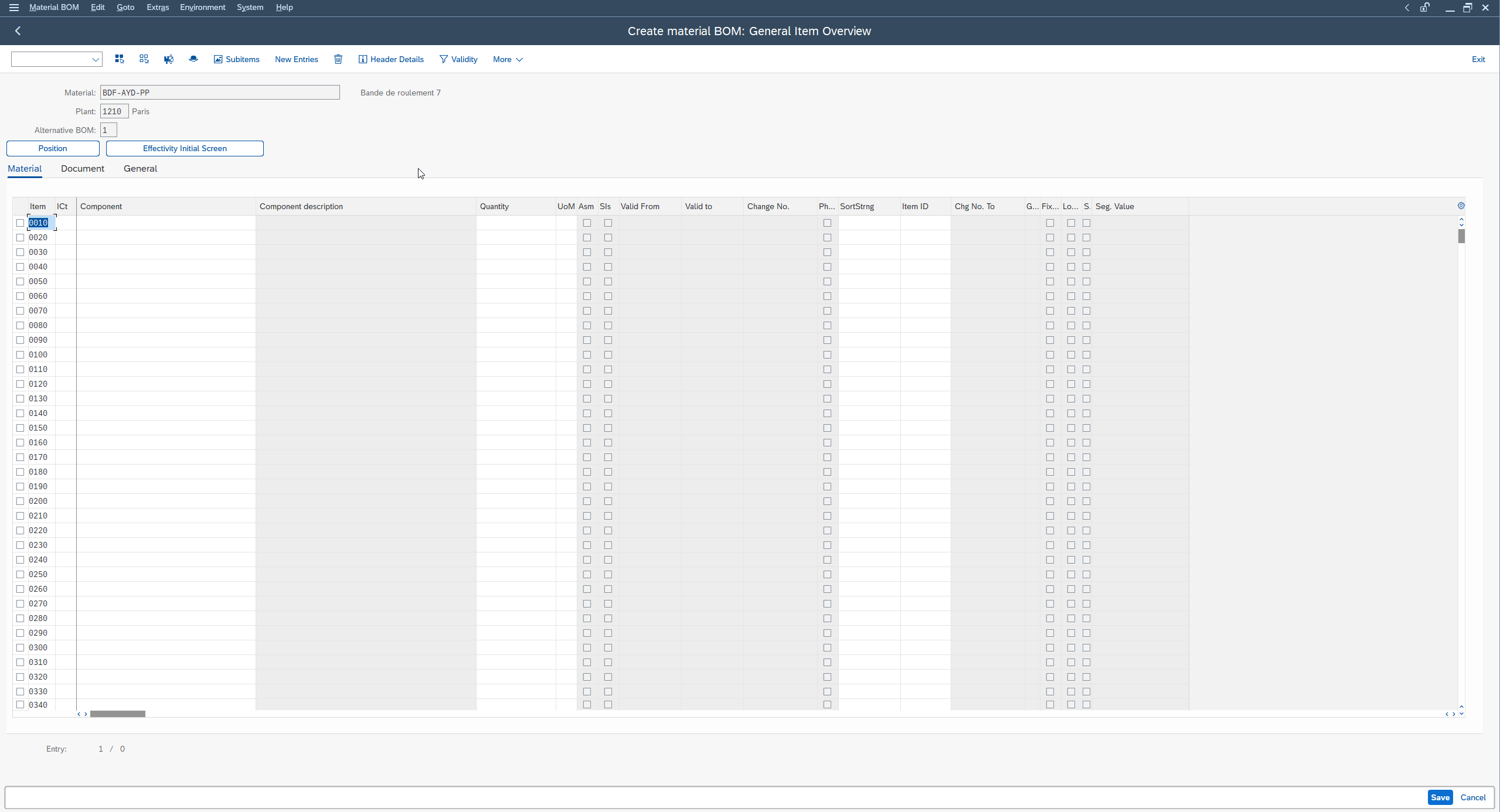
Create a BOM step by step in CS01
Here is the basic gesture, on a simple manufactured material. The flow stays the same whatever the material, which makes it easy to remember.
-
1Launch transaction CS01
Open transaction
CS01(create BOM) to start entering a new bill of materials. -
2Enter the material and the plant
Enter the manufactured material concerned and the plant the BOM is valid for. A BOM always exists in the context of a given plant.
-
3Enter the usage context
Fill in the usage context of the BOM (the field that specifies what it is used for, for example production).
-
4Confirm to reach the components
Confirm to open the component entry screen, where you will list the parts line by line.
-
5Enter each component
Put each component on a line: its material number, its item category (which distinguishes a stock managed component from another type of item) and the quantity needed relative to the base quantity.
-
6Check the base quantity
Check the base quantity of the header (the quantity of manufactured material the components relate to) to keep quantities consistent.
-
7Save
Save: the BOM is created for this material, this plant and this context, and becomes reusable in every production run.
The tricky fields to understand
A few areas deserve that you understand why they exist, because a mistake on them does not necessarily trigger an immediate error message: it shows up later, at the worst moment.
- The BOM usage context. This field indicates the use of the BOM (production, maintenance, sales, and so on). If it does not match the expected use, your BOM can be ignored by the process that was meant to consume it. The exact value depends on your system configuration, to confirm with your team.
- The component item category. It distinguishes a standard stock managed component from other item types (text, document, non stock component, and so on). Choose the wrong category, and the component will not be treated as a real part to procure.
- The base quantity and the component quantities. Component quantities are expressed relative to the base quantity of the header. If the base is set to 1 piece and your components are entered for a lot of 100, your requirements will be wrong by a factor of a hundred. Base and components consistency: it is MRP that will pay for the error.
- Validity. A BOM carries a validity date. A badly set date, and the BOM “does not exist” on the date you launch your production.
The exact values (usage context code, item category code) depend on your system configuration. Stick to the business principle and have the precise codes confirmed by your team or your consultant before you rely on them.
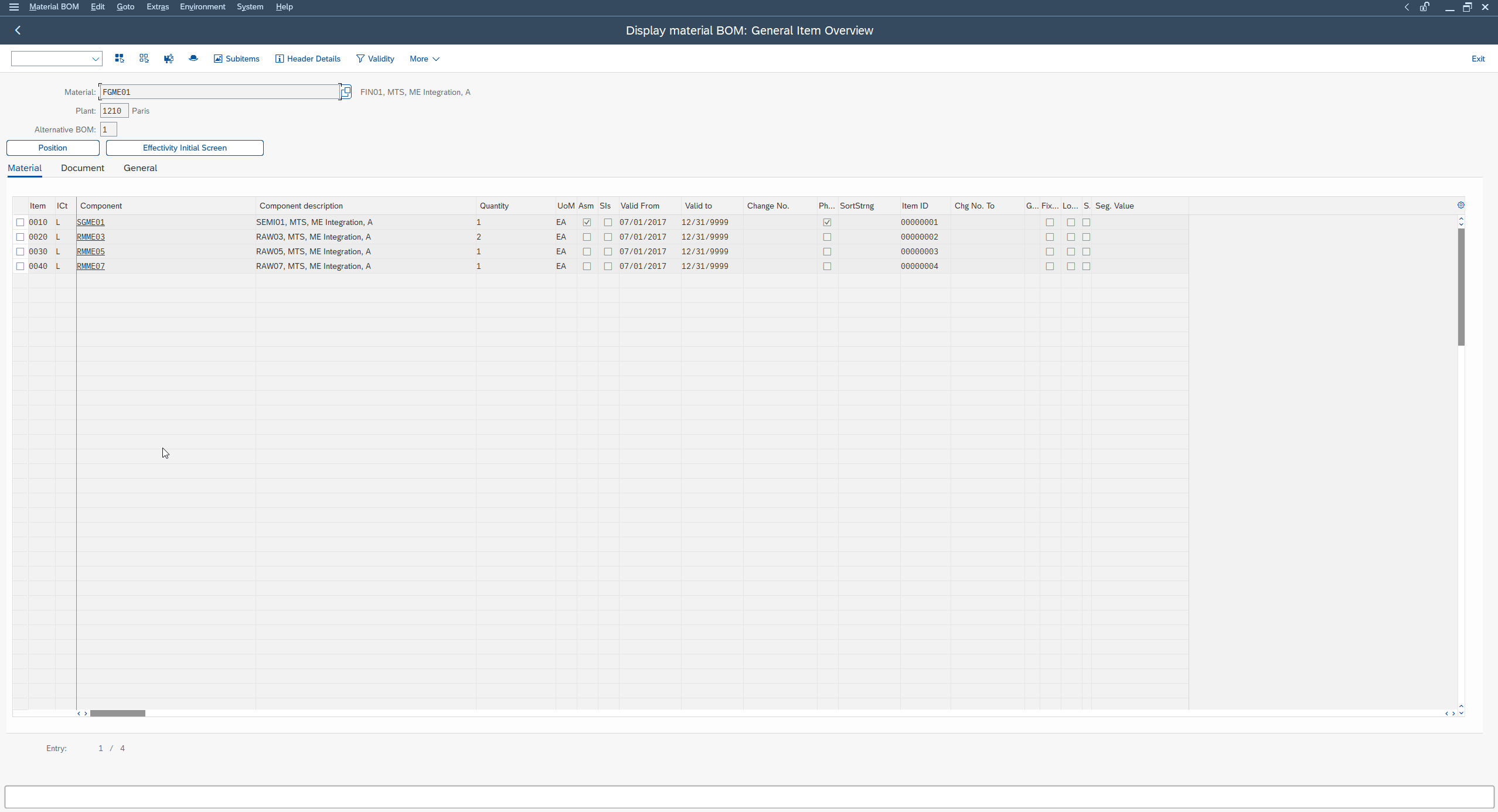
Display and change: CS02 / CS03
To keep a BOM alive, two transactions go alongside CS01: CS02 to change it (add, remove or change a component), and CS03 to display it in read only. The healthy reflex on a project: open in CS03 first to understand what exists before touching anything in CS02.
What is a SAP routing and how do you create it (CA01)?
A SAP routing is created with transaction CA01, which records the sequence of manufacturing operations of a material and the work center of each operation. You declare the material and the plant, then you enter the operations in order, linking each one to a work center and filling in its times. The routing then becomes the basis of scheduling and the conversion cost estimate.
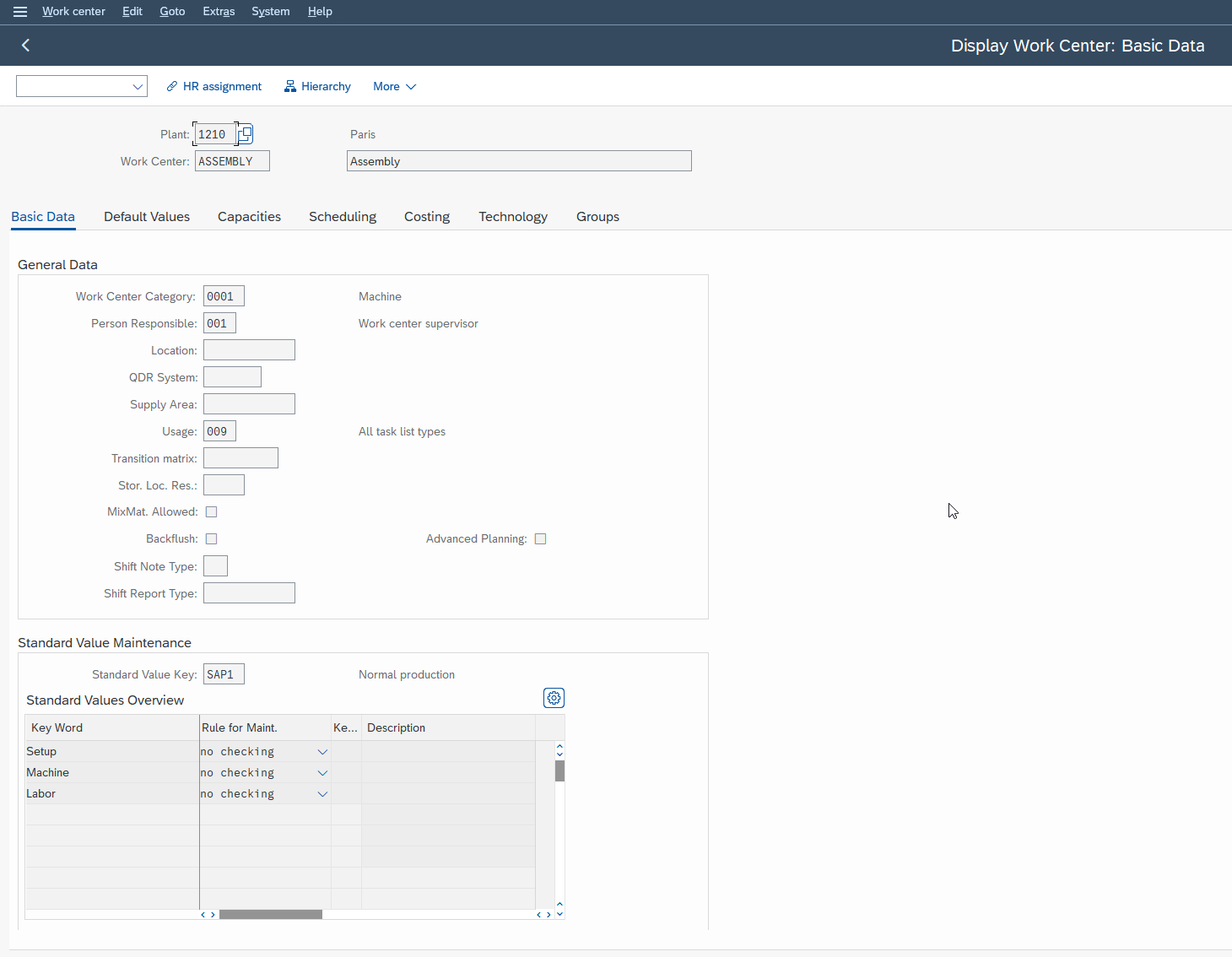
The prerequisite: the work center (CR01)
A routing cannot exist without work centers, because every operation must indicate where it is carried out. The work center is created beforehand with transaction CR01: it is the object that carries the available capacity, the time calculation formulas and the accounting assignment used to value the operation. If you start a routing without any work centers defined, you will be blocked at the very first operation. So create your work centers first, your routing second.
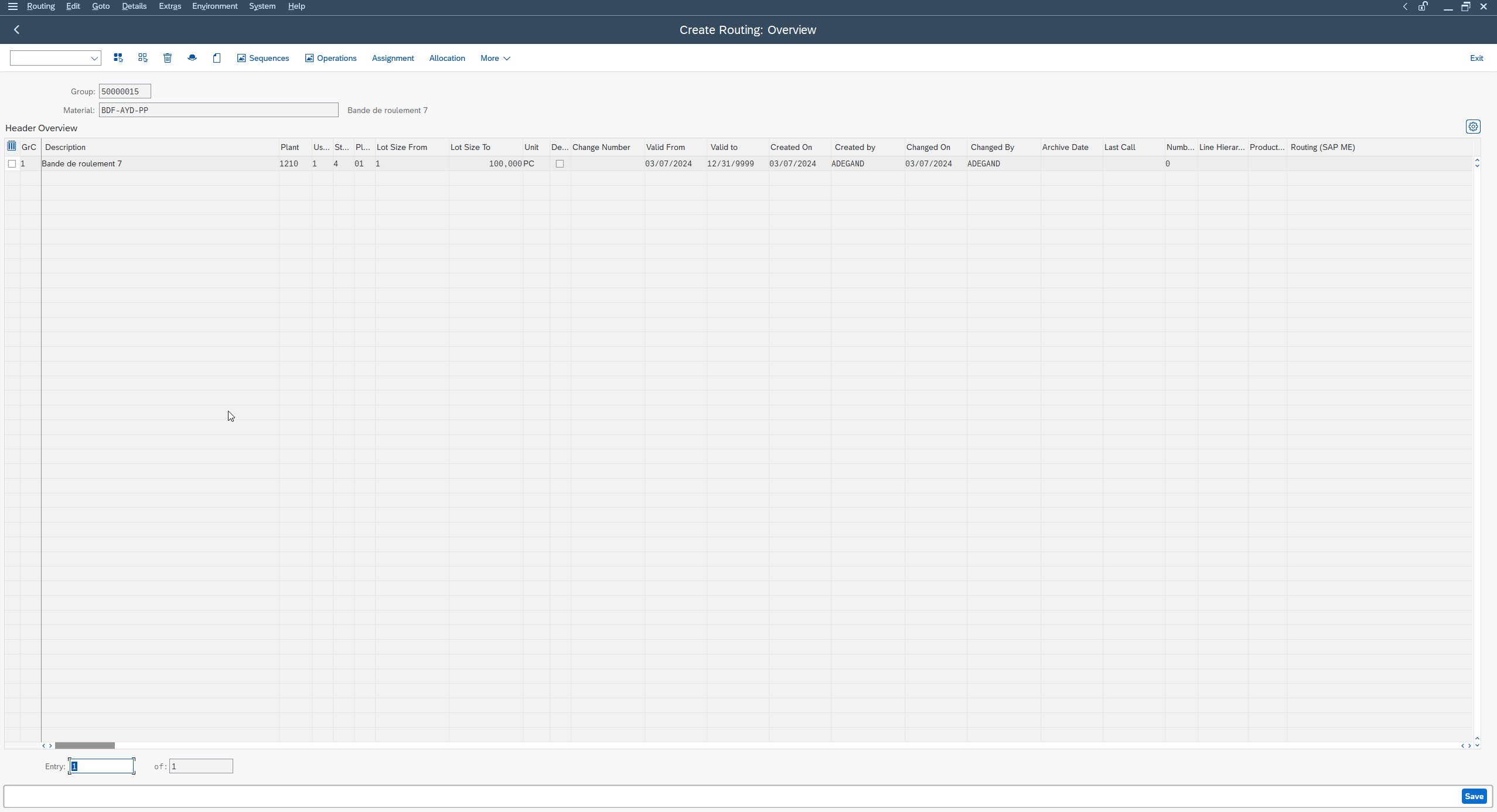
Create a routing step by step in CA01
The gesture, on the same running material as the BOM:
-
1Launch transaction CA01
Open transaction
CA01(create routing) to start a new routing. -
2Enter the material and the plant
Declare the manufactured material and the plant. Like the BOM, the routing is tied to a specific material / plant pair.
-
3Create the operations in order
Enter your operations in order (10, 20, 30, and so on), each with a text describing the work to do.
-
4Link each operation to a work center
Assign each operation to a work center (created beforehand in
CR01), which carries the times and the link to costing. -
5Fill in the times
Enter the times of each operation (setup time, machine time, labor time depending on your configuration).
-
6Assign components to operations (if needed)
If needed, assign the BOM components to the operations that consume them.
-
7Check the routing status
Check the status before saving: to be genuinely usable in production, the routing must be in a status that allows it (usually a “released” status). The exact value depends on the configuration, to confirm with your team.
-
8Save
Save: the routing is created for this material and this plant.
The tricky fields to understand
- The routing status. A routing exists but is not necessarily usable. As long as it is not in a status that makes it usable (typically “released”), it can be ignored when a production order is created. This is the most classic trap: the routing is there, but the order “does not see it.” The exact code of the usable status depends on your configuration, to confirm.
- The work center of each operation. An operation without a valid work center, or pointing to a badly configured one, and scheduling and cost fall apart. The work center carries the times and the link to the cost estimate.
- The reference routing. To avoid re-entering everything, SAP lets you start from an existing routing taken as a model, rather than creating each operation by hand. The mechanism and its exact wording vary by release: check the option available in your system before relying on it.
- The times. Missing or unrealistic times give a false schedule. A routing is only worth something if its times reflect the reality of the shop floor.
Display and change: CA02 / CA03
As with the BOM, two transactions complete CA01: CA02 to change an existing routing (add an operation, correct a time, change a work center) and CA03 to display it in read only. And the same reflex applies: you look in CA03 before you change in CA02.
How BOM and routing work together to manufacture
For a material to be genuinely producible, you need the WHAT and the HOW together: the BOM provides the components, the routing provides the operations, and SAP combines the two when a production order is created. One without the other is not enough: a BOM alone does not know how to assemble the product, a routing alone does not know with which parts.
The WHAT + the HOW = a producible product
Take the bicycle again. The BOM gives you the frame, the wheels, the handlebar, the saddle. The routing tells you: prepare the frame, mount the wheels, adjust the brakes. You need both to produce a bicycle. In SAP it is the same: the system needs a valid BOM and a valid routing for the same material and the same plant to build a complete production order, with its components to issue from stock and its operations to execute.
What MRP and the production order consume
Material requirements planning (MRP) explodes the BOM to determine which components to order or produce and in what quantity; the production order, for its part, relies both on the BOM (for the components) and on the routing (for the operations and scheduling). This master data feeds directly into material requirements planning (MRP), and that is why its quality is paid for downstream: shaky master data does not raise a nice, clearly visible red error: it produces a wrong order that looks perfectly normal.
The binder: the production version
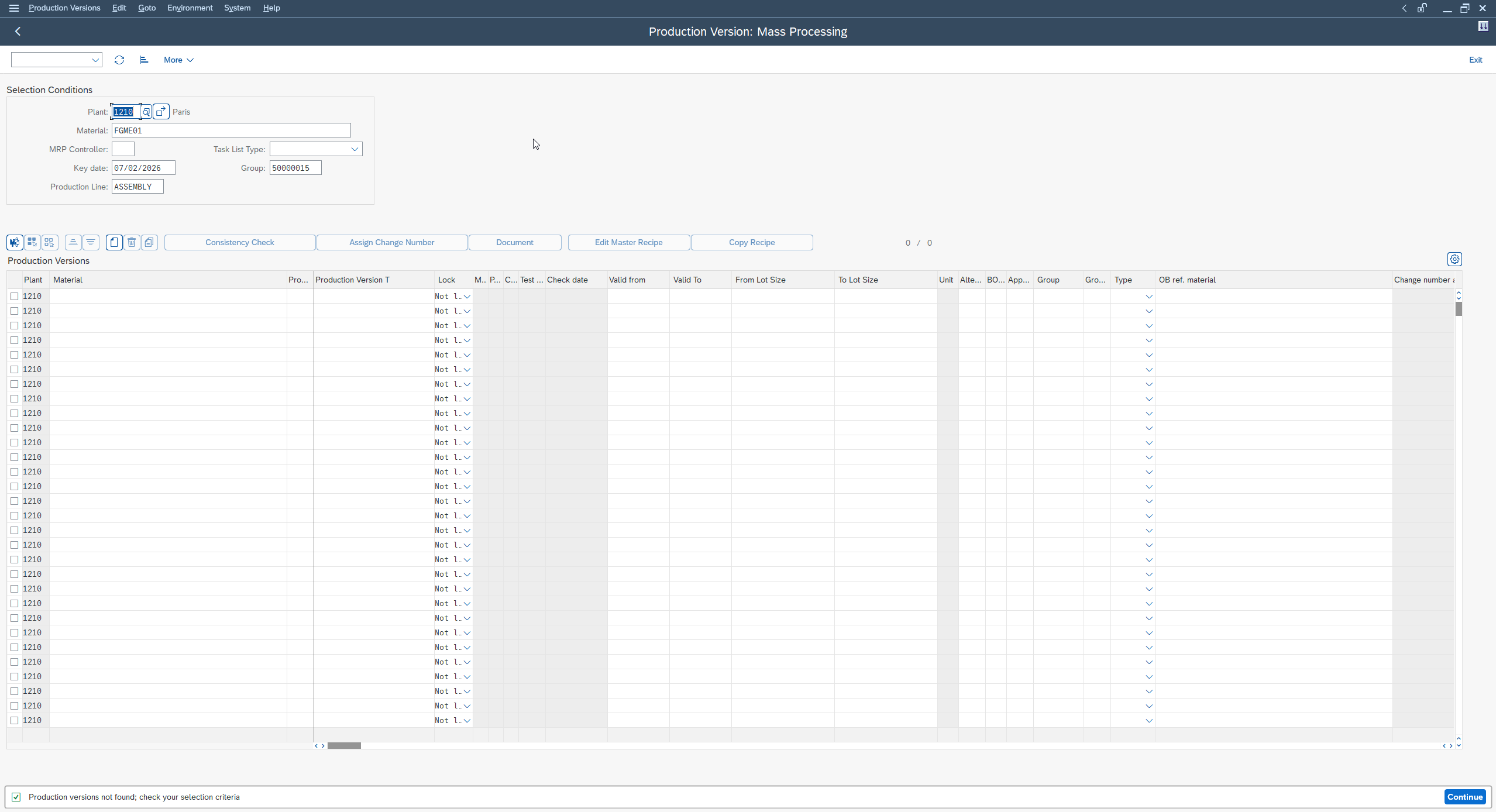
The production version is the object that links a specific BOM to a specific routing for a given material and plant. When a material can be manufactured in several ways (two alternative BOMs, two possible routings), it is the production version that fixes which BOM goes with which routing. It turns two independent objects into a consistent, official pair.
Why the production version links BOM and routing
Without a production version, SAP can still find a BOM and a routing through other mechanisms in simple cases. But as soon as you have several BOMs or several routings for the same material, or you use certain production modes, the production version becomes the clean and mandatory way to say “to manufacture this material this way, use this BOM with this routing.” It is the link that closes the trio. For the detail of this object (its creation, its consistency checks and its use cases), we have dedicated a full guide to the production version that links BOM and routing.
The full trio: BOM + routing + production version
In the end, remember the chain rather than the isolated transactions: the BOM (CS01) lists the components, the routing (CA01) describes the operations, and the production version seals the pair. This trio is the foundation of manufacturing master data. Everything else (orders, MRP, costs) relies on it.
Where to find BOM and routing in the SAP menu
Day to day, you reach these objects through the direct transactions (CS01/CS02/CS03 for the BOM, CA01/CA02/CA03 for the routing). But they are also filed in the production master data tree of the SAP menu. The menu path looks like this (it may vary by release and configuration, to confirm in your system):
SAP menu path:
Logistics -> Production -> Master Data -> Bills of Material / Routings
Common mistakes and points of attention
Most incidents on these objects do not come from complicated mechanisms, but from a few oversights that keep coming back. Here is the short list to keep on hand.
- The unreleased routing. You created the routing, but it is not in the status that makes it usable. Result: when the production order is created, SAP does not pick it up. Always check the status before concluding that “a routing is missing.”
- The wrong plant. BOM and routing are tied to a plant. Create them on the wrong plant, and the material will look devoid of master data where you need it. This is the most silent error.
- The forgotten validity date. A BOM or a routing whose validity does not cover the production date is, for SAP, nonexistent on that day. Always check the validity range.
- The wrong usage context or item category. A wrong BOM usage context, or an item category that does not match a real component to procure, and MRP will not react as expected. It does not crash: it calculates wrong.
- The inconsistent base quantity. Components entered for a lot, base quantity set to a single unit: your requirements come out at the wrong scale. Always check base and components consistency.
None of these points is difficult. They just cost dearly when you discover them in production, on an order already launched.
FAQ
What is the difference between a BOM and a routing in SAP?
The BOM lists the components of a manufactured material (the what); the routing describes the sequence of operations to produce it (the how). These are two distinct master data objects. You need both, brought together for the same material and the same plant, to manufacture the product.
How do you create a BOM in SAP with CS01?
You launch transaction CS01, you enter the manufactured material, the plant and the usage context, then you enter each component on a line with its quantity relative to the base quantity. You save, and the BOM exists for this material, this plant and this context.
How do you create a production routing in SAP with CA01?
You first create your work centers (CR01), then you launch CA01, you declare the material and the plant, and you enter the operations in order, linking each one to a work center with its times. You check the routing status before saving so that it is usable in production.
Is the SAP BOM the same thing as a customs nomenclature?
No, no connection. In SAP PP, “BOM” means Bill of Materials, that is, the list of components of a manufactured material. It has nothing to do with the customs nomenclature (HS code, CN8) or with any regulatory classification.
What is the production version for and how does it link BOM and routing?
The production version associates a specific BOM with a specific routing for a material and a plant. It is essential when a material has several BOMs or routings, or depending on the production mode: it says which BOM goes with which routing.
Where do you find BOM and routing in the SAP production menu?
You reach them through the direct transactions (CS01/CS02/CS03 for the BOM, CA01/CA02/CA03 for the routing). They are also filed in the production master data tree of the SAP menu; the exact path may vary by release and configuration.
Key takeaways
The BOM says what a material is made of, the routing says how it is built, and the production version links the two: it is this trio that makes a material genuinely producible in SAP PP. If you are just starting out, the right first move is not to read everything but to practice: open a test material in your training system, create a BOM for it in CS01, then a routing in CA01, and watch how the production order consumes them together. To go all the way through the official framing of this master data, the SAP Learning course on Production Planning and Manufacturing for S/4HANA uses the same vocabulary. And when you want to formalize the link between the two objects, it is the production version that seals the pair.
Keep reading
SAP Movement Types: 101, 261, 311 and 551 Explained
SAP Movement Types: 101, 261, 311, 551 and What Each One Triggers Marta Vidal, a purchasing key user at Glass+ in Valencia, receives twenty tonnes of silica and opens MIGO....
 Michael A.
Storage Type Search Sequence in SAP EWM Explained
Storage Type Search Sequence in SAP EWM: How Putaway Chooses Where Stock Goes Nuria Sanz runs operations at the Glass+ central warehouse in Valencia. One morning, a putaway warehouse task...
Michael A.
How to Read MD04 in SAP: Stock/Requirements List Explained
How to Read MD04 in SAP: The Stock/Requirements List Explained Available quantity goes negative on October 19. The planner calls the supplier in a hurry, and the order she pulls...
Michael A.
SAP Account Determination: How OBYC Picks the G/L Account
SAP Account Determination (OBYC): From Goods Movement to G/L Posting You post a goods receipt in MIGO. You enter a material, a quantity, a purchase order. At no point does...
Michael A.