Split valuation in SAP MM lets a single SAP material carry several distinct stock values, managed by valuation type. In plain terms: one material number in the master record, but several prices and several accounting values coexisting under that number. Many junior consultants stumble on this the first time it shows up on a project. You already know the moving average price and the material master, and suddenly you are asked to value the same material differently depending on whether it comes from a domestic supplier or from an import. The reflex to just create two materials is tempting, but it is rarely what the business actually wants.
This article takes the topic in the right order: the concept, then the valuation category versus valuation type distinction that is the real sticking point, then the configuration in transaction OMWC and activation on the material master. By the end, you will be able to set up split valuation end to end and explain its impact on stock value. If you first want an overview of the SAP fundamentals, start there, then come back here for this specific mechanism.
- Split valuation carries several accounting values under a single material number, without duplicating the master data.
- The valuation category sets the rule (which types are allowed); the type carries the actual stock value.
- The config is done in
OMWC(Customizing), stored in theT149table family. - Activation happens in
MM01/MM02, Accounting 1 view: the header segment first, the type segments next. - Each type carries its own price (MAP or standard); the header aggregates the value of the whole.
What is split valuation in SAP MM?
Split valuation lets a single SAP material carry several distinct stock values, managed by valuation type. Instead of one value and one price for a material in a valuation area, you have several, each tied to a business criterion that you define.
Picture it this way. Without split valuation, a material looks like a single drawer: one quantity, one value, one price. With split valuation, that drawer splits into several compartments. Each one carries its own quantity and its own value, but they all stay stored in the same cabinet, the same material number. Total stock and total value remain the sum of the compartments.
Why do this rather than create several materials? Because from a logistics standpoint, it is the same product: same technical characteristics, same use in production, same unit of measure. What changes is the economic value. An identical steel costs more imported than produced locally. The business wants to track that difference in accounting without duplicating the material master. Split valuation answers exactly that need: a single master record, several values.
Be careful not to confuse this mechanism with the characteristics and classes system: classification describes the technical properties of a material, whereas split valuation manages its accounting value. Two different logics, which can coexist on the same material.
When to use split valuation: business use cases
You turn on split valuation when one product needs to carry several economic values based on a stable business criterion. Here are the cases you will run into most often on a project.
Origin or source. A material bought both domestically and as an import. The cost differs because of freight, customs duties, exchange rates. The business wants to track the real value of each flow. This is the textbook case of split valuation by source.
In-house production versus external purchase. The same component is sometimes produced in-house, sometimes bought from a subcontractor. The in-house production cost and the external purchase cost are not identical. Separating the two values gives an honest picture of stock value.
Status or quality. A new material and the same material once repaired or refurbished, or first grade versus second grade. The business wants to value them differently because their market value differs, while keeping a unified stock view.
One important point: split valuation manages value, not physical quantity tracked unit by unit. If your need is to track batch numbers, expiry dates or fine traceability, this is not the right tool. Look instead at SAP batch management, which answers a quantity and traceability need, where split valuation answers a value need. The two can coexist on the same material, but they do not solve the same problem.
Valuation category versus valuation type: the key distinction
This is the point that trips everyone up at first, so let us take our time. The valuation category defines which valuation types are allowed; the valuation type is the value actually carried by the stock.
Go back to the container and its contents analogy. The category is the container: it says “this material is valued by the source criterion”. The types are the instances stored inside that container: “domestic” and “import”. The category sets the rule, the types carry the concrete values.
A few examples to anchor the idea.
| Criterion | Valuation category | Valuation type |
|---|---|---|
| Role | Container: defines which types are allowed | Instance: carries the price and real stock value |
| Source example | H (origin) | EIGEN (domestic), FREMD (import) |
| Production example | B (procurement) | INTERN (in-house production), EXTERN (external purchase) |
| Dependency | Exists on its own and opens the list of types | Does not exist without a parent category |
| What it carries | The rule, no price | The price and the accounting value |
The direction of the dependency is something you must remember: a valuation type does not exist on its own, it always has to be attached to a category. It is the category that opens the list of allowed types. If you try to assign a type to a material when it is not attached to the active category, SAP refuses. The vast majority of configuration errors come from exactly this: a type wrongly attached to its category.
A good consultant habit: before touching anything, write out your tree. One category at the top, the allowed types below. Formalizing that decision in a proper SAP functional specification before opening Customizing will save you round trips and a painful cleanup once stock exists.
Configuring split valuation in OMWC, step by step
Split valuation is configured through transaction OMWC. That is your single entry point. The configuration is stored in the T149 table family, at valuation area level.
SPRO path:
Materials Management → Valuation and Account Assignment → Split Valuation
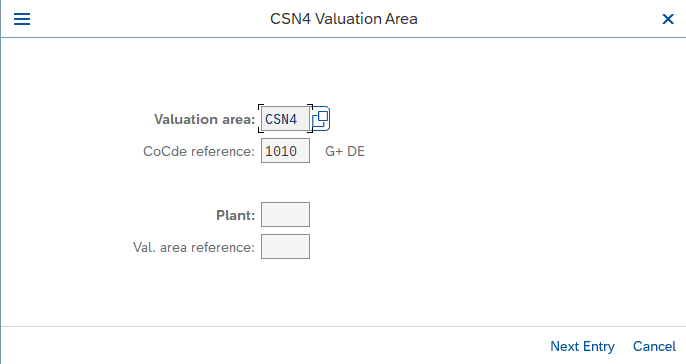
OMWC is a Customizing transaction: it requires the right permissions on the configuration client. Check ahead of time with your administrator that your profile actually opens the relevant Customizing. This is a classic lost day: the config is clear in your head, but the system blocks you on an SAP roles and authorizations gap.
Here is the logical flow in OMWC.
-
1Define the global valuation types
You first create the types at global level, independently of the categories. For example
EIGENandFREMD. At this stage you are just describing the building blocks available. -
2Define the global valuation categories
You create the categories, for example
Hfor origin. The category is the container that you will fill with types. -
3Assign the types to the category
This is the central and most forgotten step. You state which types are allowed under which category. It is this attachment that makes a type usable on a material carrying that category. Without this assignment, the type exists but stays inaccessible.
-
4Activate the category at valuation area level
The configuration then drops down to the valuation area level, where valuation actually applies. The category has to be activated for that area, otherwise you will not be able to use it on the materials concerned.
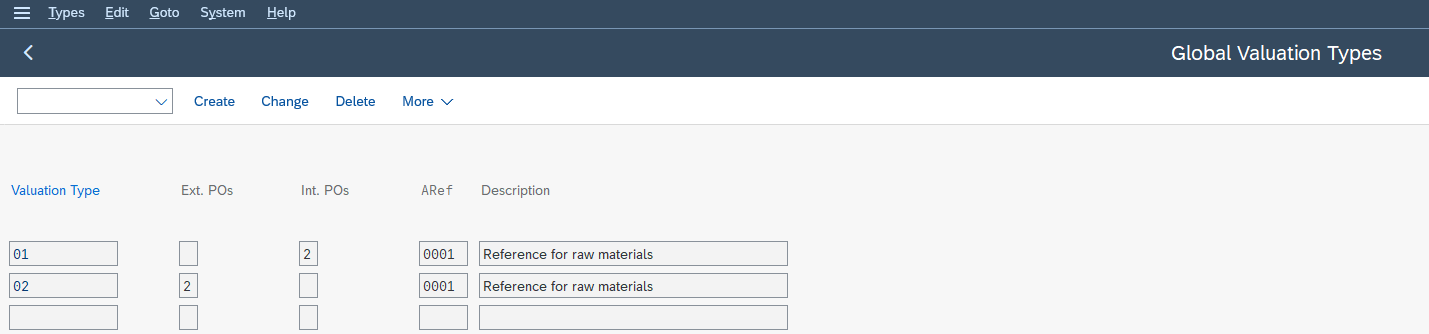
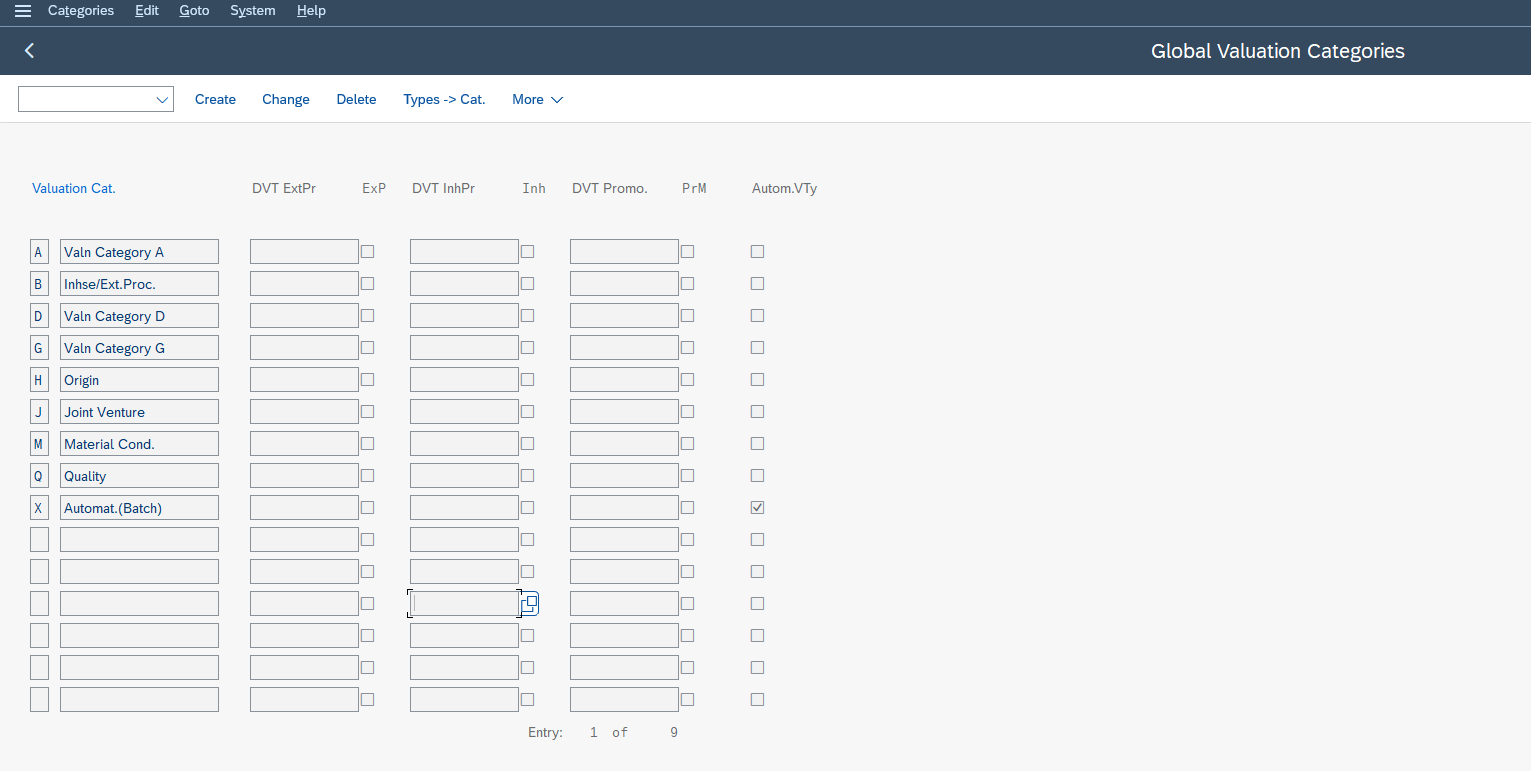
Always work from general to specific: global blocks, attachment, activation at the area. Skipping a step is a guaranteed way to get an incomprehensible error message the moment you touch the material master. Think about transport too: your configuration will have to move up from the dev client to QA and then production, so keep your transport requests clean from the start.
Activating split valuation on a material (MM01 / MM02, Accounting 1 view)
Activation happens in MM01 or MM02, Accounting 1 view, by first entering the valuation category at header level, then creating the stock segments by valuation type. The logic happens in two stages, and this is where many juniors go wrong by thinking everything is settled in one go.
-
1First stage: the header segment
You open the material in the Accounting 1 view without entering a valuation type, just the valuation area. In the valuation category field, you enter your category, for example
H. You have just created the header segment. This segment does not carry stock on its own: it aggregates. It tells the system “this material is now valued separately by category H”. It is the hat that sits on top of everything else. -
2Second stage: the stock segments by type
You then reopen the material, still in the Accounting 1 view, but this time entering a specific valuation type, for example
EIGEN. There you enter the price and the price control procedure for that type. You repeat the operation for each type,FREMDnext. Each pass creates a stock segment that will carry its own value.
The order is non-negotiable: the header first, the type segments next. If you try to create a type segment before placing the header, the system refuses, because the type has no container to live in. This is the number one mistake of first attempts.
A detail that saves hours: once stock exists on a material, changing its split valuation configuration becomes heavily constrained, even impossible without emptying the stock. So you think it through beforehand, you validate the model in a test environment, and you only activate a mature structure in production.
Split valuation and moving average price (MAP): how the value is calculated
Yes, split valuation is compatible with the moving average price. Each valuation type carries its own price, moving average price (MAP) or standard price depending on the price control procedure you choose for that type, and the header level aggregates the value of the whole.
Let us look closely at the mechanics, because this is what makes the topic confusing. When you post a goods receipt on the EIGEN type, it is the price of that type that gets updated. If EIGEN is on moving average price, its MAP recalculates from its own movements, independently of FREMD. Each type lives its own life on price: a receipt on domestic does not touch the MAP of import, and the other way around.
The header level, on the other hand, does not recalculate like a type: it aggregates. Its value is the sum of the values of the type segments, its quantity the sum of their quantities. So the header does not carry a price you enter, it mechanically reflects what its types carry. That is why you never enter a price directly on the header segment at creation.
Practical consequence for the consultant: if someone asks you “why did the material’s overall average price move when I bought nothing domestically”, the answer is almost always in a movement on another type. The header moves because one of its types moved. Reason type by type, then trace back up to the header: that is the right diagnostic reflex.
Special case: split valuation in subcontracting
Subcontracting is the case where split valuation takes on an extra dimension, and it is a classic project question. You send components to a subcontractor who returns a finished or semi-finished product. Split valuation lets you distinguish the value of the same material depending on whether it is produced in-house or by the subcontractor.
The most common pattern uses a category that separates these two modes: the product coming from subcontracting carries one type, the one coming from in-house production carries another. You value the real cost of each path on the same material number, without duplicating the master data. For logistics it is the same product, for controlling the two costs differ.
Where you need to be careful is on the combination with stock selection. When split valuation crosses a fine stock selection in subcontracting, you quickly touch related topics such as batch determination, which decides which specific stock is consumed. The two answer different questions, value on one side, which physical batch on the other, but they meet in advanced scenarios. Keep the boundary clear: split valuation does not select a stock, it values it.
Common mistakes and checkpoints before go-live
Most split valuation incidents fall into a handful of predictable categories. Here is the checklist to review before any production rollout.
The type not attached to the category. The number one error. You created the type, you created the category, but you forgot to assign the two. As a result, the type is invisible when you go to activate the material. Always check the type to category attachment in OMWC before touching the master record.
Forgetting the header segment. You try to create a type segment directly without having placed the header. The system refuses, sometimes with an unhelpful message. Remember the sequence: header first, types next.
The change lock once stock exists. You want to adjust the category or remove a type, but stock is already present. SAP blocks you, and rightly so: changing the valuation structure of valued stock would be dangerous for accounting. Any structure change is done on a material with zero stock, which is why testing upfront matters.
The category not activated at the valuation area. The global config is correct, but you skipped activation at the area level, and the material does not recognize the category. Go back through OMWC to check it.
Inconsistent price control procedure between types. Mixing standard price and moving average price across the types of one material without a clear intention leads to gaps that are hard to explain to controlling. Decide the procedure type by type, and document that choice.
Your best ally remains a disciplined sequence. Global blocks, attachment, activation at the area, header on the material, type segments. Follow that order and most of the traps disappear on their own.
In summary
Split valuation carries several accounting values under a single material number, provided you hold the distinction firmly between the category that sets the rule and the type that carries the value. Master the OMWC sequence then the activation in the Accounting 1 view, and you have a topic that comes back regularly on projects. To go deeper into the standard behavior of the configuration, the official SAP documentation on split valuation is the reference. The most useful next step: open a material in your test system, build a category with two types end to end, post a goods receipt on each type, and watch the header aggregate. It is by handling it once that the concept locks in.
Frequently asked questions
What is split valuation in SAP MM?
Split valuation lets a single SAP material carry several distinct stock values, managed by valuation type. The material master stays unique, but the stock splits into segments that each carry their own accounting value.
What is the difference between valuation category and valuation type?
The valuation category defines which valuation types are allowed; the valuation type is the value actually carried by the stock. The category is the container, the type is the instance that carries the price and the value.
Which transaction is used to configure split valuation in SAP?
Split valuation is configured through transaction OMWC, in Customizing, at the path Valuation and Account Assignment then Split Valuation.
Which SAP table stores the split valuation configuration?
The split valuation configuration is stored in the T149 table family, at valuation area level.
How do you activate split valuation on a SAP material?
Activation happens in MM01 or MM02, Accounting 1 view, by first entering the valuation category at header level, then creating the stock segments by valuation type.
Is split valuation compatible with the moving average price (MAP)?
Yes. Each valuation type carries its own price, moving average price or standard price, and the header level aggregates the value of all the segments.
Keep reading
SAP Learning Hub: review, price, and is it worth paying to practise?
As soon as you start looking to train seriously on SAP, one name keeps coming up: SAP Learning Hub. And with it, the same quietly asked question: is it really...
 Michael A.
SAP ECC vs S/4HANA: the key differences for your SAP career
If you look into SAP for your career, two acronyms keep coming up: ECC and S/4HANA. One is the older generation of SAP's ERP, the other is the current version....
Michael A.
SAP Consultant Skills: The Profile You Really Need
SAP Consultant Skills: The Profile You Really Need SAP consultant skills are, at their core, the ability to turn a business need into a working system: analyzing a process, configuring...
Michael A.
How long does it take to learn SAP: the realistic answer by goal
You are considering a career change into SAP, and the first thing you look for is a duration. How long before you feel comfortable? Before you can apply? The question...
Michael A.