SAP Material Master Views (MM01): What Each View Does and Who Fills It
At Glass+ in Valencia, Marta Vidal creates a new fine silica material, then creates her first purchase order. SAP rejects the line. The material exists, and it is linked to a vendor. What is missing is one part of the SAP material master: the Accounting view, which nobody in finance had filled in yet. A material master is completed in several passes, view by view, by several departments. Here is what each MM01 view is for, who fills it in, and what breaks when it stays empty.
- The material master is the base record of a material. It is split into views, one per user department, each tied to an organizational level (client, plant, storage location).
MM01creates the record,MM02changes or completes it,MM03displays it.- The views most often in play: Basic Data, Purchasing, MRP, Accounting, Storage and Sales. Each department fills in its own, usually at different times.
- An empty view does not show at creation: it shows later, when a process stops. A purchase order, for example, requires the Purchasing view and, for a material managed by value, the Accounting view to be maintained.
- Who fills in what is a matter of company organization, not an SAP rule. The system only insists that the information is there.
One Material Master, Several Views, Several Departments
The material master is the central source of information about a material: purchasing, inventory management, planning, invoice verification and accounting all read the same record. There is no copy per department, which avoids duplicates and discrepancies. In return, every department has to enter its own part. Do not confuse it with the purchasing info record (transactions ME11 to ME13), which links a material to a vendor: that is a different object, with its own data.
What a View Is
A view is a group of fields meant for one user department. The Purchasing view holds what the buyer needs, the Accounting view what finance needs, and so on. Each department also has a maintenance status: for every material, SAP knows which departments have filled in their part.
Each view lives at an organizational level. Some data applies to the whole company (the material group, the description, the base unit). Other data is specific to a plant, such as the purchasing group or the valuation settings. A few items go down to the storage location. That is why MM01 asks you, after the choice of views, for the organizational levels concerned.
Why the Record Is Created in Several Passes
In most companies, nobody masters every field. The buyer knows the purchasing group and the delivery tolerances, the planner knows the safety stock, and accounting decides the valuation class. So the record is built in layers, sometimes over several days. The MM key user’s job is often to know which layer is missing and who to ask for it.
The Link With Goods Movements
Every goods movement reads the material master. When you post a goods receipt, SAP relies on the material’s data to know how to update stock and value. Movement types describe the operation, and the material master supplies the context of the material. When a movement is rejected, the code is not always to blame: sometimes a view of the record was never filled in.
Material Type: The Decision That Comes Before the Views
Before the views, there is the material type, chosen on the very first screen of MM01 together with the industry sector. These two pieces of information drive the rest: the numbering mode (internal or external), the screens and views offered, the departments allowed to maintain the record, the procurement type (in-house production, external procurement, or both), the update of quantities and values, and the valuation classes allowed.
Two practical consequences. If a view you expect does not appear in the selection, the material type is the first lead, before assuming you made a mistake. And the industry sector cannot be changed after creation, so choose it with care. The usual types (raw material, finished product, trading goods) each have their own configuration; choosing between them in detail deserves an article of its own.
Summary Table: Which View, Who Fills It, What Breaks If It Is Empty
Keep this table at hand. The “who fills it” column describes a common practice in industrial companies, not an SAP obligation. The “if it is empty” column keeps only what SAP documentation confirms or what follows directly from the role of the view.
| View | What it decides | Who fills it (common practice) | Organizational level | If it is empty |
|---|---|---|---|---|
| Basic Data | Description, base unit of measure, material group, weight | Purchasing or the master data owner | Client, valid everywhere | No usable record: every department relies on it |
| Purchasing | Purchasing group, order unit, delivery tolerances, control indicators | Purchasing | Plant | No purchase order possible: the Purchasing status is not set |
| MRP | MRP type, safety stock, planned delivery time | Planning, procurement | Plant | Planning has no parameters for this material |
| Accounting | Valuation class, price control | Accounting, controlling | Valuation level (plant or company code, depending on the system) | Order rejected for a material managed by value, accounts not found during movements |
| Storage | Storage data for the material | Warehouse, logistics | Plant, sometimes storage location | Storage and physical tracking lack parameters |
| Sales | Sales data for the material | Sales administration | Sales level, check in your system | The material cannot be sold normally |
Each view in the table belongs to a module: the Purchasing and Storage views come under MM, the MRP view feeds planning (PP in a manufacturing company), the Sales view comes under SD, and the Accounting view links MM to FI/CO. Depending on the modules activated at your company, other views appear (quality if you use QM, warehouse if you use WM or EWM). The exact list depends on the system: count what MM01 offers you rather than what a generic table announces.
The Basic Data View: The Identity of the Material
This is the view everything rests on. It holds the short description, the base unit of measure and the material group. The base unit is the reference in which SAP counts stock: every other unit (order unit, sales unit) converts into it. That is why this view deserves care from the moment of creation. Changing a base unit on a material that already has movements is not trivial; before touching it, check what your system allows and who to talk to.
In Valencia, Marta’s team sets a simple rule: the fine silica material is created with a standardized description and a material group validated by purchasing. Those are the two fields everyone reads, reports included.
The Purchasing View: What Makes Ordering Possible
The Purchasing view is maintained by the buyer. It carries the purchasing group (who deals with the vendor and follows the procurement of the material), the order unit, the under-delivery and over-delivery tolerances, and several control indicators. Most of this data is entered at plant level.
What the Purchase Order Looks For
When you create a purchase order, SAP copies these values as defaults onto the line: unit, tolerances, purchasing group. The more complete the view, the fewer manual corrections the order needs. Above all, the order requires a maintenance status: the Purchasing status must be set and, if the material type manages value, the Accounting status too. That second point is what blocked Marta.
Link With the Goods Receipt
The same material is then used for the goods receipt against the order, movement 101, described in the article on movement types. A consistent record from the order onward avoids discovering the gaps when the goods are already on the dock.
The MRP View: What Decides When and How Much to Order
The MRP view sets how the material enters the requirements calculation: MRP type, safety stock, planned delivery time, and other planning parameters. It is usually filled in by planning or procurement, who know the real lead times and the stock policy. In a manufacturing company, this is also the view that ties the material to the PP world: what is made or bought, and under which rules.
An empty MRP view does not cause a loud error at creation. The material exists and can be moved, but planning has no parameters to calculate its requirements. The result then shows in MD04: if the expected requirements are not there, the material master is one of the first places to look. To go further on availability, see the availability check. If your company plans by area, the notion of MRP Area comes on top, with its own rules.
The Storage View: Where and How to Put Things Away
The Storage view gathers what the warehouse needs to know about the material. It is maintained by logistics or the warehouse. Some of its data goes down to the Storage Location level, which lets you distinguish the same material kept in two places. For batch-managed materials, batch management extends these parameters.
The Storage view of the material master does not replace warehouse management. If your company uses WM or EWM, other warehouse-specific data comes into play, and it is configured separately. In the MM record, you stop at the data that concerns the stock of the material itself.
The Accounting View: What Values the Stock
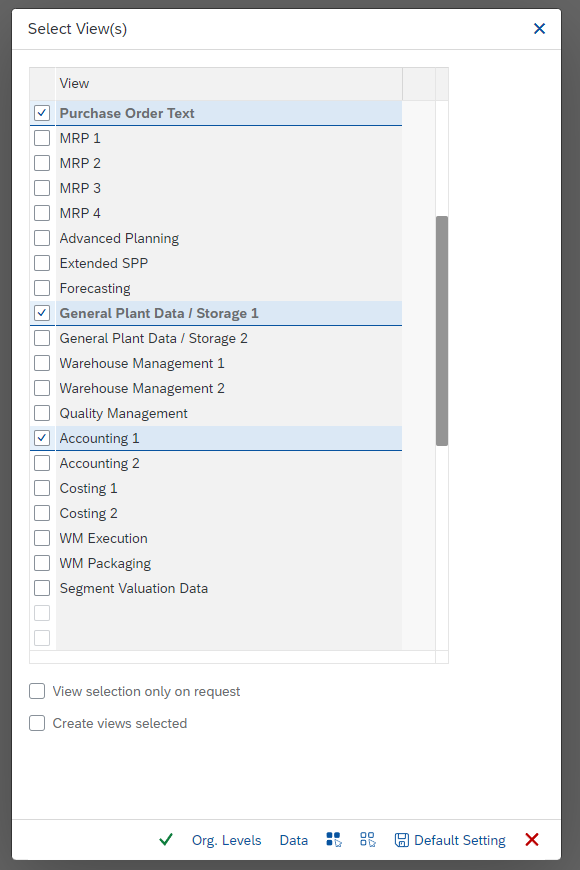
This is the view that links MM to FI/CO. It holds in particular the Valuation Class and the Price Control. The valuation class groups materials that share the same stock account: at the time of a movement, SAP reads it to find the G/L account to post. The classes allowed depend on the material type, which explains why a choice is sometimes impossible even though it looks logical.
Why the Accounting View Is Often the Last One Filled In
These fields have consequences for finance: a wrong class choice distorts the stock accounts for the whole life of the material. That is why accounting usually validates them itself. In the Valencia example, this is exactly the gap that cost half a day: the buyer had finished her part, finance had not yet done theirs.
Split Valuation
If your company values the same material differently depending on origin or quality, that is a separate feature, activated at this level: see split valuation. This article does not detail it. To understand how SAP finds the accounts from the valuation class, read account determination (OBYC).
The Other Views: Sales, Quality, Production
The Sales view carries the data sales administration (SD) needs to sell the material. It matters as soon as the material leaves the company, including as a finished product. Depending on the active modules, other views can be added: a quality view if you use QM, production management views if the material is manufactured, a classification view if you describe the material by characteristics (see the classification system). The principle is the same as for the previous views: one department, one organizational level, one maintenance status. For exact names and display order, the reference is your own system, possibly together with the official SAP S/4HANA documentation.
Who Creates What: A Realistic Creation Cycle
Back to Glass+. The Valencia plant adds a fine silica material. The sequence below is common, and each company adapts it to its own organization. Names are fictional.
-
1Marta (purchasing) opens
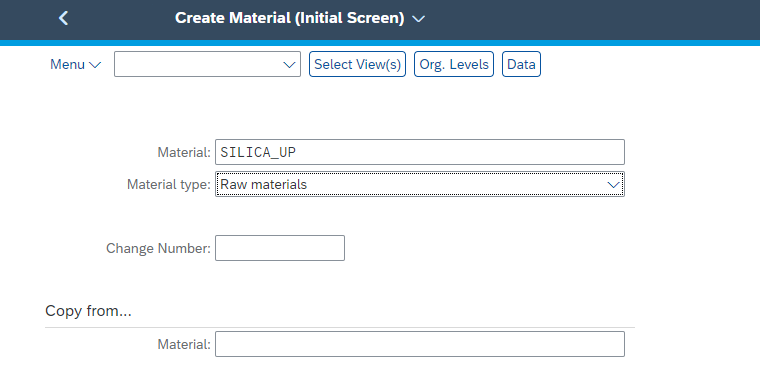
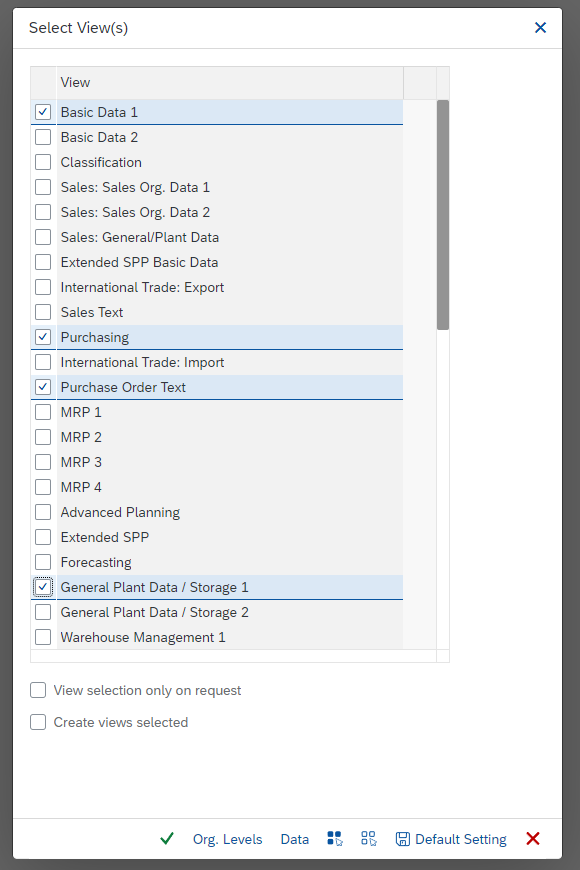
MM01enters the number, chooses the industry sector and the material type, then selects the Basic Data and Purchasing views. She indicates the plant concerned.
-
2She fills in the description, base unit and material group,
then the purchasing group and the tolerances, and saves.
-
3Planning at Valencia picks the record up in
MM02,and adds the MRP view with the safety stock and the planned lead time.
-
4Accounting adds the Accounting view:
valuation class and price control, validated with controlling.
-
5The warehouse adds the Storage view.
If the material is sold, sales administration adds the Sales view.
-
6Marta opens the record in
MM03to check that no view was left empty, then tests it with a purchase order.
Recommended Order and Who Approves
The order above follows a simple logic: identity first, then what allows ordering, then what plans, then what values. Nothing prevents you from changing it, as long as the record is complete before the first real movement. In many companies, a master data manager approves the creation; SAP does not impose this role.
When the MM Key User Gets Called
The key user usually steps in at two moments: when an order or a movement fails and the missing view has to be found, and when a department asks for help completing a record it does not know how to open. Knowing how to read the summary table above saves time in both cases.
Glass+ and its Valencia plant are also the setting of the SAP MM training simulator: there you configure the purchasing chain, from purchase requisition to invoice, then run it.
MM01, MM02, MM03 and Extending a Material
In SAP Easy Access, MM01 is found under the path below; MM02 and MM03 are in the same Material branch (Change, Display):
SAP menu path:
SAP Menu → Logistics → Materials Management → Material Master → Material → Create (General) → Immediately
MM01 creates the record: the first screen asks for the material number, the industry sector and the material type, then SAP opens the view selection, then the organizational levels dialog. MM02 is used to change or complete an existing record, MM03 to display it safely. In S/4HANA, a Fiori app for creating a material also exists, in the material master data tile group.
Extending a Material to Another Plant
Extending a material means adding views or organizational levels to a material that already exists, for example when a second plant starts managing it. SAP documentation describes a dedicated extension procedure. Transaction MM50 also lists extendable materials, meaning materials that are still missing views. This article does not detail the procedure screen by screen: try it in a test system before applying it in production.
Mass Creation
For hundreds of materials, entering them one by one makes no sense. Mass creation goes through migration tools: see the LTMC and, more broadly, data migration.
Why SAP Rejects My Material or My Movement
When a process stops, this table gives the first lead. You start from the symptom you see, and the table tells you which view to open.
| Symptom | View to check | Who fixes it (common practice) |
|---|---|---|
| Purchase order rejected on a material that exists | Purchasing, then Accounting if the material is managed by value | Purchasing, then accounting |
An expected view does not appear in the selection in MM01 | Not a view: the material type and the views chosen | MM key user, with master data |
| The movement cannot find the stock account | Accounting, valuation class | Accounting, with the MM key user |
Requirements do not show in MD04 | MRP | Planning |
| The material cannot be sold | Sales | Sales administration |
The exact wording of SAP messages varies with the logon language and the release. Always note the English text of the message: it is easier to find afterwards.
What This Article Does Not Cover
Several topics have their own page: split valuation, batch management, MRP Area and mass creation through data migration. Developments around MM01 (BAdIs, BAPIs, user exits) belong to ABAP and fall outside a key user’s scope. The precise differences between ECC and S/4HANA are not covered here.
Frequently Asked Questions
What is a material master in SAP?
The material master is the base record of a material in SAP. It brings together, in a single source, the data used by purchasing, inventory management, planning, invoice verification and accounting. It is split into views, each dedicated to a department and tied to an organizational level.
Which transaction creates a material master (MM01) and which changes it (MM02)?
MM01 creates a material master, MM02 changes or completes it, MM03 displays it. They are found in SAP Easy Access (path of MM01):
SAP menu path:
SAP Menu → Logistics → Materials Management → Material Master → Material → Create (General) → Immediately
MM01 first asks for the number, the industry sector and the material type, then the view selection and the organizational levels.
What are the views of an SAP material master and who fills them in?
The most common views are Basic Data, Purchasing, MRP, Accounting, Storage and Sales. In practice, purchasing fills in the Purchasing view, planning the MRP view, accounting the Accounting view, the warehouse the Storage view and sales administration the Sales view. This split is a company practice, not an SAP rule.
Why don’t I see all the views in MM01?
The material type, the industry sector and the active modules determine the views offered. You then choose, in the selection, the ones you want to create. If a view is missing, check the material type first, then the views you ticked, then ask your administrator whether a view was hidden in the configuration.
How do I extend a material master to another plant?
Extending a material means adding views or organizational levels to an existing material. SAP provides an extension procedure, and transaction MM50 lists materials that are still missing views. Test in a test system first, because the data specific to the new plant must be filled in.
What is the difference between a material master and a purchasing info record?
The material master describes the material itself, across all vendors. The purchasing info record links a material to a given vendor, with its price and purchasing conditions. The two complement each other: the first is created with MM01, the second with ME11.
Summary
An SAP material master is filled in by several hands: each department completes its view in turn, and the gaps show up when a process stops. Keep the summary table in mind: for each blockage, it tells you which view to check and who to call. To practice, open an existing record in MM03 in a test system and go through each of its views before creating your own in MM01. If you want to work through these topics with structured guidance, the SAP MM training covers them in a complete course.
Keep reading
SAP Movement Types: 101, 261, 311 and 551 Explained
SAP Movement Types: 101, 261, 311, 551 and What Each One Triggers Marta Vidal, a purchasing key user at Glass+ in Valencia, receives twenty tonnes of silica and opens MIGO....
 Michael A.
Storage Type Search Sequence in SAP EWM Explained
Storage Type Search Sequence in SAP EWM: How Putaway Chooses Where Stock Goes Nuria Sanz runs operations at the Glass+ central warehouse in Valencia. One morning, a putaway warehouse task...
Michael A.
How to Read MD04 in SAP: Stock/Requirements List Explained
How to Read MD04 in SAP: The Stock/Requirements List Explained Available quantity goes negative on October 19. The planner calls the supplier in a hurry, and the order she pulls...
Michael A.
SAP Account Determination: How OBYC Picks the G/L Account
SAP Account Determination (OBYC): From Goods Movement to G/L Posting You post a goods receipt in MIGO. You enter a material, a quantity, a purchase order. At no point does...
Michael A.