An SAP user presses Enter and lands on the message “You have no authorization for transaction MM03”. Three people get involved within the next minute: the user who is fuming, the SAP admin who has to figure out why, and the project manager who reminds everyone that go-live is in two days. The same scene replays in every SAP company, every week. And every time, the solution comes down to three transactions: PFCG, SU01, SU53.
This article lays out the concepts of the SAP authorization system for a key user or a junior consultant who needs to know how to read a role, understand why a user is blocked, and either unblock them or pass a clean request to the Basis team. No pure Basis angle and no advanced Security, we stay on business ground.

- An SAP role = a menu of transactions + a set of authorization objects with their permitted values. The role is created in
PFCGand assigned to a user inSU01. - When a user is blocked, the first transaction to run is
SU53. It displays the missing authorization object and the expected value. Diagnosis in 30 seconds. - Three types of roles: single (a menu + a coherent set of authorizations), composite (a grouping of single roles by business persona), and derived (inherits from a parent role with organizational restrictions specific to each entity, handy in multi-company landscapes).
- Four recurring pitfalls:
SAP_ALLleft over from dev in production, profile not regenerated after a change, star values in the objects, segregation of duties (SoD) conflicts.
What is an SAP role? (and why your key user needs one)
An SAP role is the object that determines what a user is allowed to do in the system. It combines two things: a menu (the accessible transactions) and a set of authorization objects with their values (the precise actions allowed on each transaction).
The image that works well: think of a role like an access badge in a factory. The menu = the list of doors you can open. The authorization objects = the precise conditions (for example: the warehouse door yes, but only during working hours, and only on the Luxembourg site). Without a badge, you do not get through the first door. With a badly configured badge, you can get in but you cannot do anything inside. The whole game is to calibrate each badge to the exact job of the person.
On the technical side, the role is stored in the table AGR_DEFINE and linked to a series of authorization objects through AGR_1251. The concept dates back to SAP R/3 and remains central in S/4HANA, with no paradigm break. The SAP Learning documentation on the S/4HANA authorization concept covers the full theory.
The anatomy of an SAP role in a cascade
The SAP authorization system stacks five levels. This diagram shows how the end user, at the bottom, inherits everything that is configured above:
Single, composite and derived roles: when to use which
Three types of roles coexist in SAP, and the confusion between them wastes time on every authorization project. The single role is the working unit: it carries a menu + coherent authorization objects for a precise business function. The composite role is an aggregator: it groups several single roles together but carries no authorization of its own. The derived role inherits the authorizations of a parent role while allowing organizational restrictions (BUKRS, WERKS, VKORG) specific to each legal entity: indispensable in multi-company rollouts.
In production, the three are often combined: a business parent role (for example Buyer), several organizational derived roles (Buyer FR, Buyer DE, Buyer LU) that restrict the scope per entity, then grouped into a composite by user function. On a project where multi-site preventive maintenance has to segment who does what per plant, the derived role avoids duplicating the same PM role 15 times. See the concrete illustration in business roles in preventive maintenance.
Single role
- Carries the menu and the authorization objects
- Use case: a precise function (production order confirmation, order entry, stock display)
- Granularity: 1 role = 1 function
- Reusable across several personas through a composite
Composite role
- A grouping of single roles, with no authorization of its own
- Use case: a business persona (production manager, warehouse clerk, accountant)
- Granularity: 1 composite = typically 3 to 8 single roles
- Assigned to the user through SU01
SAP does not allow an existing single role to be converted into a composite role. If you decide mid-project that a single role would be better structured as a composite, you have to create the composite separately, add the single role to it, then re-assign the users. Think carefully about the role type before generating the profile, not after.
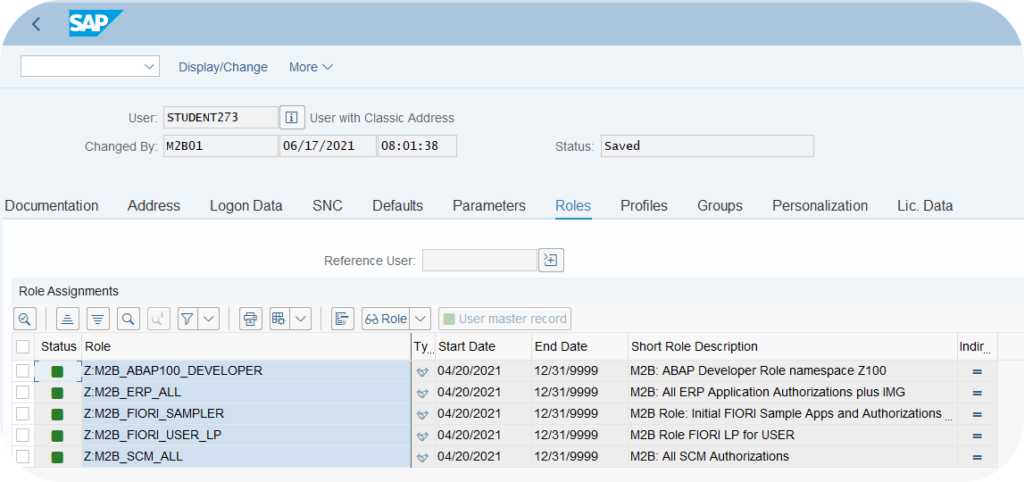
PFCG, SU01, SU53: the 3 transactions to know
Three transactions cover the vast majority of everyday operations on SAP roles and authorizations. Each one has a precise place in the workflow and a distinct target audience:
| Transaction | Who uses it | When |
|---|---|---|
PFCG | Admin / Basis / Security | Create or change a role. Seven tabs: Description, Menu, Authorizations, User, MiniApps, Personalization, Workflow (the first four are the most used). |
SU01 | Admin / Helpdesk L1 | Manage a user: create, unlock, assign or remove a role, set a validity date. |
SU53 | End user / Helpdesk | Diagnose a block. To be run right after the error, otherwise the memory buffer is lost. |
SUIM | Admin / Audit | Info system users: who has which role, who has which authorization object, who logged on when. |
SU24 | Admin / Security | SAP default authorization proposals per transaction. Serves as the basis for the PFCG configuration. |
To go further on the configuration options and the underlying tables, the help.sap.com documentation filtered on “User and Role Maintenance” covers the full mechanics of PFCG.
If you work on custom transactions, creating variants through SHD0 is complementary to authorization management: restrict access through PFCG on one side, simplify the user’s screen through SHD0 on the other.
Typical workflow: creating a business role from A to Z
The step-by-step to create a single SAP role, from the key user interview to the test account. Seven steps you will find on every authorization project:
-
1List the transactions of the job
Key user interview or field observation. Note every transaction actually used (for example
MM03,MIGO,MB52). Avoid theoretical lists like “we need all of MM”: you will end up with a role that gives access to 50 transactions of which 5 are really used. -
2Create the role in PFCG (with a copy of an SAP standard if possible)
Run
PFCG, enter a name in the Z namespace (for exampleZ_MAGASINIER_SAP), choose “Single Role”. If an SAP standard role already covers most of the need, copy it and adapt rather than starting from scratch. -
3Complete the menu (Menu tab)
Add the transactions from step 1 in the Menu tab. You can organize them in a tree structure (Menu > Production > Production Order Confirmation) so the user finds their way around. The menu determines what the user sees in their SAP Easy Access.
-
4Adapt the authorization values (Authorizations tab)
Click on “Change Authorization Data”. SAP proposes default authorization objects based on
SU24. Adapt each star value (*) to the real business value (for exampleBUKRS = 1000for the Luxembourg company code only). The SAP color code: red light = mandatory to complete, yellow light = optional but advised, green light = OK. -
5Generate the profile (padlock)
Click on the padlock icon at the top. SAP generates an authorization profile from the values entered. The profile carries an auto name like
T-XXXXXand it is the one that will actually be loaded into memory at user logon. -
6Assign the role to a user (or to several through SU10)
Either through the User tab of PFCG (fast, for a single user), or through
SU01(standard helpdesk workflow). For a mass assignment during a reorganization or a migration, useSU10: it lets you assign or remove a role for several users in a single operation, which SU01 cannot do. Remember to set a validity date, especially for temporary or intern accounts. -
7Test with a test account
Log on with the test account assigned to the role, run the full business process. If a transaction from the menu triggers a missing authorization message, run
SU53immediately after and fix it in PFCG. Iterate until the business process goes through without a block.
The 4 pitfalls that make most authorization projects fail
Four situations come up on every project and undermine the quality of the authorization system in the long run:
1. SAP_ALL left over from dev in production
The SAP_ALL profile grants all rights on all transactions. It is useful in development so as not to be blocked during configuration. The pitfall: it ends up assigned to a user in production because “we were testing, we will clean up later”, and nobody cleans up. Consequence: a business user has all SAP rights, including the ability to change financial settings or delete data. Audit failure guaranteed. The field rule: SAP_ALL in production is never, not even temporarily.
2. Profile not regenerated after a change
You change a role in PFCG, you save, you assign it to a user, and the user still does not have access. Cause: the profile has not been regenerated (padlock). The role stores the values in the database, but it is the profile that is loaded at logon. Without regeneration, the changes are not effective. Symptom: the user’s SU53 shows a missing authorization message even though the role looks fine in PFCG.
3. Star values (*) everywhere
When a consultant does not know which value to put on an authorization field, the temptation is to put * (all values). Multiplying the stars turns the role into a pseudo-SAP_ALL on the scope concerned. Across 50 users with this role, it means they can all do everything on that scope. Audit failure.
4. Segregation of duties (SoD) conflicts
The segregation of duties (Segregation of Duties) prevents a single user from combining two incompatible functions: create a vendor and approve an invoice, create a material and place a purchase order, confirm a production order and receive it. The risk is fraud or undetected error. On mature projects, an SoD audit is run every year with dedicated tools (SAP GRC or third-party equivalents). On young projects, it is often forgotten and discovered late.
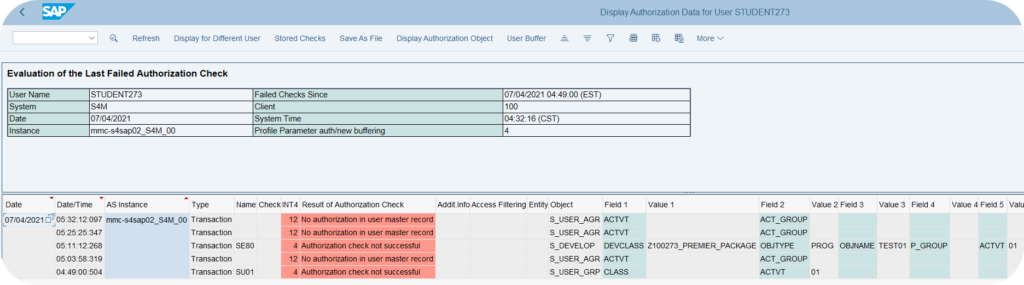
How to diagnose an authorization error in 3 steps
When a user calls saying “SAP tells me I do not have the authorization”, here is the field procedure that solves most cases in under 10 minutes:
-
1SU53 immediately after the error
Ask the user to run
/n SU53in the transaction command field right after seeing the error message. Definitely not later, the memory buffer is volatile. SU53 displays the missing authorization object and the expected value, in plain text. -
2SUIM to identify who already has the object
If you want to know who in the organization already has this authorization object with the right value, run
SUIM> Users by complex selection criteria. You quickly find a reference user whose role you can copy. -
3ST01 for advanced cases
When SU53 says nothing (or says inconsistent things) and you suspect a custom authorization check in a Z program, run
ST01in authorization trace mode. Activate the trace, have the user repeat the process, deactivate the trace, read the result. Intermediate-advanced level: not for the L1 helpdesk.

What to do when facing an authorization error
When a user runs into an authorization error, two reflexes are counterproductive: opening the code in debug to see “why it is blocking”, or temporarily requesting SAP_ALL. Both expose the organization to SOX, GDPR and ISO 27001 risks, and leave a trace that is systematically flagged by any internal or external audit.
The standard method on the Basis team’s side comes down to four steps:
-
1Reproduce the error on the user’s side
Note the transaction launched and the exact return code displayed in the SAP GUI status bar. Without a clean reproduction, the SU53 diagnosis will be empty or polluted by an earlier check.
-
2Trace the missing authorization object through SU53
Run
SU53immediately after the error. You get the last check that failed, with the object (for exampleM_BEST_BSA), the field and the expected value. This is the factual basis for everything that follows. -
3Identify the role responsible through SUIM
Open
SUIM> Roles > with authorization values and filter on the object reported by SU53. This gives the candidate role or roles to amend. If the authorization object touches an SAP classification system, the list can be wide: also filter on the user to narrow it down. -
4Decide on the amendment with the business team
Do we really need to add this authorization to this role, and therefore to everyone who has it? Or create a derived role to open it only to a sub-scope? The answer determines whether we patch the existing role through
PFCG, or whether we create a new one.
Debugging the application code to make an authorization check “pass” is never an appropriate answer in production: it bypasses the segregation of duties, masks the real need, and leaves a trace in the transports and the logs.
There are authorization bypass techniques through the SAP debugger (changing the variable SY-SUBRC to 0). These techniques are sometimes taught as a “trick”. In reality they are forbidden in production without a formal mandate: they leave a trace in ST22 or SM21, they violate the segregation of duties, and they can cost you your user accreditation if the audit detects them. If you are blocked, request the authorization. Do not bypass.
The SAP authorization system is one of those topics you learn early and keep discovering for 10 years. The basic concepts (single role, composite role, profile, authorization object, values) are enough for daily work. The pitfalls (SAP_ALL, profile not regenerated, stars, SoD) are enough to recognize a project going off the rails before it is too late. And the three transactions PFCG, SU01, SU53 cover the bulk of everyday operations. To go further on the concrete creation of roles, the official SAP documentation on the creation of authorization roles details the options by context.
Frequently asked questions
What is an SAP role?
An SAP role is the object that determines what a user can do in the system. It combines a menu (the accessible transactions) and a set of authorization objects with their values (the precise actions allowed on each transaction). The role is created in PFCG and assigned to a user through SU01.
What is the difference between a single role and a composite role in SAP?
A single role carries a menu and authorization objects for a precise business function (for example production order confirmation). A composite role is a grouping of several single roles by business persona (for example production manager), without carrying authorizations of its own. You assign the composite to the user, and SAP combines the authorizations of the single roles it contains.
What is the PFCG transaction used for?
PFCG (Profile Generator) is used to create and change SAP roles. Seven tabs organize the work: Description (metadata), Menu (accessible transactions), Authorizations (authorization objects and values), User (assignment to users), MiniApps (workplaces, little used in S/4HANA), Personalization (user parameters) and Workflow (approval integration). The first four concentrate the daily use. Any role change must be followed by a regeneration of the profile to become effective.
How do you find out why a user does not have access to an SAP transaction?
Ask the user to run transaction SU53 immediately after seeing the authorization error message. SU53 displays the missing authorization object and the expected value. The buffer is volatile, so it must be run in the same session right after the error. For more complex cases, ST01 in authorization trace mode lets you capture all the authorization checks of a user process.
What is the SU53 transaction?
SU53 is the transaction that displays the last failed authorization check for the current user. It indicates the authorization object involved, the field that blocked, and the value the user should have had. It is the number 1 diagnosis tool when a user is blocked. To be run right after the error, otherwise the memory buffer is lost.
Why is SAP_ALL forbidden in production?
SAP_ALL is the profile that grants all rights on all SAP transactions. In production, assigning it to a business user means they can do anything, including changing financial settings, deleting data or bypassing the approval processes. Audit failure almost guaranteed. The only tolerated exceptions: an emergency account of the firefighter type, traced and time-limited, with an explicit activation workflow.
What is SoD (segregation of duties) in SAP?
The segregation of duties prevents a single user from combining two incompatible business functions, such as creating a vendor and approving its invoice, or creating a material and placing the purchase order. The goal is to prevent fraud and undetected error. On mature projects, an SoD audit is run annually with SAP GRC or a third-party tool. On young projects, it is often forgotten and discovered late, during an external audit.
Keep reading
SAP EWM Master Data Integration: ERP Sync with CIF, ALE, DRF
Since the move to S/4HANA, the question "how do you synchronize data between SAP ERP and EWM" no longer has the same answer, and many projects still get it wrong...
 Michael A.
SAP Serial Number: OIS2 setup and material vs equipment
A SAP serial number is the unique identifier attached to one specific physical unit of a given material. It is the tool for unit-level traceability, the foundation for individualized after-sales...
 Pierre B.
SAP PRT: Production Resources and Tools
On an industrial site, the tools shared between production lines are often invisible in SAP. Jigs, probes and technical drawings move from one order to the next, but nobody knows...
Pierre B.
SAP WM 2 Step Picking: Optimize your order-picking processes
2-step picking cascade in SAP WM 2-step picking SAP WM: the full cascade From group creation to the dispatched delivery Step 0: Group creation VL06P (deliveries) or LT41 (transfer requirements)...
Michael A.