SAP availability check (ATP): why your sales order is not confirmed
The stock is right there on your screen, the sales rep is calling, and the confirmed quantity on the line stays at zero? The answer fits in one sentence: the SAP availability check does not read your stock, it calculates an available quantity over a scope decided by configuration. That scope includes things you cannot see on screen, and leaves out others you assumed were counted. This topic cuts across three modules at once: the sales order (SD) triggers the check, but the calculation also counts production orders (PP) and inventory management (MM) movements. Let’s look at where the verdict is written, with CO09.
- The reversal: “available” in the ATP sense is not a reading of your stock, it is a calculation over a configured scope.
- Two parameters decide everything: the availability checking group (carried by the material master) and the checking rule (carried by the operation).
- Their combination points to a scope of check: the list of stocks, receipts and issues actually counted.
- Where to read the verdict:
CO09, with the material, the plant and the checking rule. You read the cumulated ATP quantity and the line that consumes the quantity. - Three classic cases: the total replenishment lead time (distant or optimistic confirmations), check at order entry versus at delivery, and complete or partial delivery on the customer side.
- Your job as a key user: observe, document with
CO09, raise a precise request. Changing a scope affects every material carrying the group.
The starting misunderstanding: SAP is not looking at the stock you are looking at
“Available” in the ATP sense is not a reading of your stock overview. It is a calculation. SAP starts from the stocks, adds the planned receipts, subtracts the planned issues, and returns a quantity available to promise (ATP) on a precise date.
The point that unlocks everything is elsewhere: the list of elements entering that calculation is not a constant. It is a parameter. The SAP documentation is explicit on this: you can define the stock types kept (safety stock, stock in transfer, stock in quality inspection, blocked stock), the receipts kept (purchase orders, production orders) and the issues kept (sales orders, reservations coming from inventory management).
The list of counted elements is not a property of the material, nor a universal SAP rule: it is a parameter. As long as you look for the explanation in the stock, you are looking in the wrong place. Look for it in the scope.
Direct consequence, and this is the one that surprises: two materials sitting in the same warehouse can behave differently at confirmation. Not because their stock differs, but because they do not carry the same configuration.
One word to clear up a frequent confusion: if the quantity is confirmed but the order is not moving forward, this is not your topic. Look at the credit block instead, the other big cause of a stalled sales order.
The two parameters that decide everything: checking rule and scope of check
The mechanism rests on a three-layer cascade, none of which shows up on your sales order. That is exactly why it is missing from your diagnosis.
The availability checking group (material master side)
The material master carries a field that decides whether a check happens and of which type. In the SAP documentation, it sits on the Sales: General/Plant Data view, in the Availability check field, and it is valid for a given plant. That same group is also used on the requirements planning data side.
Remember the principle rather than the location: the group travels with the material, not with the sales order. Two materials, two groups, two behaviours. Go and read the value in your own system before concluding.
The checking rule (the operation that triggers)
The checking rule, for its part, is attached to the operation. Creating a sales order, creating a delivery, issuing goods, releasing a production order: each of these operations is assigned its rule in customizing. That is why the same material can answer differently depending on when you ask it.
The scope of check (what SAP really counts)
Neither the group alone nor the rule alone decides: it is the combination of the two. For a given group and rule pair, customizing defines the stocks, the receipts and the issues taken into account in the check. That list is the scope of check.
Every element then falls on one side or the other. And the same element can switch columns from one configuration to another: that is exactly where the gap opens up between your stock and your confirmed quantity.
What the scope counts
- The stock types kept by the configuration
- The planned receipts kept: purchase orders, production orders
- The planned issues kept: sales orders, reservations
- The total replenishment lead time, as long as the dedicated checkbox does not switch it off
What the scope ignores
- The stock types unticked: safety stock, stock in transfer, stock in quality inspection, blocked stock
- The purchase orders, if they are not kept as receipts
- The reservations, if they are not kept as issues
- Any element outside the scope: present in the system, absent from the calculation
A single checkbox in that list sometimes explains an entire day of discussion. Is stock in quality inspection counted? Are purchase orders counted? Two different answers, two different confirmed quantities, for rigorously identical physical stock.
This is also why stock that is present is not always stock that can be confirmed: it exists physically, but sits in quality inspection and the scope excludes it. If you work with batch management, you will meet this case regularly.
Why this is an SD, PP AND MM topic all at once
The availability check is the exact point where three modules touch. That is what makes it hard to diagnose when you only know one of the three.
SD triggers it and carries the result. The sales order launches the check, and it is on its line that the confirmed quantity and the date are written. The check runs at plant level, for a very precise date: the material availability date, which the system calculates backwards from the delivery date requested by the customer.
PP feeds the scope. Production orders can count as planned receipts in the calculation. And the requirements coming from your sales orders are passed to requirements planning, which then decides how to procure. If you work with MRP areas, that planning scope also conditions what the check will find.
MM supplies the raw material of the calculation. Stock levels, stock types, purchase orders as receipts and reservations are exactly what the scope keeps or ignores. The same check runs outside SD too: when creating a reservation, on a goods issue, on a production order.
That is the real difficulty of the key user role: your sales order is not confirmed because of something happening outside your module. It is what makes building skills across the whole flow more rewarding than going deeper module by module.
Diagnosing with CO09: the availability situation line by line
The CO09 transaction displays the availability situation as SAP calculates it. Not your stock: the result of the calculation, with the elements actually kept. It is the tool that makes the gap visible.
-
1Open the availability overview (CO09)
In the SAP menu, the path goes through Logistics, Materials Management, Inventory Management, Environment, Stock, then Availability Overview.
-
2Enter the three input fields
The material, the plant, and the checking rule. That third one is the one people forget: it is what determines what the screen is going to count.
-
3Read the cumulated ATP quantity
This is the verdict. If it is zero on the date you care about, SAP has nothing to confirm, whatever stock you see elsewhere.
-
4Identify the line that consumes the quantity
The screen lists the elements kept, receipts and issues, over time. Look for the one absorbing the stock ahead of your sales order.
-
5Compare with what you thought was available
The gap between your stock overview and this list is exactly the scope of check. What is missing from the screen is not absent from the system: it is excluded from the calculation.
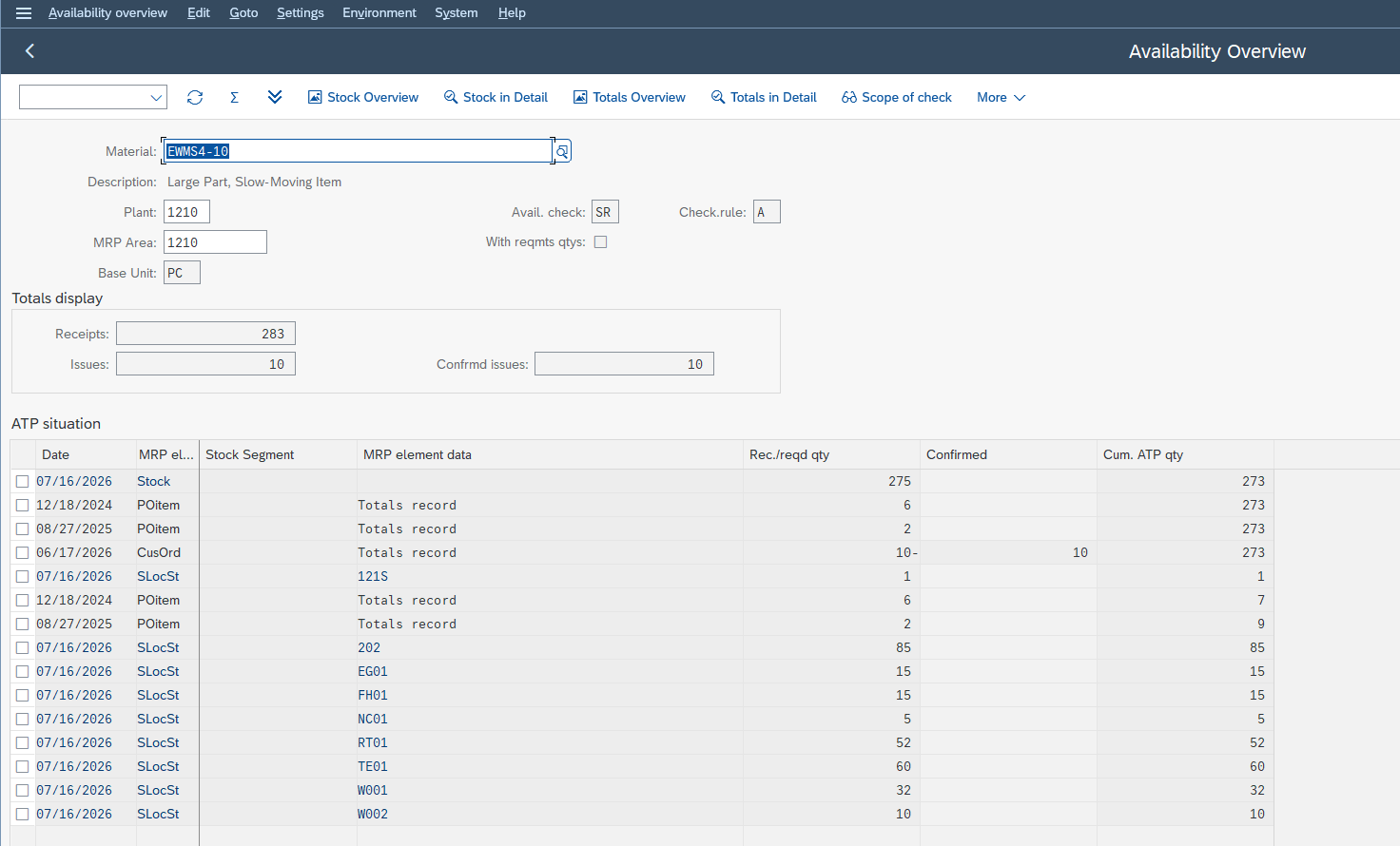
CO09 does not show all the stock: it shows the counted stock. The difference between the two is the answer to your question.
The cases that come up most often (and what they mean)
Three symptoms come back on a loop, with three distinct causes. None of them is a malfunction.
“It confirms me in 3 months”: the total replenishment lead time
The check does not only answer yes or no. When the requested date cannot be met, the system calculates forward the next date at which the quantity becomes reachable, then creates an additional schedule line with that new date. A distant date is therefore the symptom of a receipt expected late, not of a refusal.
The total replenishment lead time is the other half of the explanation, and the most counter-intuitive parameter of the lot. SAP considers that the material will be available at the latest once that lead time expires: any requirement whose material availability date falls after that lead time is therefore confirmed. Without stock, without a purchase order, without anything. That is what explains optimistic confirmations, and a dedicated checkbox in the scope of check switches it off.
“It was confirmed yesterday, not today”: check at order entry or at delivery
Creating an order and creating a delivery are two distinct operations. They therefore carry two distinct checking rules, which can point to two different scopes. A quantity confirmed at order entry may well no longer be confirmed at delivery, without anything having moved physically.
A confirmation you had can also be lost when the system reschedules quantities across competing orders. That is a topic of its own, with its own transactions, and it is not today’s.
“It confirms nothing even though there is stock”: complete or partial delivery
The most discreet of the three, because the cause is not in the material but in the customer. The delivery agreement is maintained in the partner data, per sales area, and is refined in the customer-material info record, which takes priority.
The consequence is clear-cut. If the customer requires a complete delivery, quantities cannot be split: until the full amount is available on one same date, you get nothing. The same material, the same stock, with partial deliveries allowed, would have given an immediate partial confirmation and then a second one later. It is not the stock that changed, it is the customer agreement.
Where it is configured: the SPRO path
The availability check is configured in customizing, via the SPRO transaction. The full path, as the SAP documentation gives it:
SPRO path:
SAP Customizing IMG → Sales and Distribution → Basic Functions → Availability Check and Transfer of Requirements → Availability Check → Availability Check with ATP Logic or Against Planning → Define Checking Groups
That path is not the only entry point: the same settings show up on the Production side, and the scope applicable to goods movements and reservations is configured under Materials Management. Consistent with what we saw above, the availability check belongs to no module in particular.
The scope is defined for a group and rule combination. Changing it affects every material carrying that group, on every operation using that rule. An adjustment made to unblock one order can therefore shift many others. It is not a question of authorizations, but of blast radius.
In production, it is therefore not your job to touch that setting.
Your job is upstream, and it is worth more than it looks: observe, document the case with CO09, and raise a precise request. “Group X with rule Y excludes stock in quality inspection, and here is the order where you can see it” saves a considerable amount of time for whoever will handle the topic.
Classic ATP or aATP: what changes in S/4HANA
The classic availability check has not disappeared in S/4HANA. Added to it is aATP (Advanced Available-to-Promise), an evolution that extends the check with additional functions.
I am deliberately staying back on the functional detail: the exact scope of aATP depends on your release and on what is activated at your site. For that detail, the reference is the SAP documentation on product availability check, which is authoritative and follows the releases.
The reasoning in this article, a configured scope rather than a reading of stock, remains the right starting point in both cases. SAP describes ATP logic as the main strategy of the material availability check: others exist, such as the check against product allocations.
FAQ
The stock is there, why does SAP not confirm my sales order?
Because SAP is not looking at physical stock: it calculates an available quantity over a scope defined by the scope of check. Part of your stock may already be consumed by other orders or reservations, or simply excluded from the calculation, like stock in quality inspection or blocked stock.
What is the CO09 transaction for?
To display the availability situation as SAP calculates it, with the elements kept by the checking rule you enter. You read the cumulated ATP quantity and the line that consumes the quantity. It is the tool that makes visible the gap between your stock and the available quantity.
What is the difference between the checking rule and the scope of check?
The checking rule is attached to the operation: creating an order, creating a delivery. The scope of check is the content, that is, the list of stocks, receipts and issues counted. It is defined for the combination of the group carried by the material and the rule.
Can a key user change the availability check themselves?
Not in production: this is customizing. And the scope is not specific to one material: it applies to all those carrying the same checking group. The key user diagnoses, documents the case, and passes on a precise request. The change goes through the consultant.
Why is my sales order confirmed but on a distant date?
The check does not only answer yes or no. When the requested date is not tenable, the system calculates forward the first date where the quantity becomes reachable according to the planned receipts in the scope, and creates a schedule line on that date. The distant date is the symptom of a receipt expected late.
Why does SAP confirm a quantity when there is no stock at all?
Look at the total replenishment lead time. SAP considers that the material will be available at the latest once that lead time expires, and therefore confirms any requirement whose material availability date falls beyond it. This behaviour is switched off in the scope of check.
Is the availability check different in S/4HANA?
S/4HANA brings aATP (Advanced Available-to-Promise), which extends the classic availability check. The exact scope depends on your release and on what is activated. The official SAP documentation is the right reference for the functional detail.
The reflex to build
The availability check does not lie to you and does not bug. It applies a rule someone wrote, over a scope you did not choose and that nothing displays on the sales order screen.
So do it now, on your own case: take the material giving you trouble today, open CO09 with its plant and its checking rule, and look for the line that consumes the quantity. You are going to find an element you thought was counted and that is not. That is the moment configuration stops being something you just put up with.
Keep reading
SAP Movement Types: 101, 261, 311 and 551 Explained
SAP Movement Types: 101, 261, 311, 551 and What Each One Triggers Marta Vidal, a purchasing key user at Glass+ in Valencia, receives twenty tonnes of silica and opens MIGO....
 Michael A.
Storage Type Search Sequence in SAP EWM Explained
Storage Type Search Sequence in SAP EWM: How Putaway Chooses Where Stock Goes Nuria Sanz runs operations at the Glass+ central warehouse in Valencia. One morning, a putaway warehouse task...
Michael A.
How to Read MD04 in SAP: Stock/Requirements List Explained
How to Read MD04 in SAP: The Stock/Requirements List Explained Available quantity goes negative on October 19. The planner calls the supplier in a hurry, and the order she pulls...
Michael A.
SAP Account Determination: How OBYC Picks the G/L Account
SAP Account Determination (OBYC): From Goods Movement to G/L Posting You post a goods receipt in MIGO. You enter a material, a quantity, a purchase order. At no point does...
Michael A.