SAP output determination: how SAP decides which document to print or send (NACE)
A SAP output document never fires “just because”. When a sales order goes out as an email confirmation, when an invoice prints on the right printer, or when a shipping notification is sent to the customer via EDI, the system made a decision. And that decision follows a precise mechanism, the very same one that handles pricing. This is exactly what SAP output determination (output management) is about, and the entry point to this mechanism on the configuration side is called NACE.
If you are a key user or a junior SD consultant, sooner or later you will run into the question: “why did this document go out, and why is that one not going out?”. This article answers from the functional side, following the thread of “how SAP decides”, not “how I build a form”. We won’t touch SAPscript, Adobe Forms or ALE. We look at the decision logic.
- SAP document output is driven by the condition technique, exactly like price determination.
- Transaction
NACEis the entry point for configuring classic output management (output types, access sequences, condition tables and condition records). - The output type says what to send, the condition record says through which medium and to which recipient.
- The
NASTtable stores the output decision and the message status (to be processed, processed, in error). - A document that “won’t go out” is often just waiting for its job: the program
RSNAST00sweeps the pending messages. - To diagnose the “why”, the official tool is the determination analysis, the exact equivalent of the pricing analysis.
The business problem: at a given moment, SAP must decide what to send, to whom, through which channel
Take a sales order you have just created. At that instant, SAP must answer three questions, at the same time and automatically:
- What? Should a document be sent out, and which one (an order confirmation, an acknowledgment, a notification)?
- To whom? Which recipient, that is, which partner function (the sold-to party, the goods recipient, the payer)?
- How and when? Through which output medium: print, email, EDI, fax? And at what time: right now, or later through a job?
Nobody hard-codes these answers. If we did, every customer, every sales organization, every document type would require an exception in the program. It would be unmanageable. SAP therefore needs a configurable mechanism that looks at the document context and derives the correct output. You may already know this mechanism under another name.
SAP’s answer: the condition technique, the same one used for pricing
SAP documentation is explicit on this point: just like price determination and text determination, document output is driven by the condition technique. This is the heart of the article, and it is also the best learning shortcut I can give you.
If you have already understood the condition technique explained in price determination, you already know 90 percent of output management. Same building blocks, in the same order, with the same vocabulary. Only the object changes: instead of determining an amount, SAP determines which output message to propose and with which properties.
Here is the term-for-term mapping between the two worlds:
| Price determination (SD) | Output management (document output) | Shared role |
|---|---|---|
Condition type (e.g. PR00) | Output type (e.g. BA00) | The object SAP is trying to determine |
| Access sequence | Access sequence | The search strategy, from specific to general |
| Condition tables | Condition tables | The possible combinations of key fields |
| Condition records (price) | Output condition records | The concrete data maintained by the business |
| Pricing procedure | Message determination procedure | The ordered list of what SAP must look for |
Remember this mapping. If you can read a pricing analysis, you can read an output analysis. The mental gymnastics are identical: you are, in fact, learning the same technique twice.
The building blocks of message determination: output type, access sequence, tables, records, procedure
Let’s go through each building block in the order SAP uses them.
The output type
The output type is the basic unit. It is what represents “an order confirmation”, “a printed invoice”, “an EDI shipping notification”. In standard SD, the order confirmation often carries the code BA00. A condition record attached to an output type holds its properties in a given context: the output medium, the timing, the language, and the recipient partner function.
The access sequence
The access sequence is the search strategy. The rule, written in black and white in the SAP documentation, is to search “from specific to general”. Concretely, each step of the sequence points to a condition table, and SAP scans them in order: first the finest combination (this specific customer, this sales organization), then broader combinations if nothing was found. As soon as a condition record matches, SAP stops. Exactly like for pricing.
The condition tables
Each condition table defines a combination of key fields on which a record can exist. For example: one record per sales organization, or one record per customer and document type. It is this structure that makes output configurable without touching code: you add a combination, not a software exception.
The output condition records
This is the master data the business maintains. An output condition record says, for example: “for customer C650 in sales organization 1010, send the confirmation BA00 by fax”. This is where the medium and recipient are concretely decided. The consultant sets up the mechanism; the key user, on the other hand, mostly lives in the condition records, because that is where you handle a specific customer case without requesting development.
The message determination procedure
The procedure is the ordered list of output types SAP must evaluate for a given object (the order header, or an item). It is assigned by document type. It is the direct equivalent of the pricing procedure: without an assigned procedure, SAP doesn’t know what to look for, and nothing goes out.
NACE: the transaction where everything is set up
What is transaction NACE for? It is the single entry point for configuring classic output management. From NACE, you choose the relevant application (for example V1 for sales, V3 for billing) then you access the entire condition-technique tree: the output types, the access sequences, the condition tables, the procedures, and the assignment to document types. It is the screen where the consultant assembles the mechanism described above.
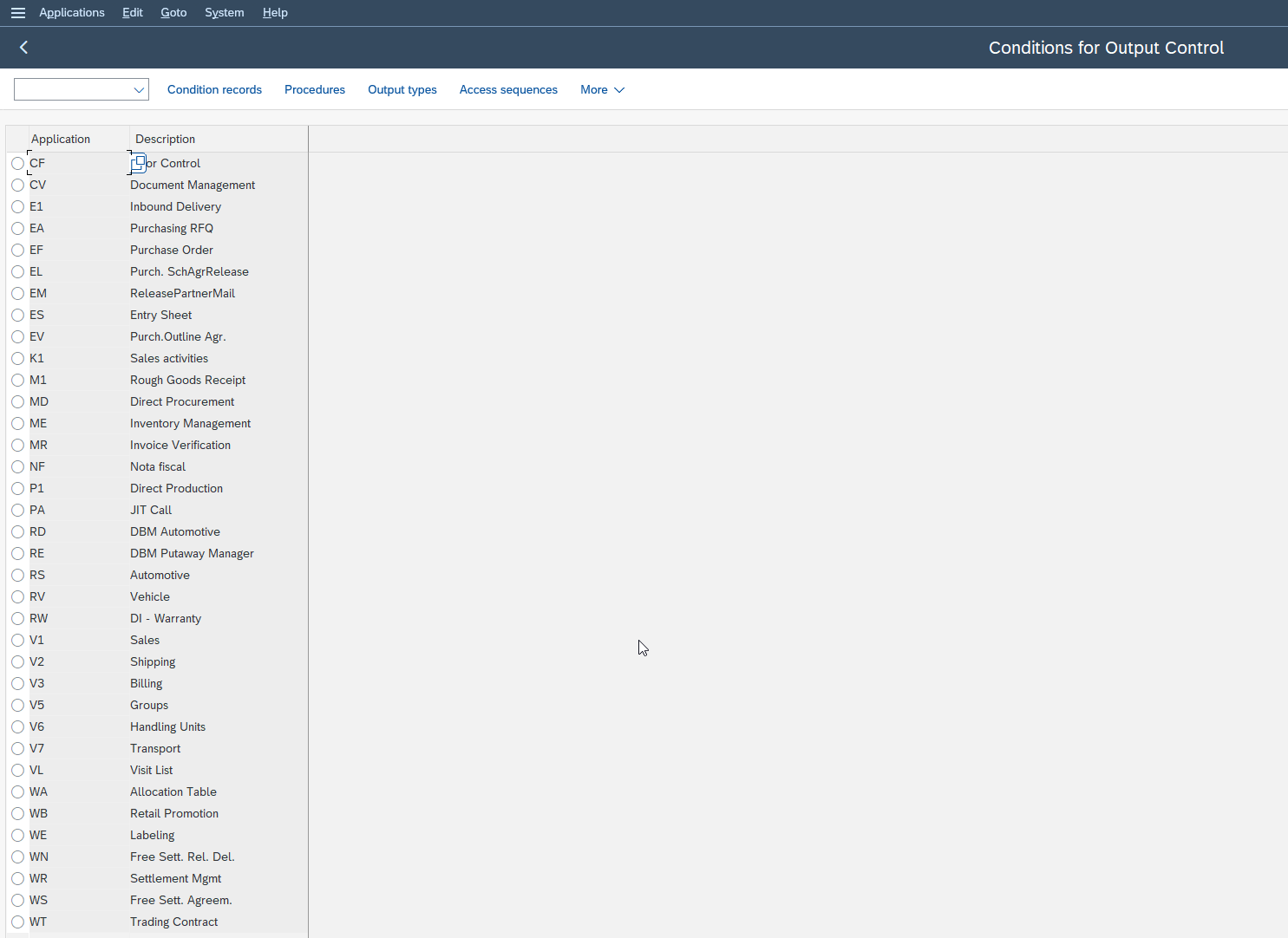
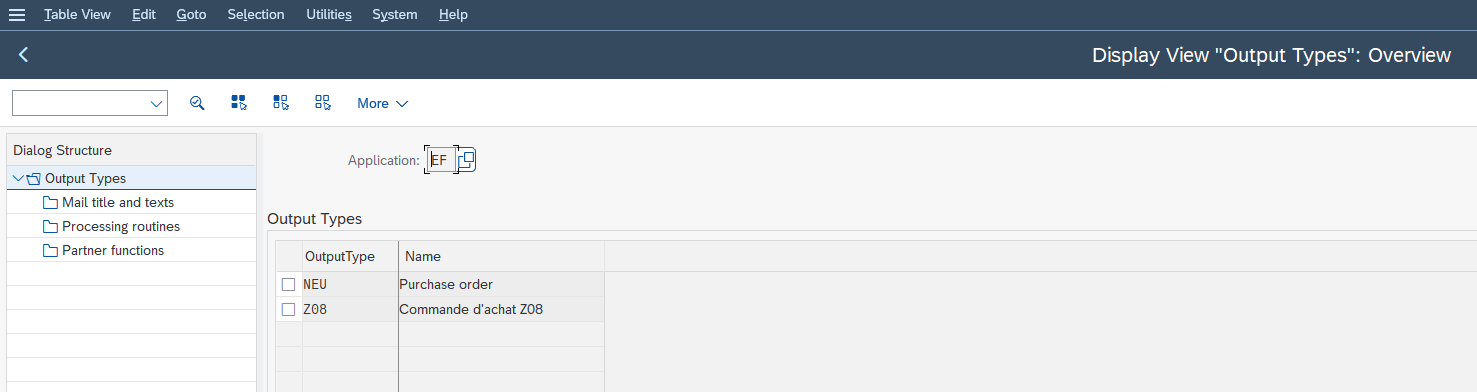
An important point of vocabulary about SAP S/4HANA versions. Alongside the classic output management driven by NACE, SAP offers New Output Management, which no longer relies on the condition technique but on a rules engine, BRFplus (Business Rule Framework plus), with decision tables instead of access sequences and condition records. It is configured elsewhere, through the Cross-Application components and activation per application object type, for example SALES_DOCUMENT. The two worlds coexist. To know which one applies, you first check whether New Output Management is active for the object concerned. As long as it is inactive, it is indeed the classic NACE mechanism that drives the output. For the official details of both worlds depending on your version, the official SAP S/4HANA on-premise documentation is the authority.
For a key user, the good news is that the decision logic stays the same in both cases: SAP looks at the document context, from the most specific to the most general, to derive what to send, through which channel and to whom. Only the engine and the location of the configuration change.
Medium and timing: through which channel and at what time SAP sends the document
Once SAP has determined which output type to propose, two properties of the condition record drive the actual output.
The output medium says how the document is sent. The SAP documentation lists print, email, EDI (Electronic Data Interchange, for automated exchanges between systems), fax. Concretely: an order confirmation can go out as print for one customer, and as EDI for another, simply because their condition records differ. That is data, not development.
The dispatch time (timing) says when the document goes out. SAP offers several standard times. The document can be sent automatically as soon as the object is saved (immediate send), or queued to be processed by a program that runs at regular intervals (by job). The standard program RSNAST00 is precisely the one that sweeps the pending messages and sends them on the next run. This is a distinction that saves a lot of diagnostic time: a document that “won’t go out” is very often a perfectly determined document, simply waiting for its job.
NAST: the table where SAP stores its decision and the message status
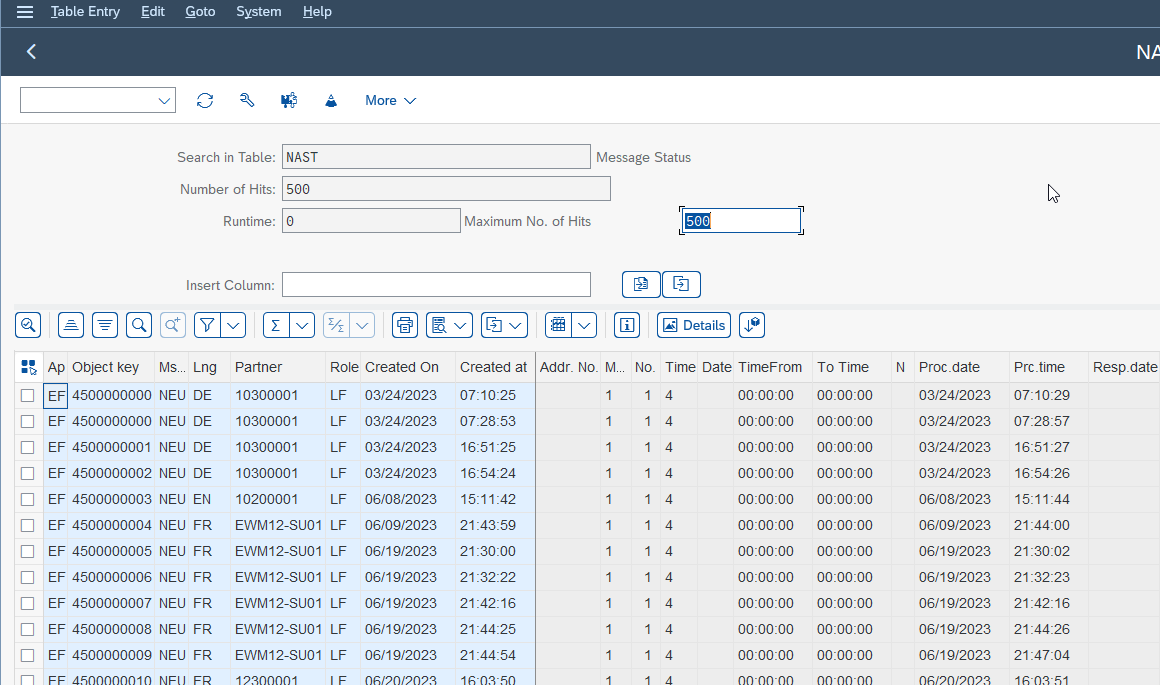
When SAP has decided to send a message for a document, it stores that decision and its status in the message table, NAST. Each record carries a processing status: to be processed, processed successfully, or in error. It is the memory of the output decision.
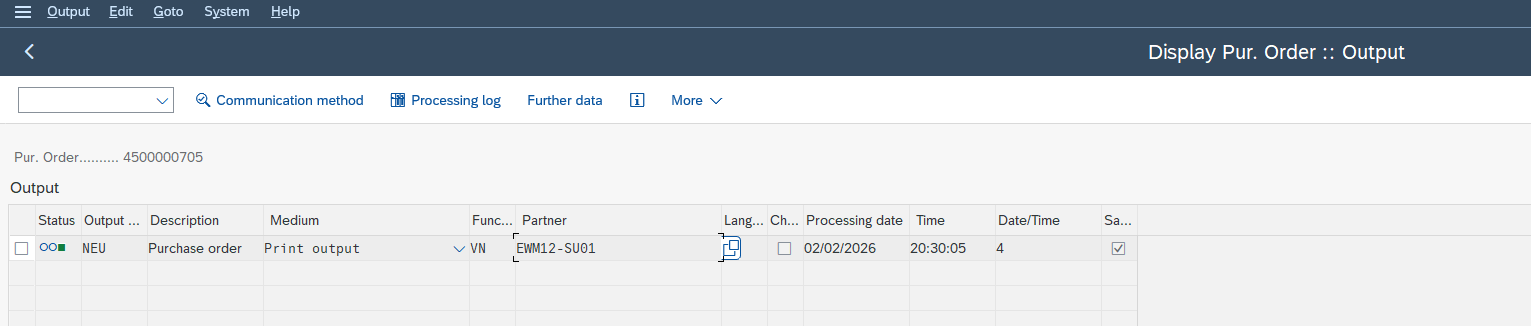
For the key user, NAST and a document’s output screen are the first two diagnostic reflexes. On the document itself, the output screen lists the determined messages and their status. And SAP provides a dedicated analysis function: from a sales document, you open the output screen then the determination analysis, following this menu path:
Menu path:
Extras → Output → Header (or Item) → Edit → Goto → Determination analysis
This analysis tells you why an output type was proposed, or why it was not. It is the exact equivalent of the pricing analysis. When people ask me “why won’t my SAP output document go out”, my first answer is almost always: run the determination analysis, then look at the status in the document output.
End-to-end practical case: from the order to the sent document
Let’s follow an order confirmation, from the save click to the sent document. This is the sequence SAP runs, and it is also the one you trace backwards when something goes wrong.
-
1Procedure identification
You save the sales order. SAP looks at the document type and identifies the message determination procedure assigned to the header.
-
2Launching the access sequence
For each output type in the procedure (for example
BA00), SAP launches the access sequence and scans the condition tables from specific to general. -
3A condition record matches
As soon as a condition record matches the context (this customer, this sales organization), SAP retains the output type with its properties: output medium, timing, partner function.
-
4Recording in NAST
SAP creates the message record in
NAST, with its initial status. -
5Applying the timing
Depending on the timing, the message goes out immediately, or waits for the send program to run (
RSNAST00for job processing). -
6Transmission on the medium
The document is transmitted on the right medium (printer, email, EDI) to the retained partner.
If nothing came out in the end, you replay this chain backwards: the NAST status first, then the determination analysis to see where the search failed, then the missing or mistargeted condition record. Nine times out of ten, the problem is a missing condition record or a misunderstood timing, not a bug.
Common mistakes and control points for the key user
Here are the confusions I see most often with juniors, and the associated control reflex.
- Confusing “not determined” with “not sent yet”. A message that is determined but waiting for a job is not an error. Check the timing before panicking.
- Looking for the problem in the form. If no message appears in the document output, the issue is in the determination (condition technique), not in the SAPscript or the Adobe form. The form only comes into play once the message is determined.
- Forgetting the partner function. An output type can be perfectly determined but never arrive if the recipient partner has no email address or no valid contact details for the chosen medium.
- Ignoring the determination analysis. It is the tool SAP provides specifically to answer “why”. Don’t guess, run the analysis.
- Thinking that
NACEand New Output Management are mutually exclusive. Both coexist on the same system (New Output Management relies on a BRFplus rules engine, not on the classic condition technique). Check which one is active for your object before looking in the wrong place.
Frequently asked questions
How does SAP decide which document to print or send?
SAP uses the condition technique. When a document is saved, it reads the message determination procedure, launches the access sequence over the condition tables, and as soon as a condition record matches the context, it retains the output type with its output medium, timing and recipient.
What is transaction NACE for in SAP?
NACE is the entry point for configuring classic output management. There you set up, per application (sales, billing), the output types, access sequences, condition tables, procedures and their assignment to document types.
What is the difference between output type, access sequence and condition record?
The output type is what SAP tries to propose (a type of document). The access sequence is the search strategy, from specific to general. The condition record is the concrete data maintained by the business that says, for a specific context, which medium and which recipient to use.
Why won’t my SAP output document go out, and how do I check its status?
First check the message status in the NAST table and in the document output screen. If the message does not appear, run the determination analysis from the output screen to see why no output type was retained. If it appears but did not go out, look at the timing: it may be waiting for its job.
Do price determination and output management use the same mechanism?
Yes. Both rely on the condition technique: access sequence, condition tables, condition records and procedure. Whoever can read a pricing analysis can read an output analysis. It is the same reflex.
In conclusion
SAP output management is not a black box: it is a decision, made by the condition technique, exactly like pricing. Once you see NACE, the output types, the access sequence, the condition records and the NAST table as a single decision mechanism, diagnosis becomes mechanical rather than magical. The next time a document won’t go out, don’t search at random: open the determination analysis and look at the NAST status. And if you want to anchor the mechanism for good, re-read SAP SD price determination keeping in mind that you are, in fact, learning the same technique twice.
Keep reading
How to Read MD04 in SAP: Stock/Requirements List Explained
How to Read MD04 in SAP: The Stock/Requirements List Explained Available quantity goes negative on October 19. The planner calls the supplier in a hurry, and the order she pulls...
 Michael A.
SAP Account Determination: How OBYC Picks the G/L Account
SAP Account Determination (OBYC): From Goods Movement to G/L Posting You post a goods receipt in MIGO. You enter a material, a quantity, a purchase order. At no point does...
Michael A.
SAP Document Flow: Trace an Invoice Back to Its Order (VBFA)
SAP Document Flow: Trace an Invoice Back to Its Order (VBFA) It is 9:10 in the morning. A customer is disputing an invoice and wants your answer before noon. You...
Michael A.
SAP Object Locked by Another User: What It Means (SM12)
SAP Object Locked by Another User: What It Means (SM12) An object locked by another SAP user and an object you have no rights on feel exactly the same: everything...
Michael A.