When you first discover SAP WM, one question keeps coming back: “why learn the structure of a module everyone says will disappear with S/4HANA?” It is a fair question, and the answer is reassuring. What we call the SAP WM warehouse structure, meaning the way SAP breaks a warehouse down into levels, is not folklore doomed to die. It is a foundation. It survives almost identically in Stock Room Management, the lightweight option in S/4HANA, and it even serves as a point of comparison for understanding EWM, the strategic successor. In other words: getting this structure straight once gives you the basics for all three worlds. Let us lay it out cleanly.
Why SAP models a warehouse in levels
Before listing the levels, you need to understand why they exist. SAP did not break the warehouse into layers for the pleasure of complexity. Each level answers a concrete operational need.
The first is granularity. If the system only knows “there are 500 pieces of this material somewhere in the storage location”, it cannot tell you where to go and pick them up. By breaking the warehouse down into zones, then into bins, SAP makes every quantity addressable. You go from an accounting balance to a physical position. It is this precision that lets you guide a forklift operator to the right place instead of leaving them to search the aisles.
The second need is putaway and picking strategies. When goods arrive, where do you put them away? Near the shipping zone if they move fast, up high if they are slow, in a cold zone if they are sensitive. When an order goes out, which bin do you pick from first? These automatic decisions only make sense if the warehouse is structured into coherent zones. Without levels, no strategy is possible.
The third is zone-level inventory and traceability. With a fine structure, you can count an aisle without blocking the whole warehouse, track the movement history bin by bin, and know at any moment what is where. So the structure is not an administrative constraint: it is the prerequisite that makes the warehouse controllable. Everything else in WM rests on it.
The boundary between Inventory Management and Warehouse Management
Before getting into the WM levels, you need to draw a boundary that many beginners confuse: the one between Inventory Management (IM) and Warehouse Management (WM). These are two different layers, answering two different questions.
Inventory Management reasons at the storage location level. A storage location is a stock subdivision attached to a plant. It tells you how much of a material you have at a given logical place: 500 pieces in the production storage location, 200 in the central one. But it does not know which physical bin they sit in. At this level, stock is a balance, not a position.
SPRO path:
Enterprise Structure → Definition → Materials Management → Maintain storage location
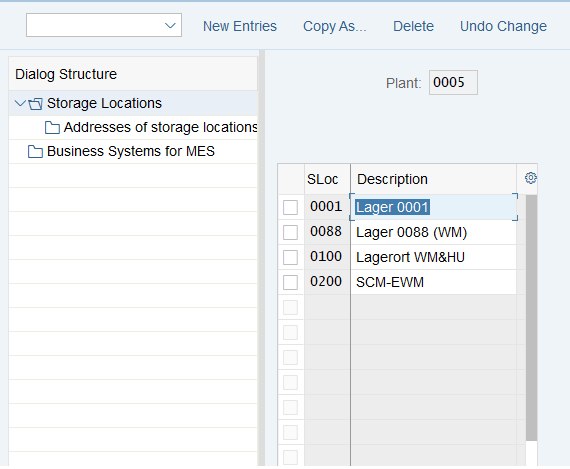
Warehouse Management, on the other hand, reasons at the warehouse number level. This is where you move from “how much” to “where exactly”. WM takes a storage location managed in WM and details it bin by bin. The quantity IM sees as a block of 500 pieces becomes, in WM, a concrete breakdown: so much in this bin, so much in that one.
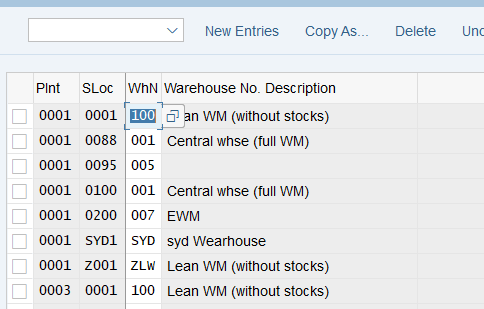
The link between the two worlds is a precise Customizing point: you assign a warehouse number to a plant + storage location combination. It is this assignment that tells SAP: “that storage location is managed by this WM warehouse”. As long as this link does not exist, IM and WM ignore each other. Once it is set, every IM stock movement can trigger a putaway or picking operation on the WM side. It is the seam between the two layers, and it is what holds the whole edifice together.
SPRO path:
Enterprise Structure → Assignment → Logistics Execution → Assign warehouse number to plant/storage location
The four levels of the SAP WM warehouse structure
Here we reach the heart of the matter. The WM warehouse structure has four nested levels, from broadest to finest. Each level contains another, like Russian dolls: a warehouse number contains its storage types, which contain their sections, which contain their storage bins.
Level 1: the warehouse number
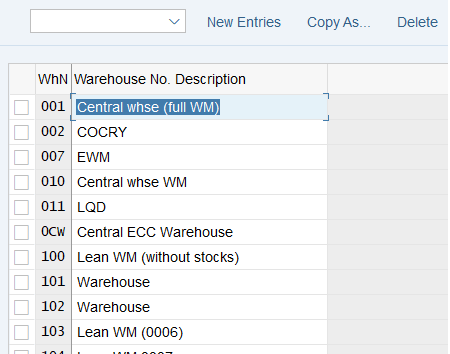
The warehouse number is the organizational unit that sits on top of everything. It represents a complete physical warehouse, or a part of a warehouse managed as a whole. Every other level lives beneath it. When you assign a storage location to WM, it is to a warehouse number that you attach it, and that assignment (seen above) is the seam between IM and WM. In Customizing, the warehouse number itself is defined on the enterprise-structure side:
SPRO path:
Enterprise Structure → Definition → Logistics Execution → Define, copy, delete, check warehouse number
Level 2: the storage type
Inside a warehouse number, the storage type breaks the space into zones that share the same physical or functional logic. High-bay pallet racking, a floor picking zone, a bulk storage zone: each is a distinct storage type. Some storage types do not store goods permanently: they are interim zones that act as buffers, for example at goods receipt (inbound) or before shipping (goods issue). It is at the storage type level that putaway and picking behaviors are wired in: it is the one that carries the “how we handle this zone”. In Customizing, you define it here:
SPRO path:
Logistics Execution → Warehouse Management → Master Data → Define Storage Type
Level 3: the storage section
The storage section is a subdivision of a storage type, on the putaway (placement) side. It groups storage bins that share the same storage characteristic. The classic example: within a single storage type, separating fast-moving items, placed near the main aisles, from slow-moving ones, pushed to the back. The section mainly serves to refine where to put away: during a putaway, SAP can choose the right section before drilling down to the bin. It is an optional level in spirit, but it becomes structuring as soon as you want to organize a zone finely. Its Customizing sits here:
SPRO path:
Logistics Execution → Warehouse Management → Master Data → Define Storage Sections
Level 4: the storage bin
The storage bin is the finest level: the smallest addressable slot in the warehouse. It is the exact physical address where goods are placed, the equivalent of a numbered parking space. Everything eventually comes back to here: a putaway strategy, however sophisticated, ultimately points to a specific storage bin. It is also the only level you create and maintain directly with dedicated transactions: LS01N (create), LS02N (change) and LS03N (display). In Customizing, the objects related to storage bins live here:
SPRO path:
Logistics Execution → Warehouse Management → Master Data → Storage Bins
The satellites not to confuse with a level
Around these four levels orbit several notions that are sometimes mistaken for extra floors. Here is what you need to put them back in their place.
The quant is not a structural level: it is what occupies a bin. A quant is the stock of a material with identical characteristics (same batch, same status, and so on) present in a single storage bin. If you place two pallets of the same material in the same bin, you have one quant. If you split them across two bins, you have two quants. The quant is therefore the contents, not the container.
The storage bin type is not a fifth nested level either: it is a classification attribute of storage bins. It is used in particular for capacity checking during putaway: putting a large pallet in a small bin makes no sense, and it is this storage bin type that lets SAP verify compatibility. It is a property of a bin, not a rung in the hierarchy. You define it here:
SPRO path:
Logistics Execution → Warehouse Management → Master Data → Storage Bins → Define Storage Bin Types
The picking area is the counterpart of the storage section, but on the picking side: it is a subdivision of a storage type that groups storage bins to organize order picking. It does not slot in between the section and the storage bin in the main chain; it lives in parallel, on the picking dimension.
Finally, Storage Unit Management is an optional function of classic WM that lets you manage stock by homogeneous physical carrier (an identified pallet, for example) rather than just by bin. It is a purely qualitative notion at this stage, and above all you must not confuse it with the Handling Units of EWM: these are two distinct mechanisms, each belonging to a different world. In classic WM, you talk about storage units, not handling units.
How this structure works day to day
A structure that is laid out is useless if it does not “search itself” at the right moment. Day to day, the real work of WM consists of automatically choosing the right level for each operation. This is where the structure comes to life.
When goods arrive and need to be put away, SAP works down the hierarchy from top to bottom. It first determines which zone to place them in, via the storage type search strategy, which says “heavy pallets go in the high-bay racking, small parts in the floor picking”. Once the zone is chosen, it refines by selecting the right putaway sub-zone, via the storage section search, for example to separate fast movers from slow movers. And when capacity checking comes into play, it is the storage bin type search that verifies the target bin can indeed accommodate the format of the unit to be put away.
The same reasoning applies on the outbound side, for picking. The structure does not only serve to put away, it also serves to organize picking. This is where picking areas and optimizations such as 2-step picking come in, where you first group the items for several orders before splitting them out. In every case, the logic is the same: the structure provides the terrain, and the search strategies trace a path through it from the warehouse number down to the bin. It is this search mechanism, more than the list of levels, that gives WM its operational value.
LE-WM, Stock Room Management or EWM: what it changes for the structure
That leaves the awkward question: with S/4HANA, what becomes of all this? You have to be precise, because the topic generates a lot of noise. The good news for anyone learning the structure is that it is largely preserved. Here are the three options and what they do with this hierarchy.
| Option | Status on S/4HANA | What becomes of the structure |
|---|---|---|
| LE-WM (classic WM) | No longer the target architecture. Runs in compatibility mode, whose compatibility-pack usage right was framed by SAP until 31/12/2025 (SAP Note 2577428; overall strategy in SAP Note 2270211). | Structure unchanged as long as you use it: warehouse number > type > section > bin. This is the end of the compatibility-pack usage right, not an overall end of support, and it does not extend to SAP ECC. |
| Stock Room Management | Available since S/4HANA 1909. A lightweight option, with no separate license, that reuses the core of LE-WM. No new functional innovation. | Exactly the same structure: warehouse number, storage type, section, bin. What you learn here transposes as is. |
| SAP EWM (embedded or decentralized) | The strategic solution, which receives all the functional innovation. | Remodels the warehouse organization (different concepts, different units). The general logic of levels remains a good entry point, but the objects differ. |
The reading to take away is sober, no panic. Classic WM has not “disappeared”: it still works in compatibility mode, and its compatibility-pack usage right was framed until the end of 2025 by SAP Note 2577428. If your need is simple and you stay on the classic foundation, Stock Room Management lets you land softly, with the same warehouse structure and no extra license cost. If your need is ambitious (automation, complex processes, high volumes), EWM is the strategic trajectory, but you have to accept relearning its modeling. In both scenarios that are viable on S/4HANA, understanding the classic WM structure remains the right starting point.
FAQ: SAP WM warehouse structure
What is the hierarchy of the warehouse structure in SAP WM?
The SAP WM warehouse structure has four nested levels, from broadest to finest: the warehouse number (the whole warehouse), the storage type (a homogeneous zone), the storage section (a putaway subdivision inside a zone) and the storage bin (the smallest addressable slot). Every movement ends up pointing to a specific storage bin in this scheme.
What is the difference between Storage Location (IM) and warehouse number (WM)?
The storage location belongs to Inventory Management (IM): it indicates how much of a material sits in a logical storage location, without knowing its physical position. The warehouse number belongs to Warehouse Management (WM): it details this stock bin by bin and knows where exactly each quantity is put away. You link the two by assigning a warehouse number to a plant + storage location combination.
What is a quant in SAP WM?
A quant is the stock of a material with identical characteristics present in a single storage bin. It is not a level of the structure but the contents of a bin. The same material split across two storage bins gives two distinct quants.
Are storage bin and storage bin type the same thing?
No. The storage bin is the physical location itself, the smallest addressable slot. The storage bin type is a classification attribute of that bin, used in particular for capacity checking during putaway. One is the container, the other is a property of the container, not an extra hierarchical level.
Does SAP WM disappear with S/4HANA? What becomes of Stock Room Management and EWM?
Classic WM (LE-WM) is no longer the target architecture on S/4HANA, but it keeps working in compatibility mode, whose compatibility-pack usage right was framed until 31/12/2025 (SAP Note 2577428). Two successors exist: Stock Room Management, a lightweight option with no separate license available since S/4HANA 1909, which reuses the core of LE-WM, and SAP EWM, the strategic solution that receives all the functional innovation.
Does Stock Room Management use the same warehouse structure as WM?
Yes. Stock Room Management keeps the same organizational structure as classic WM: warehouse number, storage type, storage section and storage bin. That is precisely what makes it a continuity option: what you learned of the WM structure transposes directly, with no relearning of the model.
Keep reading
SAP WM 2 Step Picking: Optimize your order-picking processes
2-step picking cascade in SAP WM 2-step picking SAP WM: the full cascade From group creation to the dispatched delivery Step 0: Group creation VL06P (deliveries) or LT41 (transfer requirements)...
 Michael A.
SAP WM storage section search: tier 2 putaway (T334B)
In the WM scoping workshops with the key users, the Storage Section Search is often the one we deal with last. We quickly cover the Storage Type (the zone) and...
Michael A.
SAP WM storage type search: tier 1 putaway setup
On S/4HANA Supply Chain kickoffs, the end of SAP WM has become a recurring topic. And the discussion systematically drifts toward the putaway cascade. How does the Storage Type Search...
Michael A.
SAP WM storage bin type search: the complete guide (2026)
"My transfer order is going to the wrong bin, and we can't figure out why." If you work on an SAP WM project, you've definitely heard this sentence. Often during...
Michael A.