The same company buys from you and sells to you. In SAP ECC, that meant two master records, created in two transactions, with two different numbers: a customer record and a vendor record. Two records to maintain, and the same work done twice.
S/4HANA removes that duplication with the SAP Business Partner: a single master object, maintained in a single transaction, that carries every face of the same partner. This guide walks through the model and its customizing, with real screens to back it up.
- The Business Partner is mandatory in S/4HANA: customers and vendors are managed through a single master object, in transaction
BP. - A BP belongs to a category (person, organization, group) and carries roles: FLVN00/FLVN01 on the vendor side, FLCU00/FLCU01 on the customer side.
- The BP number comes from the grouping selected at creation, linked to an internal or external number range (the assignment is stored in
BUT000). - CVI (Customer/Vendor Integration) synchronizes the technical customer and vendor masters in the background, still used by Financial Accounting.
- Setting up BP/CVI is a prerequisite for any S/4HANA conversion, to be handled before the migration, not after.
SAP Business Partner: definition and where it sits in S/4HANA
An SAP Business Partner is a person, an organization, or a group your company has a business interest in. In S/4HANA, it is the central master object: customer and vendor master data is managed through it, and through it alone. Maintenance runs through transaction BP or the Maintain Business Partner Fiori app, both of which open the same object.
When you create a Business Partner, you first pick the partner category. It is final and determines which fields are available:
- person, for an individual (a contact, an employee, a private customer);
- organization, for a legal entity or part of one (a company, a department);
- group, for a set of people or organizations (a community of heirs, a married couple).
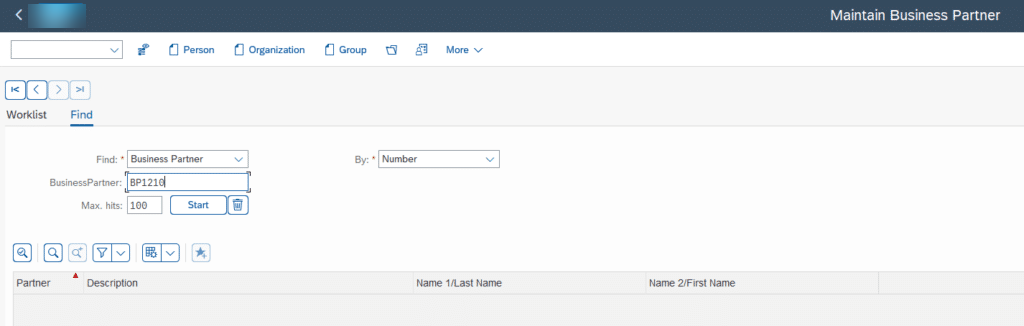
The official reference for the model is the Business Partner documentation on SAP Help, but the core idea fits in one sentence: one partner, one master record, several roles.
ECC vs S/4HANA: the end of the duplicate customer/vendor master
In SAP ECC, a business partner was either a customer or a vendor, never both in the same master record. The data lived in two separate worlds, each with its own dedicated transactions and its own account groups.
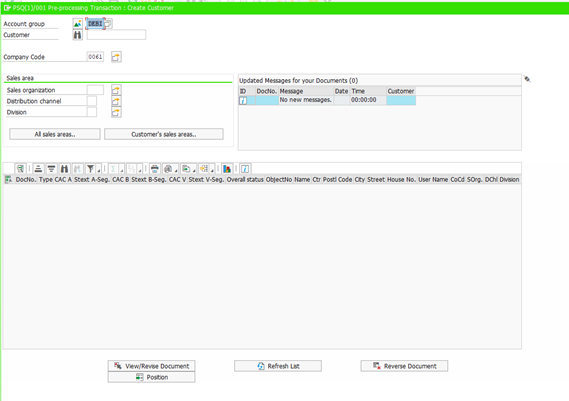
As long as a partner was only a customer or only a vendor, the separation went unnoticed. The trouble started as soon as one company played both parts: you had to maintain two independent records for the same legal entity. Duplicate storage, duplicate maintenance, and the great classic of every project: the address updated on the customer side but not on the vendor side.
SAP ECC
- Two separate records: customer and vendor
- Dedicated transactions for each world
- Two numbers for the same partner
- Field selection driven by the account group
- Shared data maintained twice
SAP S/4HANA
- One single Business Partner
- One transaction: BP
- One number, several roles
- Field selection driven by the BP role
- General data entered only once
Here is what many teams discover mid-project: this model is not optional. Switching to the Business Partner is part of the S/4HANA conversion prerequisites, and existing customer and vendor data has to be brought into this model, for instance through the Migration Cockpit and the Migrate Your Data app.
The BP role concept: one partner, several business contexts
The role is the centerpiece of the model. A BP role corresponds to a business context the partner operates in, and each role unlocks the matching data views.
On the vendor side, three roles structure purchasing: 000000 Business Partner General carries the general data at client level (the client in the SAP sense of the term, the whole system), FLVN00 FI Vendor carries the financial data at company code level, and FLVN01 Supplier carries the purchasing data at purchasing organization level. On the customer side, the logic is symmetrical with FLCU00 Customer (Financial Accounting) and FLCU01 Customer for the sales data.
The role, combined with the BP type, is also what drives field selection: which fields are hidden, displayed, required, or optional. In ECC, that control belonged to the account group; not anymore. The account group has not disappeared though: it is still assigned in the background to the technical vendor or customer master, based on the grouping, through table TBC001.
Watch out for a false friend: a BP role describes the business context of a partner record. It has nothing to do with SAP authorization roles, which define what a user is allowed to do in the system. Two vocabularies, two worlds.
Reading the real screens: the BP transaction and its role-based tabs
The best way to understand how roles work is to look at the same partner under two different roles.
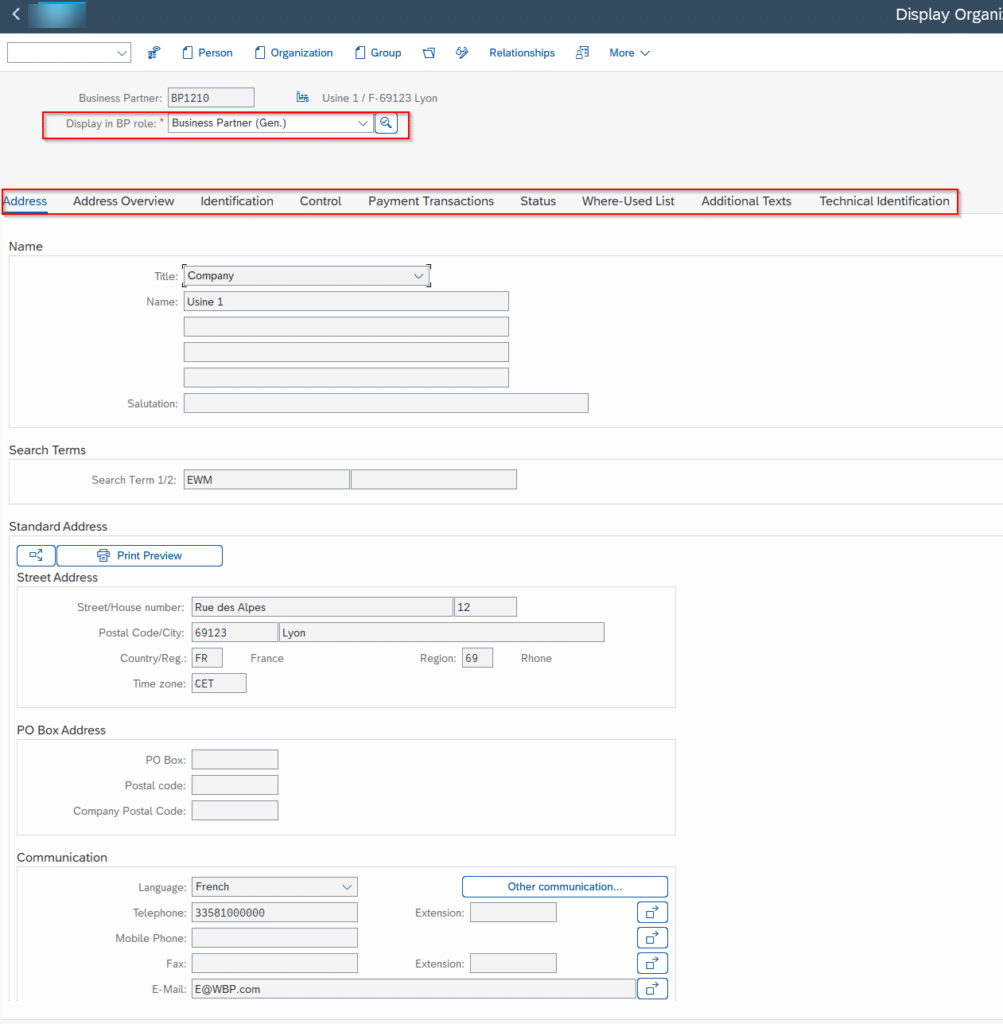
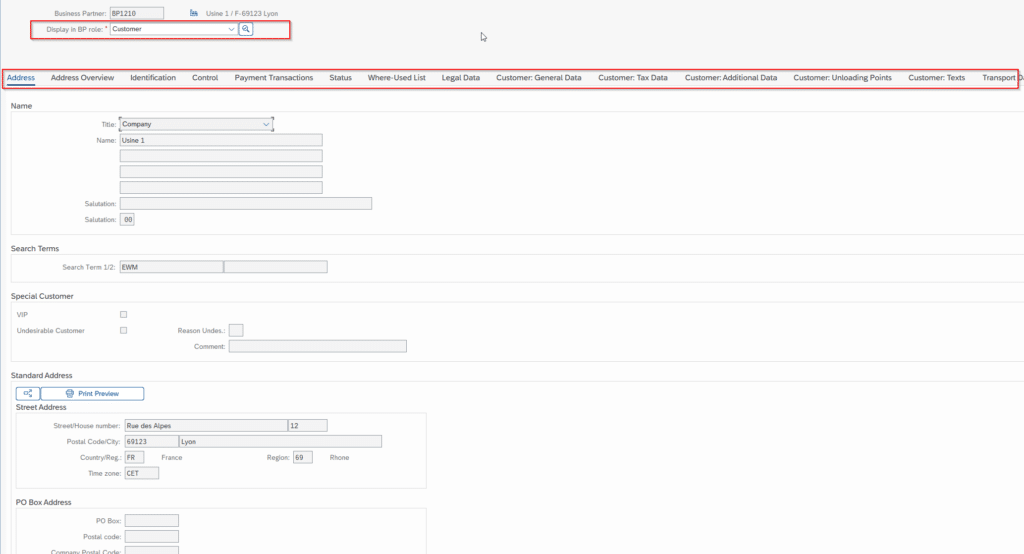
Simply switching the role in the header of transaction BP changes the tabs: the general view gives way to the data specific to that context. One partner number, and as many sets of fields as there are activated roles. That is exactly what the ECC double record could never do.
Groupings and number ranges: what decides the BP number
When you create a Business Partner, the system asks for a grouping. That choice is not cosmetic: the grouping determines the number range the partner ID will be drawn from, and how the number gets assigned.
There are two modes. With internal numbering, the system automatically assigns the next sequential number in the range. With external numbering, the user enters a number belonging to the range, numeric or alphanumeric. The assignment of the partner to its grouping is stored in table BUT000.
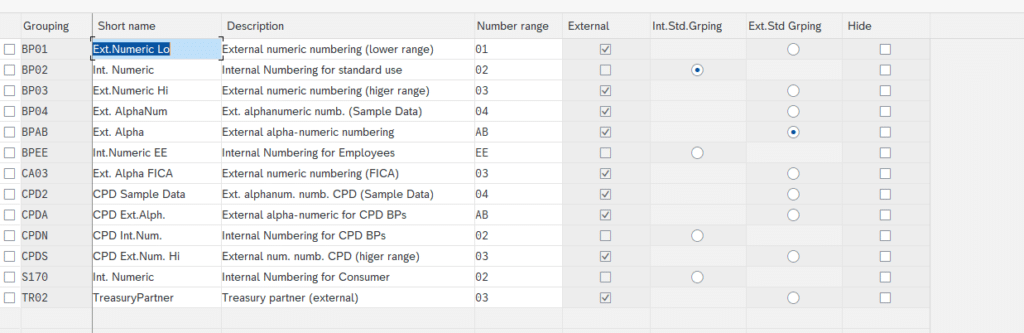
A few rules worth knowing when you configure this: the same number range can be assigned to several groupings, and standard groupings can be defined as defaults for internal and external numbering, used whenever the user picks none. Finally, if the partner is extended to both customer and vendor, the classic recommendation is to align all three number assignments so that the BP, the customer, and the vendor carry the same number: a daily comfort for the teams, and simpler reconciliations.
CVI: Customer/Vendor Integration running in the background
The Business Partner did not make the technical customer and vendor masters disappear. Financial Accounting still works with its subledger accounts, and those structures remain part of the postings. What changes is how they are fed: CVI, short for Customer/Vendor Integration, synchronizes the Business Partner record with the corresponding customer and vendor masters in the background.
When you save a BP in the Supplier role, the system automatically creates or updates the technical vendor master, with its account group derived from the grouping. The user sees one object; the system keeps three of them consistent.
Mainstream maintenance for SAP ECC 6.0 ends on December 31, 2027 for EHP 6 to 8 (end of 2026 for EHP 0 to 5), with paid extended maintenance available until the end of 2030, as laid out on the SAP maintenance strategy page. And setting up the Business Partner and CVI is a prerequisite for the S/4HANA conversion: it is a data workstream to launch ahead of the project, not a box to tick during the migration.
That prerequisite has a direct consequence for migration tooling: the legacy customer and vendor creation transactions can no longer be used, which explains why LSMW no longer works for this data in S/4HANA. Data loads go through the BP model, either via the Migration Cockpit or through interfaces.
Customizing step by step: roles, relationships, groupings in the IMG
Business Partner customizing lives in the Cross-Application Components section of the IMG. Three work areas cover most of it.
First: the roles. This is where you review the standard roles and create your own, by copying a delivered role.
SPRO path:
Cross-Application Components → SAP Business Partner → Business Partner → Basic Settings → Business Partner Roles → Define BP Roles
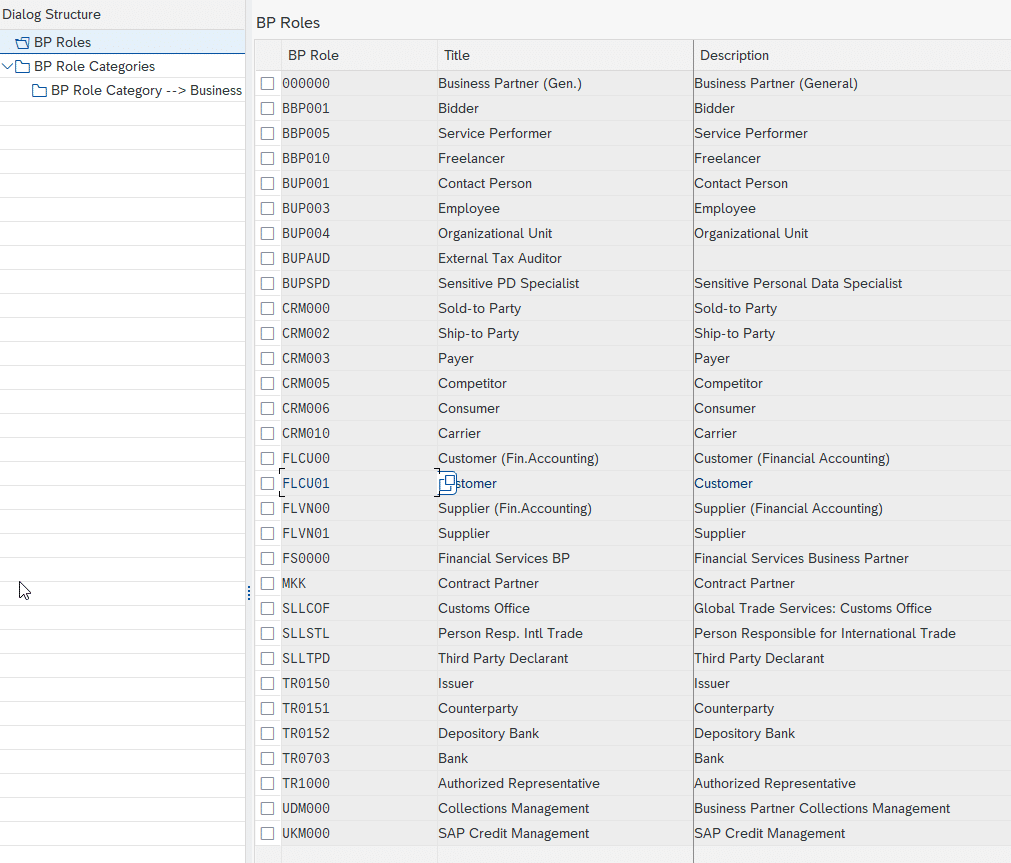
Second: numbering. Number ranges are defined and then assigned to groupings, in two neighboring activities.
SPRO path:
Cross-Application Components → SAP Business Partner → Business Partner → Basic Settings → Number Ranges and Groupings → Define Number Ranges
Its twin activity, Define Groupings and Assign Number Ranges, in the same node, links each grouping to its range and sets the standard groupings.
Third: relationships between partners. A relationship connects two BPs with a business meaning, the classic example being a person defined as the contact person of an organization.
SPRO path:
Cross-Application Components → SAP Business Partner → Business Partner Relationships → Basic Settings → Define Relationship Types
Finally, CVI synchronization has its own dedicated customizing node, where you maintain, among other things, the links between groupings and account groups:
SPRO path:
Cross-Application Components → Master Data Synchronization → Customer/Vendor Integration → Business Partner Settings
The Business Partner is one of those topics where S/4HANA does not offer an improvement, it imposes a change of model. The good news: the model is healthier than what it replaces, and once roles and groupings click, transaction BP quickly becomes familiar ground. If a conversion is on your horizon, the natural next step is our guide to the Migration Cockpit, the tool that brings your customers and vendors into this new model.
FAQ: your questions about the SAP Business Partner
What is a Business Partner in SAP S/4HANA?
It is the central master object representing any person, organization or group the company has a business interest in. In S/4HANA, customers and vendors are managed through the Business Partner, maintained via transaction BP or the Maintain Business Partner Fiori app.
What is the difference between a Business Partner and a customer or vendor in SAP?
The customer and the vendor are technical views inherited from ECC, still used by Financial Accounting. The Business Partner is the single object sitting on top of them: one BP record can carry both the customer role and the vendor role, and CVI synchronizes the technical masters in the background.
Which transaction is used to create a Business Partner in S/4HANA?
Transaction BP, which combines create, change and display. The Maintain Business Partner Fiori app offers the same functions from the launchpad. The legacy ECC customer and vendor creation transactions can no longer be used in S/4HANA.
Is the Business Partner mandatory in S/4HANA?
Yes. The Business Partner model with CVI synchronization is the single target model in S/4HANA for customers and vendors, and setting it up is part of the prerequisites for a conversion from ECC. The data workstream has to be handled before the migration.
What is CVI (Customer/Vendor Integration) in SAP?
It is the synchronization mechanism that keeps the Business Partner record consistent with the technical customer and vendor masters. When a BP is saved in a customer or vendor role, CVI automatically creates or updates the corresponding master, with its account group derived from the grouping.
How are Business Partner numbers assigned in SAP?
Through the grouping selected at creation: each grouping is linked to a number range, with internal numbering (the system assigns the number) or external numbering (the user enters it). The assignment is stored in table BUT000, and the common recommendation is to align the BP, customer and vendor numbers.
Keep reading
SAP Serial Number: OIS2 setup and material vs equipment
A SAP serial number is the unique identifier attached to one specific physical unit of a given material. It is the tool for unit-level traceability, the foundation for individualized after-sales...
 Pierre B.
SAP Classification System: characteristics and classes
You are looking for every high-criticality 24V piece of equipment in SAP. Every batch with a viscosity between 200 and 250. Every premium customer in a specific geographic area. If...
Pierre B.
Beginner's guide to batch management in SAP MM
I have seen consultants tick the "Batch management" box on thousands of materials in a MASS run, without realizing the batch level was still set at client level. A few...
Pierre B.
SAP EWM Master Data Integration: ERP Sync with CIF, ALE, DRF
Since the move to S/4HANA, the question "how do you synchronize data between SAP ERP and EWM" no longer has the same answer, and many projects still get it wrong...
 Michael A.